
Airbnb refunds are a frequently misunderstood and often misrecorded part of short-term rental accounting. Partial refunds, full cancellations, guest disputes, and post-stay adjustments all affect your true revenue, yet they rarely appear clearly when hosts rely solely on bank deposits or payout summaries.
When refunds are handled incorrectly, they can overstate income, distort profitability, and create discrepancies between your books and what Airbnb reports to the IRS – potentially increasing audit risk. This guide explains how Airbnb refunds actually work, common accounting mistakes to avoid, and how Tallybreeze automates refund tracking and reconciliation in QuickBooks to keep your books accurate and audit-ready.
Note: For a complete guide to QuickBooks for Airbnb, see Airbnb & QuickBooks: A Comprehensive Guide.
Common Accounting Mistakes with Airbnb Refunds
Airbnb refunds are easy to misaccount for because they are rarely issued as separate cash transactions. Instead, refunds are typically netted against future payouts rather than sent as standalone withdrawals. When hosts rely solely on bank deposits or payout summaries, these refunds can go unnoticed and unrecorded.
From an accounting standpoint, refunds reduce gross revenue, not expenses, and they must be recorded separately from Airbnb service fees or other operating costs. Failing to do so leads to distorted financial statements and reconciliation issues.
Mistake 1: Recording net payouts as income
One of the most common mistakes is recording only the net Airbnb payout as revenue. When refunds are netted before the payout is issued, this approach completely hides the refund and overstates income. Tallybreeze solves this by importing reservation-level detail, ensuring refunds are captured and recorded as revenue reductions even when no separate cash movement occurs.
Mistake 2: Misclassifying refunds as expenses
Refunds are not operating expenses. Posting them to expense accounts distorts gross revenue and makes margin analysis unreliable. Tallybreeze automatically classifies refunds correctly, recording them as reductions to revenue rather than expenses.
Mistake 3: Mismatch with Airbnb 1099-K reporting
Airbnb’s 1099-K reports gross payment volume, not net payouts, and refunded amounts are not removed from the reported totals. If refunds are not tracked properly, your books will not reconcile to Airbnb’s tax reporting. Tallybreeze separates refunds from payouts, allowing QuickBooks to reflect true net revenue while still aligning with Airbnb’s gross 1099-K figures.
How to Automate Airbnb Refunds in QuickBooks with Tallybreeze
Tallybreeze helps you track Airbnb refunds accurately by ensuring they are accounted for correctly at the reservation level. It connects directly to Airbnb (as well as Vrbo or Guesty) and imports detailed, reservation-level financial data.
Step 1: Connect Tallybreeze to Airbnb and QuickBooks
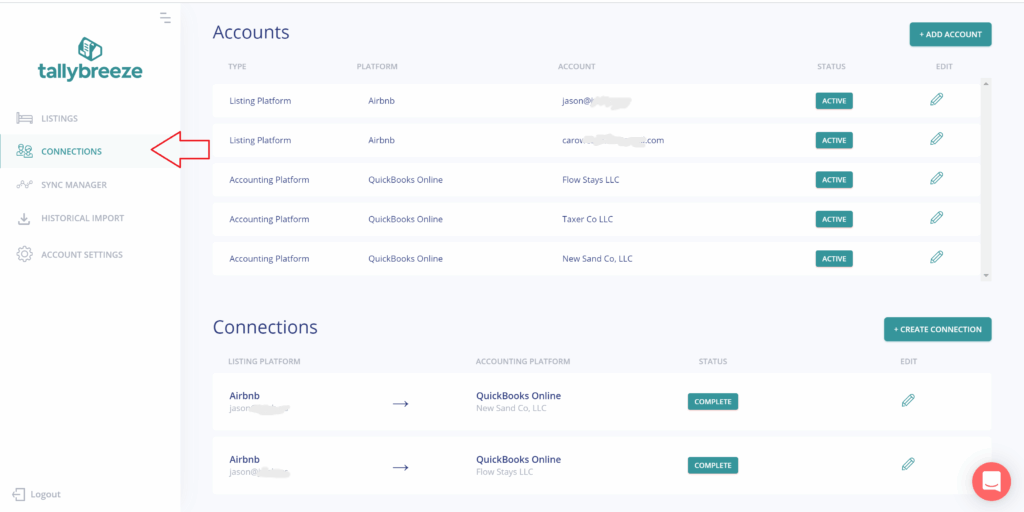
To get started:
- Log in to Tallybreeze and go to Connections
- Add your Airbnb account (and Vrbo or Guesty if applicable)
- Add your QuickBooks Online account
- Create a connection and configure:
- A payment clearing account
- A suspense account
- Save the connection
This establishes the data pipeline that allows Tallybreeze to sync reservation details into QuickBooks accurately.
Step 2: Set Up Listing Rules for Refunds
Next, configure how refunds should be recorded for each listing:
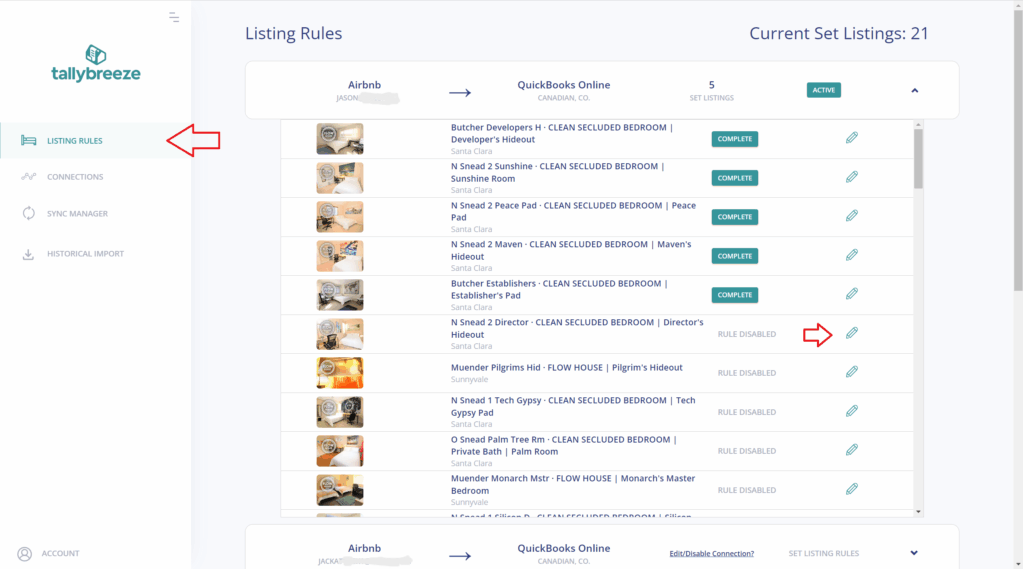
- Go to Listing Rules in Tallybreeze
- Click Edit next to a listing
- Choose a predefined template or configure rules manually
- Scroll down to Refund Events and map all refund items to their designated accounts in QuickBooks. For accommodation fare, cleaning fee and resolution adjustments, be sure to use separate refund codes.
- Map class tracking for each line item so that you can identify all items, including refunds for the listing.
Each listing can have its own rule set, which is especially important for accurately tracking which listing a refund belongs to.
See the following article for more precise details on setting up a Listing: Airbnb Accounting – Listing Setup
Step 3: Import and Validate Historical Data
Before importing all history, it’s best practice to test a small sample:
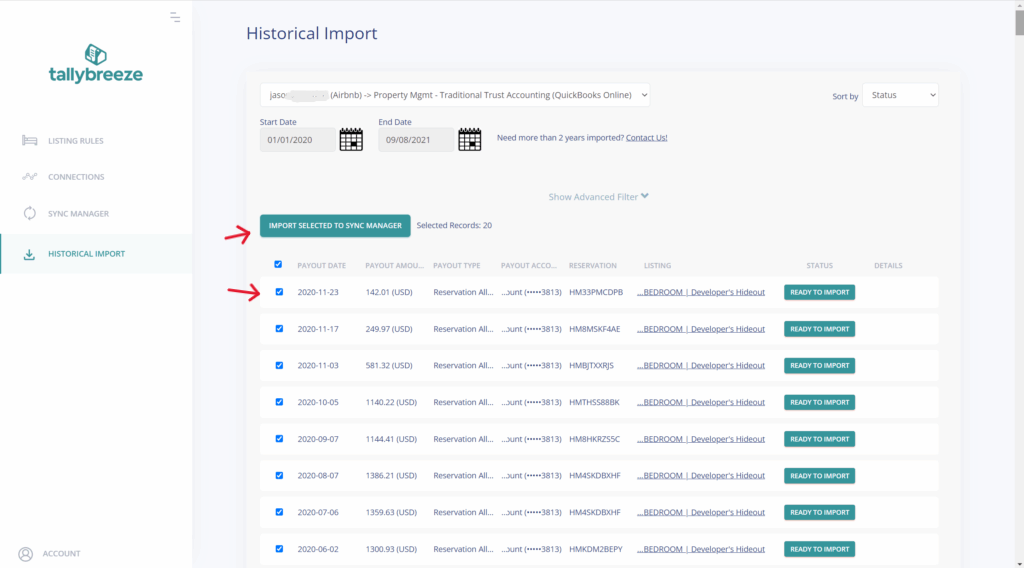
- Navigate to Historical Import
- Select your connection
- Choose a short date range (e.g., the previous calendar month)
- Import a handful of reservations as well as any refunds
Review how refunds appear in QuickBooks:
- Confirm they post to their correct accounts.
- Ensure they do not deduct from income accounts, but are applied to their own refund accounts.
- Verify balances match Airbnb reservation breakdowns.
If adjustments are needed, you can roll back and resync reservations until everything is correct. Once all is good, expand the date range to include any historical period you need to import.
Step 4: Enable Auto-Sync for Ongoing Refund Tracking
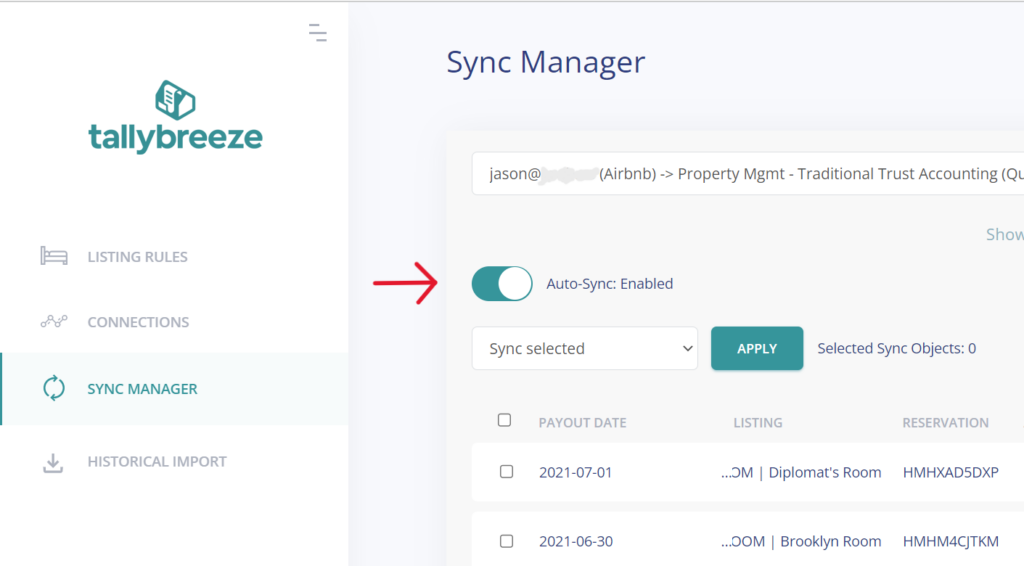
With Auto-Sync enabled in Sync Manager:
- New reservations are imported automatically
- Refunds are separated and categorized in real time
- Refund accounts stay current as bookings occur
The income and refund accounts in QuickBooks always aligns with Airbnb’s reservation data, making reconciliation and tax reporting far easier.
Benefits of Using Tallybreeze for Refund Accounting vs Manual Entry
Tallybreeze keeps refund accounting accurate by recording refunds on a line item basis mapped to their correct account code, not hidden or misclassified entries. Refunds are captured at the reservation level and tied directly to the listing, making revenue changes clear and allowing your books to reconcile cleanly with Airbnb’s gross 1099-K reporting. If adjustments are needed, reservations can be rolled back and resynced without duplicates.
| Tallybreeze | Manual Entry | |
|---|---|---|
| Refund visibility | ✅ Clearly separated line items differentiating between refunds and income items | ❌ Refunds are often hidden in net payouts with no differentiation from income or expenses |
| Revenue accuracy | ✅ Constantly tracked and correct by design | ❌ Frequently miscategorized and smuggled within net payout |
| 1099-K reconciliation | ✅ Straightforward with real-time sync | ❌ Difficult with backdated recording |
| Error correction | ✅ Rollback & resync | ❌ Manual journals |
| Scalability | ✅ Built to scale | ❌ Poor |
Final Thoughts
Airbnb refunds are easy to overlook but costly to ignore. When refunds aren’t recorded correctly, income is overstated, tax reporting becomes inconsistent, and reconciliation turns into guesswork.
By syncing Airbnb refunds directly into QuickBooks with Tallybreeze, you ensure refunds are handled accurately, revenue stays clean, and your books reconcile to Airbnb and IRS reporting with confidence. Whether you manage one listing or hundreds, this approach delivers clarity, control, and audit-ready Airbnb accounting.
Frequently Asked Questions (FAQ)
Are Airbnb refunds considered expenses?
No. Refunds are reductions of gross revenue, not operating expenses.
Do refunds reduce Airbnb’s 1099-K totals?
No. Airbnb’s 1099-K reports gross payments processed, even if refunds were later issued.
Can I fix refund mistakes after syncing?
Yes. Tallybreeze allows you to roll back and resync reservations after updating listing rules.
Do refunds affect occupancy taxes?
In most jurisdictions, refunded amounts also reduce taxable revenue. Tallybreeze syncs refund-related tax adjustments when Airbnb posts them.