

Occupancy taxes – sometimes called transient occupancy taxes (TOT), hotel taxes or lodging taxes – apply to short-term rentals in many jurisdictions and can present accounting challenges for Airbnb hosts and property managers. These taxes are collected from guests based on the cost of a stay and are either remitted by Airbnb on your behalf or collected by you and paid directly to the appropriate tax authority.
In jurisdictions where hosts are allowed to receive occupancy taxes themselves, there is an additional financial benefit: the ability to hold those funds until remittance and potentially earn yield on them, such as through low-risk instruments like U.S. Treasuries.
Properly accounting for these taxes ensures you stay compliant, avoid overstating revenue, and maintain clean, defensible books in QuickBooks Online. This article explains how occupancy taxes work for Airbnb hosts and how to track and automate them accurately in QuickBooks using Tallybreeze.
Note: For a complete guide to QuickBooks for Airbnb, see Airbnb & QuickBooks: A Comprehensive Guide.
- What Are Airbnb Occupancy Taxes?
- Why Occupancy Tax Accounting Often Goes Wrong
- Collecting and Remitting Occupancy Taxes Yourself vs. Airbnb Handling Them
- How to Automate Airbnb Occupancy Taxes in QuickBooks with Tallybreeze
- Paying and Reconciling Occupancy Taxes in QuickBooks
- Benefits of Using Tallybreeze for Occupancy Tax Accounting
- Final Thoughts
- Frequently Asked Questions (FAQ)
What Are Airbnb Occupancy Taxes?
Occupancy taxes are local or state taxes charged on short-term lodging. They are typically calculated as a percentage of the nightly rate and, in some jurisdictions, may also apply to cleaning fees. The rules vary widely by city, county, and state.
Depending on your location and Airbnb’s agreements with tax authorities, occupancy taxes may be:
- Collected and remitted by Airbnb on your behalf
- Collected by Airbnb and passed to you for remittance
- Not collected by Airbnb at all, requiring you to collect and remit directly
Regardless of who remits the tax, occupancy taxes are never revenue. They represent funds held in trust for a tax authority and must be recorded as a liability in QuickBooks.
Why Occupancy Tax Accounting Often Goes Wrong
Many Airbnb hosts rely on bank deposits or payout summaries when recording income. Because Airbnb either subtracts taxes before issuing payouts or includes them with payouts, hosts often:
- Fail to record occupancy taxes at all
- Record net payouts as revenue, overstating income
- Lose visibility into how much tax is owed by listing or jurisdiction
These errors compound over time and can create issues during audits, tax filings, or when working with accountants.
Tallybreeze solves this by syncing occupancy tax line items directly from Airbnb into QuickBooks as structured accounting entries.
Collecting and Remitting Occupancy Taxes Yourself vs. Airbnb Handling Them
In many jurisdictions, Airbnb allows hosts to receive occupancy taxes directly rather than having Airbnb remit them on the host’s behalf. While Airbnb-handled remittance can appear simpler on the surface, collecting and remitting occupancy taxes yourself often provides greater financial control, clearer accounting, and meaningful cash-flow advantages.
For operators who want accurate reporting, listing-level visibility, and the ability to hold tax funds until remittance – potentially earning yield in the process – self-remittance is frequently the more strategic choice. Understanding the differences between these approaches allows you to align your tax handling with your accounting practices, compliance requirements, and long-term financial goals.
When Airbnb Collects and Remits Occupancy Taxes
When Airbnb collects and remits occupancy taxes on your behalf, the platform calculates the tax at checkout, collects it from the guest, and submits payment directly to the applicable tax authority. This approach is often positioned as the “simplest” option, particularly for newer or very small operators.
Perceived Benefits of Airbnb-Handled Remittance
- Reduced administrative effort: Airbnb handles tax calculation, filing, and payment, which means you do not need to track deadlines or submit returns for those taxes.
- Lower operational complexity: For hosts with a single listing or minimal activity, this can reduce the amount of hands-on tax management required.
- Built-in compliance handling: Airbnb manages remittance logistics and timing, limiting the need to interact directly with local tax authorities.
Meaningful Trade-Offs to Consider
- Limited transparency and control: You have little visibility into how or when taxes are remitted and must rely on Airbnb reports rather than your own accounting system.
- Restricted reporting flexibility: You cannot customize reporting by listing, jurisdiction, or tax type beyond what Airbnb provides.
- No ability to earn yield on tax funds: Because Airbnb remits the taxes immediately, you never hold the funds. This eliminates the opportunity to earn yield on those balances – an increasingly meaningful consideration when remittance schedules are monthly, quarterly, or annual.
When You Collect and Remit Occupancy Taxes Yourself
In many jurisdictions, Airbnb allows hosts to receive occupancy taxes directly and remit them independently. When this option is available, choosing self-remittance can provide both greater financial control and a tangible economic advantage.
Benefits of Self-Remittance
- Full financial control and visibility: You maintain direct oversight of tax balances, filings, and payments within your own accounting system rather than relying on third-party reporting.
- Clear, defensible audit trail: All tax collections, liabilities, and payments are recorded in QuickBooks, providing documentation that is easier to reconcile, review, and defend if questioned by a tax authority.
- Better alignment with professional operating models: Self-remittance is often required or preferred for property managers, trust accounting setups, and operators managing funds on behalf of owners.
- Greater reporting flexibility: You can report occupancy taxes by listing, jurisdiction, or tax type – supporting local filing requirements and internal analysis.
- Ability to earn yield on tax funds: This is the most overlooked advantage. Depending on the jurisdiction, occupancy taxes may be remitted monthly, quarterly, or even annually. When allowed, holding these funds gives you the opportunity to earn yield – such as through U.S. Treasuries or other low-risk instruments – during the holding period. Over time, this can meaningfully improve cash efficiency without increasing operational risk.
Trade-Offs of Self-Remittance and How Tallybreeze Helps
- Increased administrative responsibility: Self-remittance requires tracking balances, filing returns, and making timely payments. Tallybreeze reduces this burden by automatically separating occupancy tax amounts at the reservation level and maintaining accurate liability balances in QuickBooks, so you always know exactly what is owed.
- Greater need for accounting precision: Occupancy taxes must be tracked accurately to avoid underpayment, overpayment, or penalties. Tallybreeze enforces correct accounting by design, mapping tax line items directly to liability accounts and preventing them from being misclassified as income.
Bottom Line: While Airbnb-handled remittance may seem simpler, it comes at the cost of control, transparency, and the ability to earn yield on tax funds. For operators who take accounting seriously, or who manage multiple listings, self-collecting and remitting occupancy taxes often provides a superior financial and operational outcome, especially when paired with automation tools like Tallybreeze that remove the manual complexity.
How to Automate Airbnb Occupancy Taxes in QuickBooks with Tallybreeze
When you choose to receive occupancy taxes directly from Airbnb, Tallybreeze helps you track those taxes accurately so you can fully benefit from holding the funds. Tallybreeze connects directly to Airbnb (as well as Vrbo or Guesty) and imports detailed, reservation-level financial data
Step 1: Connect Tallybreeze to Airbnb and QuickBooks
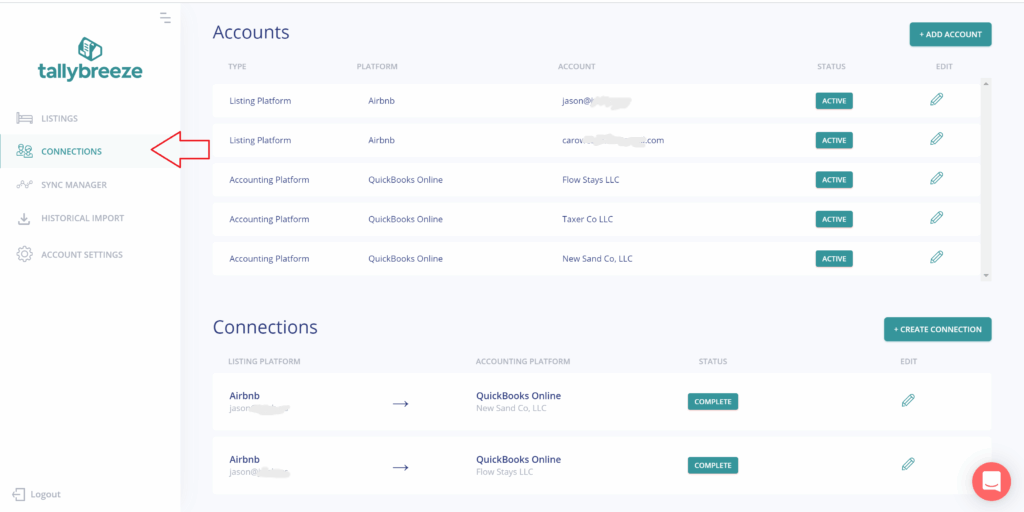
To get started:
- Log in to Tallybreeze and go to Connections
- Add your Airbnb account (and Vrbo or Guesty if applicable)
- Add your QuickBooks Online account
- Create a connection and configure:
- A payment clearing account
- A suspense account
- Save the connection
This establishes the data pipeline that allows Tallybreeze to sync reservation details into QuickBooks accurately.
Step 2: Set Up Listing Rules for Occupancy Taxes
Next, configure how occupancy taxes should be recorded for each listing:
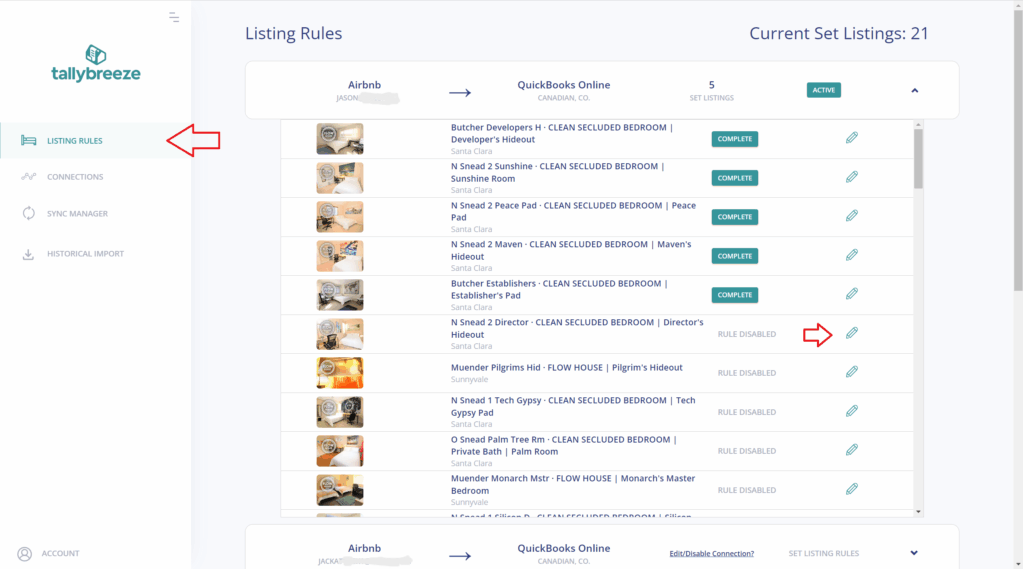
- Go to Listing Rules in Tallybreeze
- Click Edit next to a listing
- Choose a predefined template or configure rules manually
- Map occupancy tax line items to a liability account in QuickBooks (e.g., Occupancy Tax Payable)
- Map class tracking for each line item so that you can identify all items, including taxes payable for the listing.
Each listing can have its own rule set, which is especially important if you operate in multiple jurisdictions with different tax requirements.
Step 3: Import and Validate Historical Data
Before importing all history, it’s best practice to test a small sample:
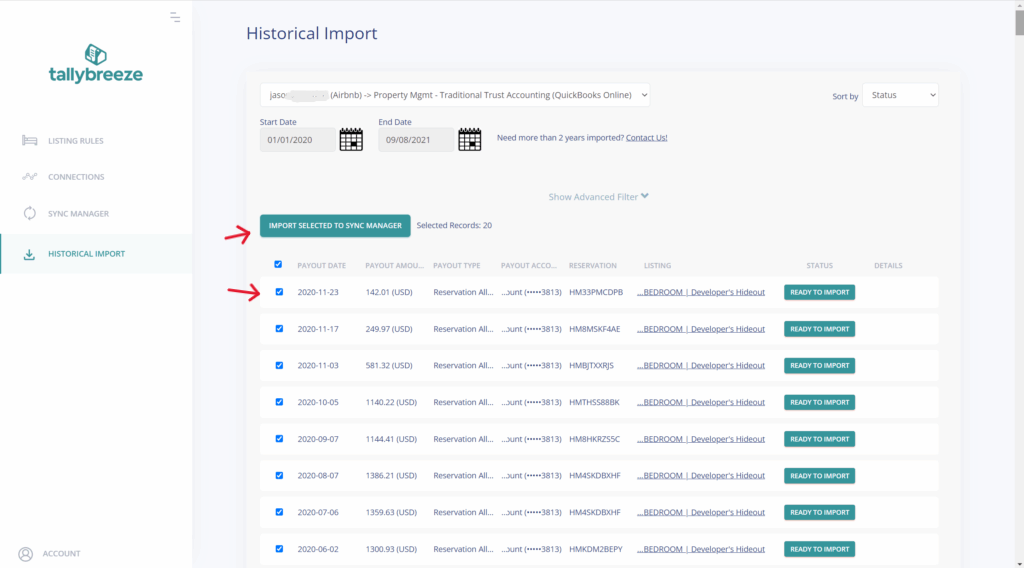
- Navigate to Historical Import
- Select your connection
- Choose a short date range (e.g., the previous calendar month)
- Import a handful of reservations
Review how occupancy taxes appear in QuickBooks:
- Confirm they post to the liability account
- Ensure they do not inflate revenue
- Verify balances match Airbnb reservation breakdowns
If adjustments are needed, you can roll back and resync reservations until everything is correct. Once all is good, expand the date range to include any historical period you need to import.
Step 4: Enable Auto-Sync for Ongoing Tax Tracking
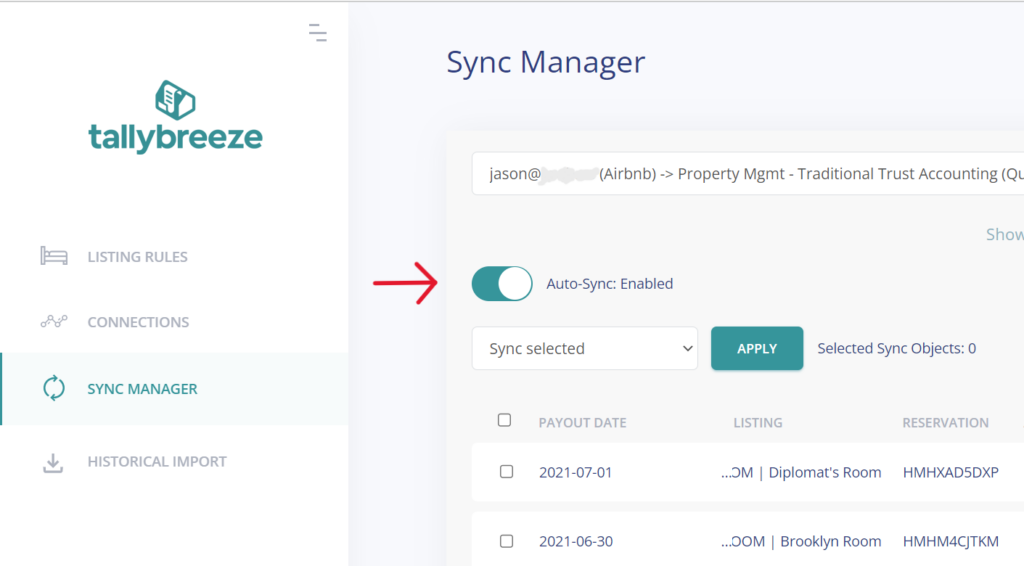
With Auto-Sync enabled in Sync Manager:
- New reservations are imported automatically
- Occupancy taxes are separated and categorized in real time
- Liability balances stay current as bookings occur
The running balance in QuickBooks always aligns with Airbnb’s reservation data, making reconciliation and tax reporting far easier.
Paying and Reconciling Occupancy Taxes in QuickBooks
When it’s time to remit occupancy taxes:
- Run a Balance Sheet by Class in QuickBooks
- Locate your Occupancy Tax Payable account
- The balance reflects what you owe the tax authority for each class (listing)
- For each listing, record payments against that liability account to reduce the balance. This can be done by creating bills in QuickBooks.
If you’re using Tallybreeze, the Custom Taxes line item in your presets will automatically capture these taxes. All you need to do is remit the amount collected to the appropriate tax authority. Here’s an example:
Example
The Airbnb listing at 462 Atlas Way is configured in Airbnb to collect custom taxes for all reservations. In Tallybreeze, these amounts are posted to “24200 – Airbnb Custom Taxes Payable.” After running a Balance Sheet report for this listing in QuickBooks, you determine that $2000 is owed in transient occupancy taxes.
To remit this amount, send your payment to the appropriate tax authority via bank transfer, ACH, check, or another accepted method. Once the payment has posted, record the outgoing transaction from your Operations Bank Account using the following entry:
| Debit | Credit | Class Category | |
|---|---|---|---|
| 1XXXX – Operations Bank Account (Asset) | $2000 | 462 Atlas Way | |
| 24200 – Airbnb Custom Taxes Payable | $2000 | 462 Atlas Way |
Detailed instructions for QuickBooks Online
1. Check how much exists in the Custom Taxes Payable account for the property
The amount that needs to be paid to the tax authority can be found in the balance sheet. Filtering the balance sheet by the class for each listing, look up the total amount under “24200 – Rental Liability: Airbnb Custom Taxes Payable”.
2. Create Bill
| Vendor | Category | Description | Class |
|---|---|---|---|
| Tax Authority | Airbnb Custom Taxes Payable | “Taxes Paid: 11% City TOT” | Investment: 462 Atlas Way |
- Set the vendor of the bill to the name of the tax authority
- Set the Category Airbnb Custom Taxes Payable
- Set a detailed description, starting with “Taxes: ” and describe the tax
- Set the class to the listing
3. Transfer the amount from your operations bank account to the tax authority
Send the money via bank transfer, ACH, check or other means.
4. Reconcile operations bank account statement line amount with bill
Reconcile the bill with the bank feed in QuickBooks
Benefits of Using Tallybreeze for Occupancy Tax Accounting
Tallybreeze removes the complexity from occupancy tax accounting by automating how taxes are captured and recorded in QuickBooks. Occupancy taxes are classified correctly by default, tracked at the listing level, and posted to liability accounts – not income. With rollback and resync capabilities, audit-ready records, and direct data syncing from Airbnb, Vrbo, and Guesty, Tallybreeze eliminates spreadsheets and manual cleanup while keeping your tax reporting accurate and compliant.
| Tallybreeze | Manual Accounting | |
| Classification of occupancy taxes | ✅ Automatically posted to liability accounts | ❌ Often misposted as income |
| Listing-level tax tracking | ✅ Built-in per-listing and jurisdiction rules | ❌ Manual and error-prone |
| Handling rule changes or corrections | ✅ Roll back and resync without duplicates | ❌ Requires journal entries or rework |
| Audit readiness | ✅ Clear liability balances and transaction detail | ❌ Inconsistent documentation |
| Historical data accuracy | ✅ Automated historical imports | ❌ Time-consuming spreadsheet cleanup |
| Ongoing tax tracking | ✅ Auto-sync keeps balances current | ❌ Constant manual input required |
| CSV downloads and uploads | ✅ Not needed | ❌ Required |
| Risk of over- or under-reporting | ✅ Significantly reduced | ❌ High |
| Scalability as portfolio grows | ✅ Designed to scale | ❌ Poor |
Final Thoughts
Occupancy taxes are a critical – and commonly misrecorded – component of Airbnb accounting. Treating them as revenue can distort financial statements and create compliance issues, especially as your portfolio grows. When handled correctly, however, occupancy taxes can also represent a cash-flow opportunity.
By using Tallybreeze to automate occupancy tax tracking in QuickBooks, you ensure every tax dollar is properly classified, every liability is clearly visible, and every remittance is supported by clean, accurate records. In jurisdictions where hosts are permitted to collect and remit taxes themselves, this accuracy also enables you to hold those funds until remittance and potentially earn yield on them – such as through low-risk instruments like U.S. Treasuries. Whether you manage one listing or operate across multiple jurisdictions, this approach delivers clarity, control, and confidence in your Airbnb accounting.
Frequently Asked Questions (FAQ)
Are Airbnb occupancy taxes considered income?
No. Occupancy taxes are not income. They are amounts collected from guests on behalf of a tax authority and must be recorded as a liability in QuickBooks – not as revenue.
Can I track occupancy taxes by listing or jurisdiction?
Yes. Tallybreeze supports listing-level rules, allowing occupancy taxes to be tracked separately for each property. This is especially useful when managing listings across multiple cities or tax jurisdictions.
What if my local tax authority requires reporting or documentation?
You can generate reports in QuickBooks – such as Balance Sheet or Account Transaction reports – filtered by listing or tax liability account. These reports provide clear documentation of taxes collected and owed.
Can I correct mistakes if my occupancy taxes were mapped incorrectly?
Yes. Tallybreeze allows you to roll back and resync any reservation or transaction. You can update your listing rules and reimport the data until the setup is correct, without creating duplicates.
What if Airbnb does not collect occupancy taxes in my area?
If Airbnb does not collect the tax, you can still use Tallybreeze to record occupancy taxes properly by mapping tax amounts to a liability account in QuickBooks, ensuring accurate tracking and remittance.
Do I need separate liability accounts for different taxes?
In many cases, yes – especially if you operate in multiple jurisdictions with different tax authorities. Tallybreeze listing rules allow you to map different tax line items to different liability accounts as needed.
Will occupancy taxes affect my profit and loss report?
No, if recorded correctly. Because occupancy taxes are posted to liability accounts, they do not impact your P&L. This keeps your profitability reporting accurate.
Does Tallybreeze automate ongoing occupancy tax tracking?
Yes. Once Auto-Sync is enabled, all new reservations are imported automatically, and occupancy taxes are separated and posted correctly in real time – no manual work required.