

Reconciling Airbnb payouts in QuickBooks isn’t as straightforward as matching a single bank deposit to a single reservation. Airbnb subtracts service fees, refunds, adjustments, and sometimes taxes before sending the payout – meaning the amount that lands in your bank account rarely reflects what you actually earned. This guide walks you through how Airbnb payouts really work, how to break them into accurate accounting components, and how to streamline the entire reconciliation process in QuickBooks – especially when using Tallybreeze to automate the heavy lifting.
Note: For a complete guide to QuickBooks for Airbnb, see Airbnb & QuickBooks: A Comprehensive Guide.
Why Airbnb Payouts Don’t Reflect What you Actually Earn
Many hosts make a critical mistake by reporting only the payout that lands in their bank account. This practice both understates revenue (a common audit red flag) and eliminates valid deductions for Airbnb service fees and guest refunds.
Why does this occur? Because Airbnb deducts its fees and any applicable refunds before releasing the payout. As a result, the bank deposit reflects only the net amount, not the true financial activity of the reservation.
Accurate accounting requires breaking the payout into its individual components and recording each one separately. For a single Airbnb reservation, the correct definition of a payout is:
Payout = Accommodation Fare + Cleaning Fee − Airbnb Service Fee − Refunds

Source: Airbnb Accounting: A Comprehensive Guide
To maintain clean, defensible books, every element on the right-hand side of this equation must be assigned to the proper chart-of-accounts category in QuickBooks. Simply recording the net payout as income obscures your real financials and leads to misstatements that compound over time.
What Tallybreeze Syncs from Airbnb into QuickBooks
To resolve this discrepancy, it’s important to break down every line item for each reservation within a payout. Each component should be categorized separately in your accounting system.
| Airbnb Line Item per Reservation | Why it Matters |
| Accommodation Fare | This represents your core revenue and reflects the value of the lodging services provided to the guest. Because it is calculated as nights stayed multiplied by the nightly rate, it forms the largest portion of the payout. However, it must be classified separately to ensure accurate revenue reporting and proper accrual tracking. |
| Cleaning Fee | Although it appears alongside the payout, the cleaning fee is a distinct revenue stream. It reflects income earned for preparing the property – not for hosting the stay itself. Separating it from the accommodation fare allows clearer reporting, better cost-matching, and improved analysis of cleaning profitability. |
| Co-Host Payout Adjustments | This line appears when Airbnb sends part of the reservation earnings to a co-host. It represents a direct cost of delivering the service and should be tracked as an expense or COGS. Proper classification ensures accurate profit margins for co-hosted listings. |
| Airbnb Service Fee | Airbnb deducts a service fee from every reservation before issuing the payout. Because this is a true operating cost, it must be recorded separately rather than absorbed into net revenue. Doing so preserves gross-to-net visibility and prevents understated expenses. |
| Occupancy Tax Collection | If you opt to have Airbnb collect occupancy taxes on your behalf, this line item reflects the funds received from guests that you must later remit to the tax authority. Since this money is not revenue or expense (merely a liability) tracking it separately ensures compliance and prevents accidental income inflation. |
| Resolution Adjustment | Resolution items represent post-booking adjustments (positive or negative) resulting from disputes, reimbursements, or special case resolutions. Because they are unrelated to the core reservation economics, isolating them preserves the integrity of your revenue reporting. |
| Tax Withholding | In some cases, Airbnb withholds taxes and remits them directly to government authorities. These amounts must be tracked to document what was paid on your behalf and to avoid discrepancies between Airbnb records and your own tax filings. |
| Suspense Items | Although rare, suspense items represent amounts not tied to any listing or reservation. Keeping these transactions separate prevents distortions in revenue, expense, and operational metrics and allows proper investigation and classification later. |
How to Reconcile Airbnb Payouts in QuickBooks with Tallybreeze
1. Connect Airbnb & QuickBooks
In Tallybreeze, select “Connection” and add both your Airbnb and QuickBooks accounts.

From there, connect Airbnb to QuickBooks, configure your payment clearing and suspense accounts, and save the connection.
For more details on this step, see article: Connect your accounts
2. Setup your Airbnb Listings Rules
In Tallybreeze, select “Listing Rules” on the left menu and select to edit any listing by clicking its edit link on the right.
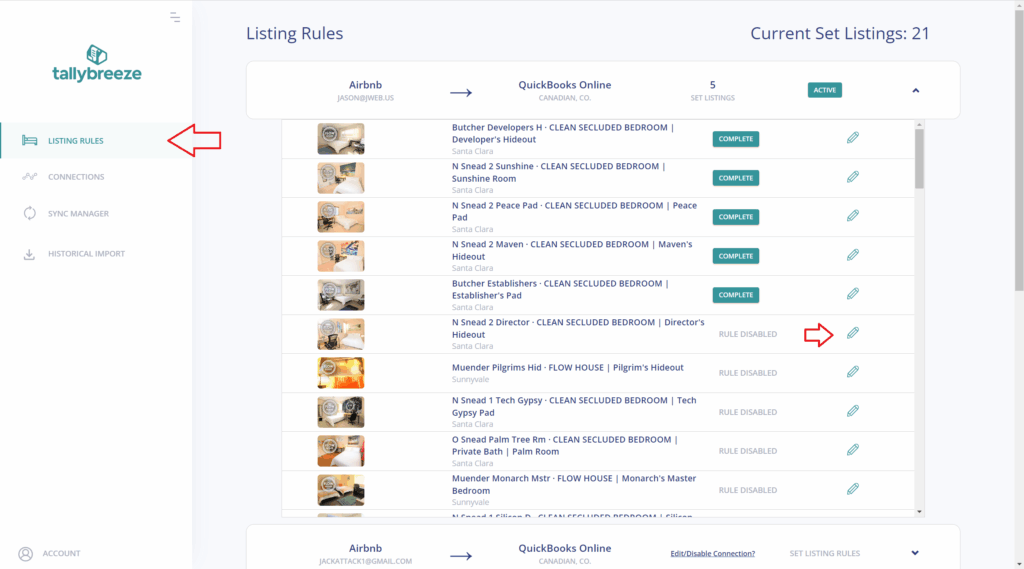
From there set up your listing rules by using a template (details below) or setup manually with your own chart of accounts. For more details on this step, see article: Enable your first listing
3. Import and Sync Reservations from Airbnb to QuickBooks
- Navigate to Historical Import in the left menu and confirm that your connection is selected at the top.
- Review the Start and End Dates – begin by importing the current month and the previous month (both are free during your trial).
- Check the reservations you want to bring in, then click Import Selected to Sync Manager.
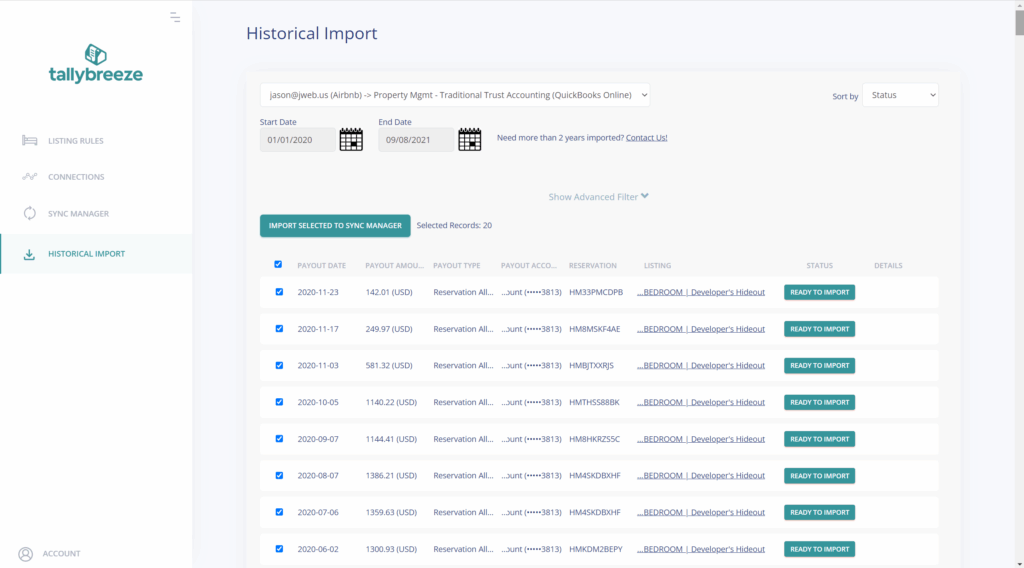
As new reservations are created, Tallybreeze automatically syncs them into your Sync Manager and breaks out every line item – Accommodation Fare, Cleaning Fee, Airbnb Service Fee, Co-Host Payout Adjustments, Occupancy Tax Collections, and more. The running balance always matches the net amount Airbnb deposits, keeping your accounting aligned with real-time revenue activity.
For more details on this step, see article: Import and sync reservations
4. Match Airbnb Bank Deposits in QuickBooks
When an Airbnb payout appears in your QuickBooks bank feed, open the Banking tab and review the suggested match to the transfer from your payment clearing account. A single click on Match completes the workflow, turning reconciliation into a quick verification rather than a manual reconstruction. You can also create a bank rule to automatically route Airbnb deposit amounts to the clearing account for even faster processing.
Airbnb Accounting Templates
In Airbnb accounting, different business models require different chart-of-accounts templates. Each model classifies financial activity in its own way, so the correct setup depends entirely on how your business operates.
For instance, if you own the Airbnb property, then 100% of the accommodation fare is recognized as your income. But if you’re a property manager operating a trust account, the full accommodation fare belongs to the trust account – not to you. In that case, only your commission (e.g., 20%) is recorded as your income.
Because each model reflects a distinct path for accounting, the chart of accounts must be tailored accordingly. Explore the templates below to see how each business model works and which structure fits your operation.
- Investment Property Accounting
- Rental Arbitrage Accounting
- Co-Host Accounting
- Property Management Accounting without a Trust Account
- Trust Accounting for Property Managers
- Accounting for Costs to Operate Airbnb Listings
Occupancy Taxes
In many jurisdictions, Airbnb can collect and remit transient occupancy taxes for you. However, in regions where Airbnb allows you to receive these taxes directly, you assume responsibility for reporting and remitting them to the appropriate local authority. The guidance below applies to hosts who have chosen to handle these tax payments themselves.
In QuickBooks, you can determine the amount owed by going to Reports → Balance Sheet. Select the reporting period you need, then filter the results using the class assigned to your listing. Locate the account used for collecting transient occupancy taxes. From there the balance shown represents the taxes you must remit.
If your local jurisdiction requires documentation to support your filing, you can generate an Account Transaction report. Filter it by your listing’s class and by the tax liability account to provide a clear statement of the amounts collected and owed.
Benefits of using Tallybreeze to Reconcile Airbnb in QuickBooks
Tallybreeze gives Airbnb operators and property managers accounting that scales without adding friction. It delivers clean, automated reservation data directly into QuickBooks, eliminating manual fixes and ensuring clear visibility into every dollar.
It handles accruals, reconciliation, and tax allocations with precision – and continues to unify your financials as you expand to channels like Vrbo or Guesty and payment methods like Stripe or GuestyPay.
Because QuickBooks stays your system of record, you maintain full control. Connect unlimited Airbnb or Vrbo accounts, customize workflows for any business model, and roll back or redo any synced reservation. Every fare, fee, and tax is tracked accurately at the listing level for complete clarity.
Teams consistently notice immediate improvements:
- No more data juggling, reservations sync cleanly into QuickBooks. Your finance workflows move faster because the numbers arrive organized, complete, and ready for reporting.
- Every revenue and cost component lands in the proper chart-of-accounts category. Airbnb fees, refunds, taxes, commissions, and adjustments are all posted precisely—strengthening your profitability analysis.
- Listing-level performance becomes clearer and more actionable. You can quickly see which listings perform, which underperform, and which markets or strategies merit expansion.
- Reconciliation stays effortless—even during peak seasons. Higher booking volume no longer leads to higher workload or stress.
- Month-end closes become smooth and consistent. Cleaner data means leadership gets timely insights with greater confidence.
- Historical cleanup becomes straightforward. The Historical Import feature supports accounting catch-up when upgrading systems or formalizing financial processes.
For hosts managing a single property or operators overseeing hundreds, Tallybreeze provides clear Airbnb accounting, automated with precision – delivering the accurate, unified financial record your business relies on.
Final Thoughts
Reconciling Airbnb payouts in QuickBooks becomes far simpler once you understand how each reservation breaks down and how those components flow into your accounting system. By separating fares, fees, taxes, and adjustments, you gain a clear and accurate picture of your true earnings – something a net bank deposit alone can never provide. With Tallybreeze automating the syncing, categorization, and matching process, reconciliation turns into a quick verification rather than a manual project. Whether you manage one listing or an entire portfolio, this approach ensures cleaner books, smoother month-end closes, and financial visibility you can rely on as your Airbnb business grows.
One thought on “How to Reconcile Airbnb Payouts in QuickBooks”
Comments are closed.