

Who should read this guide?
This guide explains how to manage trust accounting for Airbnb listings in QuickBooks for property managers who use a trust account to collect funds on behalf of property owners. It provides a comprehensive accounting method designed for those who must follow strict state or local regulations governing trust accounts. A trust account is a dedicated bank or financial institution account used by licensed property managers or real estate brokers to hold owner funds securely and separately from operating funds.
For the purposes of this guide, we assume that QuickBooks Online is your bookkeeping system and that all funds collected by Airbnb are deposited directly into your trust bank account. We also assume that you maintain a separate bank account for your general business operations.
Note: For a complete guide to QuickBooks for Airbnb, see Airbnb & QuickBooks: A Comprehensive Guide.
Table of Contents
What you’ll get from this guide:
- QuickBooks Chart of Accounts Template for Trust Accounting of Airbnb Listings
- How to Automate Trust Accounting for Airbnb Listings
- Execute Common Transaction Workflows in QuickBooks
- Generate Monthly Reports and Owner Statements in QuickBooks
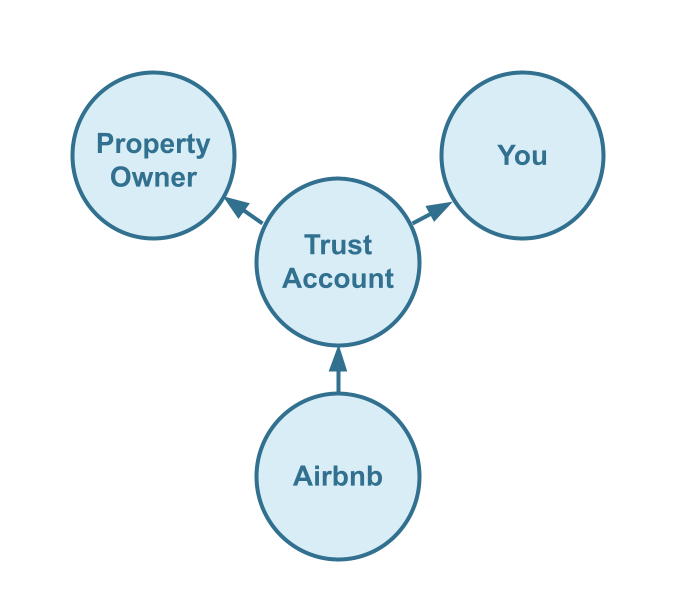
Cash Flow Diagram
Who should not read this guide?
There are other business models that may be a better fit for your specific situation, and these are explained in more detail in the following guides:
- QuickBooks for Airbnb Listings: Property Management without Trust Accounting
- QuickBooks for Airbnb Listings: Co-Host Accounting
- QuickBooks for Airbnb Listings: Rental Arbitrage Accounting
- QuickBooks for Airbnb Listings: Investment Property Accounting
- All QuickBooks Templates for Airbnb
- Airbnb Accounting & Bookkeeping: A Comprehensive Guide
Trust Accounting vs Accounting for your Business
As part of trust accounting for Airbnb listings, you, the property manager, act in a fiduciary role as a custodian of funds on behalf of property owners. Any money you handle for an owner is considered to be held in trust (What is a trust account?). Because of this, many jurisdictions impose specific accounting and reporting requirements for trust accounts. Even if your state does not mandate these rules, it is still a best practice to operate as though the requirements apply.
Why take this approach? Proper trust accounting provides maximum transparency to your owners. Owners value transparency, and it builds confidence in your services. The more your owners trust you, the more likely they are to recommend you to others, which ultimately helps your business grow.
Three-Way Trust Reconciliation
The proper reconciliation method for trust accounting is known as the three-way trust reconciliation process. This process requires three separate records to match exactly during reconciliation: the trust ledger, the stakeholder ledgers, and the trust bank statement (Source).
- The trust ledger: This is the record of all transactions within the trust account, which you will track in QuickBooks Online. In our chart of accounts template, the trust ledger corresponds to the Trust Account Liability.
- The stakeholder ledgers: These ledgers take the trust ledger one step further by assigning each transaction to a specific stakeholder and grouping all trust account activity associated with that individual stakeholder. In our chart of accounts template, under the Trust Account Liability, we separate two primary stakeholders: Owner Funds and Property Management Funds. We also use class categories in QuickBooks Online to further distinguish funds for each owner.
- The trust bank statement: This statement is issued by the bank where the trust account is held and provides third-party verification of all transactions posted to the trust account.
During reconciliation, the trust bank statement balance must match both the trust ledger and the combined balances of all stakeholder ledgers. This requirement is what makes it a ‘three-way reconciliation.’
Accounting for your Property Mangement Business
In addition to reconciling the trust ledger and each stakeholder ledger, the property manager must also reconcile their own company ledgers. Property management funds are held in the trust account and are eventually transferred from the trust bank account to the property manager’s operating bank account. This process will be explained in detail later in the guide.
Accordingly, our template is organized into three main sections: Trust Account Asset, Trust Account Liability, and Property Management Revenue. These sections represent the following:
- Trust Account Asset: This account tracks the amount owed to the property management company from the trust account and should always match the Property Management Funds total within the Trust Account Liability.
- Trust Account Liability: This is the trust ledger discussed above.
- Property Mgmt Revenue: This account tracks all earnings of the property management company, including revenue generated from the trust account.
QuickBooks Chart of Accounts Template for Trust Accounting of Airbnb Listings
Building on the previous sections, this part of the guide explains our chart of accounts template in detail. It is presented in the same structure used in QuickBooks, with parent categories and their respective subcategories shown below:
Account Codes
| No. | Account | Type |
|---|---|---|
| 12000 | Trust Account Asset | Asset |
| 12100 | Trust Account Asset: Property Mgmt Funds Reserved | Asset |
| 12200 | Trust Account Asset: Property Mgmt Funds Receivable | Asset |
| 23000 | Trust Account Liability | Liability |
| 23100 | Trust Account Liability: Property Mgmt Funds | Liability |
| 23120 | Trust Account Liability: Property Mgmt Funds: Property Mgmt Funds Reserved | Liability |
| 23140 | Trust Account Liability: Property Mgmt Funds: Property Mgmt Funds Payable | Liability |
| 23300 | Trust Account Liability: Owner Funds | Liability |
| 23310 | Trust Account Liability: Owner Funds: Owner Funds Reserved | Liability |
| 23320 | Trust Account Liability: Owner Funds: Airbnb Collections | Liability |
| 23330 | Trust Account Liability: Owner Funds: Airbnb Collections: Accommodation Fare | Liability |
| 23340 | Trust Account Liability: Owner Funds: Airbnb Collections: Cleaning Fees | Liability |
| 23350 | Trust Account Liability: Owner Funds: Airbnb Collections: Resolution Adjustments | Liability |
| 23360 | Trust Account Liability: Owner Funds: Airbnb Collections: Airbnb Service Fees | Liability |
| 23370 | Trust Account Liability: Owner Funds: Airbnb Collections: Refunds | Liability |
| 23380 | Trust Account Liability: Owner Funds: Airbnb Collections: Custom Taxes Payable | Liability |
| 23390 | Trust Account Liability: Owner Funds: Airbnb Collections: Tax Withholdings | Liability |
| 23400 | Trust Account Liability: Owner Funds: Airbnb Collections: Airbnb Suspense Account | Liability |
| 23500 | Trust Account Liability: Owner Funds: Less Amounts Due to Property Mgmt | Liability |
| 23600 | Trust Account Liability: Owner Funds: Less Owner Payouts | Liability |
| 41000 | Property Mgmt Revenue | Revenue |
| 41100 | Property Mgmt Revenue: Airbnb Commissions | Revenue |
| 41200 | Property Mgmt Revenue: Airbnb Cleaning Fees | Revenue |
NOTE: In this guide, we only cover income accounting, not costs. For a guide about Airbnb costs and chart of accounts to consider, check out this guide instead: Accounting for Costs to Operate Airbnb Listings: Best Chart of Accounts
Detailed Explanation of Accounts
Click to expand and learn more about any particular account.
Trust Account Asset
12000 – Trust Account Asset – This account balance should always match “23100 – Trust Account Liability: Property Mgmt Funds”. This is the account for all trust account portions allocated to the property management company in the trust account.
12100 – Trust Account Asset: Property Mgmt Funds Reserved – This account balance should always match “23120 – Trust Account Liability: Property Mgmt Funds: Property Mgmt Funds Reserved”. This account tracks amounts allocated to the property management company in the trust account but are held in reserve within the trust account for funding any issues needing to be paid by the property management company. For example, if you provide a refund to a guest because of something at the fault of the property management company (e.g. to reimburse on a complaint for an unclean listing), this amount should be paid out of the property management company portion of the trust account.
12200 – Trust Account Asset: Property Mgmt Funds Receivable – This account balance should always match “23140 – Trust Account Liability: Property Mgmt Funds: Property Mgmt Funds Payable”. This account tracks amounts due to the property management company from the trust account.
Trust Account Liability
23000 – Trust Account Liability – This account is the trust ledger for three-way trust reconciliation. This account balance, which includes all balances of its child accounts, should match the trust bank account statement balance during reconciliation. This is a ledger of all the transactions flowing into and out of the trust account.
23100 – Trust Account Liability: Property Mgmt Funds – This account is a stakeholder ledger within the trust ledger for three-way trust reconciliation. Also, this ledger balance should always match “12000 – Trust Account Asset”. This stakeholder ledger is specifically for the property management company. This is the account for all trust account portions allocated to the property management company in the trust account.
23120 – Trust Account Liability: Property Mgmt Funds: Property Mgmt Funds Reserved – This account balance should always match “12100 – Trust Account Asset: Property Mgmt Funds Reserved”. This account tracks amounts allocated to the property management company in the trust account but are held in reserve within the trust account for funding any issues needing to be paid by the property management company. For example, if you provide a refund to a guest because of something at the fault of the property management company (e.g. to reimburse on a complaint for an unclean listing), this amount should be paid out of the property management company portion of the trust account.
23140 – Trust Account Liability: Property Mgmt Funds: Property Mgmt Funds Payable – This account balance should always match “12200 – Trust Account Asset: Property Mgmt Funds Receivable”. This account tracks amounts due to the property management company from the trust account.
23300 – Trust Account Liability: Owner Funds – This account is a stakeholder ledger within the trust ledger for three-way trust reconciliation. This stakeholder ledger is specifically for all owners grouped together. Transactions in this ledger should be further classified for each individual owner by the use of class categories within QuickBooks.
23310 – Trust Account Liability: Owner Funds: Owner Funds Reserved – This account tracks amounts allocated to owners in the trust account held in reserve. Rather than being paid out to owners, these amounts are held for funding property maintenance from the trust account.
23320 – Trust Account Liability: Owner Funds: Airbnb Collections – This account tracks all amounts collected from Airbnb in the trust account.
23330 – Trust Account Liability: Owner Funds: Airbnb Collections: Accommodation Fare – This account tracks the accommodation fare portion of each Airbnb reservation. The accommodation fare is equal to the number of nights multiplied by the average nightly rate of each reservation.
23340 – Trust Account Liability: Owner Funds: Airbnb Collections: Cleaning Fees – This account tracks the cleaning fee portion of each Airbnb reservation.
23350 – Trust Account Liability: Owner Funds: Airbnb Collections: Resolution Adjustments – This account tracks any resolution adjustments collected from Airbnb.
23360 – Trust Account Liability: Owner Funds: Airbnb Collections: Airbnb Service Fees – This account tracks service fee costs from Airbnb for each reservation, which is subtracted from Airbnb collections.
23370 – Trust Account Liability: Owner Funds: Airbnb Collections: Refunds – This account tracks refunds executed by Airbnb, which is subtracted from Airbnb collections.
23380 – Trust Account Liability: Owner Funds: Airbnb Collections: Custom Taxes Payable – This account tracks any custom taxes collected from Airbnb and payable to a tax authority from the trust account.
23390 – Trust Account Liability: Owner Funds: Airbnb Collections: Tax Withholdings – This account tracks any taxes withheld by Airbnb for income tax obligations. This is very rare and usually due to the Airbnb account holder lacking tax identification information. Ideally, this account should not contain any balance and is seldom (if ever) used. To avoid income tax withholdings from Airbnb, be sure to update your Airbnb account with your tax identification information and verify your account.
23400 – Trust Account Liability: Owner Funds: Airbnb Collections: Airbnb Suspense Account – This account tracks any income or refund events from Airbnb not tied to any particular reservation or listing. For example, on rare occasions if you receive a credit from Airbnb for referring another host or if you purchase photography from Airbnb. When there’s no associated reservation related to the transaction, there’s no particular listing rules to handle the amounts in Tallybreeze.
23500 – Trust Account Liability: Owner Funds: Less Amounts Due to Property Mgmt – This account tracks any amounts subtracted from the owner’s portion of the trust account to pay the property management company.
23600 – Trust Account Liability: Owner Funds: Less Owner Payouts – This account tracks any amounts subtracted from the owner’s portion of the trust account to pay the owners.
Property Mgmt Revenue
41000 – Property Mgmt Revenue – This account, along with its child accounts, tracks property management revenues received from the trust account as an income to the property management company.
41100 – Property Mgmt Revenue: Airbnb Commissions – This account tracks Airbnb commissions earned by the property management company.
41200 – Property Mgmt Revenue: Airbnb Cleaning Fees – This account tracks Airbnb cleaning fees earned by the property management company.
Accounts not included in this template
For the scope of this guide, we’re mainly focused on Airbnb revenue recognition and movements within the trust account. It is important to point out that our template does not include many general accounts. We also make reference to some accounts not include in this particular template, which we’ll list here:
- 11000 – Airbnb Payment Clearing Account – This account is created by Tallybreeze but is not included in this template in particular. This account is used to apply payments to Airbnb invoices upon the day the Airbnb reservation payout is posted. Payouts can take 3-5 days (or longer) to arrive in the bank account after posted from Airbnb. Monies owed are held in this clearing account until the payouts are received in the bank. This account also helps to automate the reconciliation process in QuickBooks.
- 1XXXX – Trust Bank Account – This is a bank account set up with your financial institution for funds held in trust. It’s a cash asset account solely for the management of owner funds as part of the three-way reconciliation process.
- 1XXXX – Operations Bank Account – This is a separate bank account set up with your financial institution. It’s a cash asset account to facilitate your property management company’s day-to-day business operations.
- 4XXXX – Billable Expenses Income – This is a general account for capturing income received for the payment of billable expenses by owners, which may include a markup.
- 7XXXX – Billable Expenses – This is a general account for tracking billable expenses for any owners.
Quick Setup Steps
Here’s how to import the above chart of accounts template. All of the accounts discussed in this article can be imported into QuickBooks automatically using Tallybreeze’s setup tools. Here’s how to access this utility…
- If you haven’t already, Sign Up to Tallybreeze. It includes free use of this template.
- Once registered, go to the Connections manager in Tallybreeze. Connect your Airbnb account, connect your QuickBooks Online account and then create a connection between the two.
- Within the Connection settings, select “Set Up QuickBooks”
- Select your business model from the drop-down list at the top and select “Import Template to QuickBooks”.
How to Automate Trust Accounting for Airbnb Listings
Every reservation received from Airbnb can be reconciled automatically, and in great detail, using Tallybreeze. In addition, all property management commissions can be split and allocated instantly using proper trust accounting practices. In this section, we’ll discuss how Tallybreeze automates Airbnb reservation accounting, along with the presets it provides for Airbnb trust accounting that align with the chart of accounts described above.
Tallybreeze connects Airbnb to QuickBooks and processes accounting data for each reservation. Within Tallybreeze, you can set specific accounting rules for each listing. When a reservation is received from Airbnb, Tallybreeze can automatically create an invoice in QuickBooks Online with all trust account allocations applied, including Airbnb collections, property management commissions, cleaning fee distributions, and any other required splits.
Tallybreeze Listing Presets for Trust Accounting on Airbnb
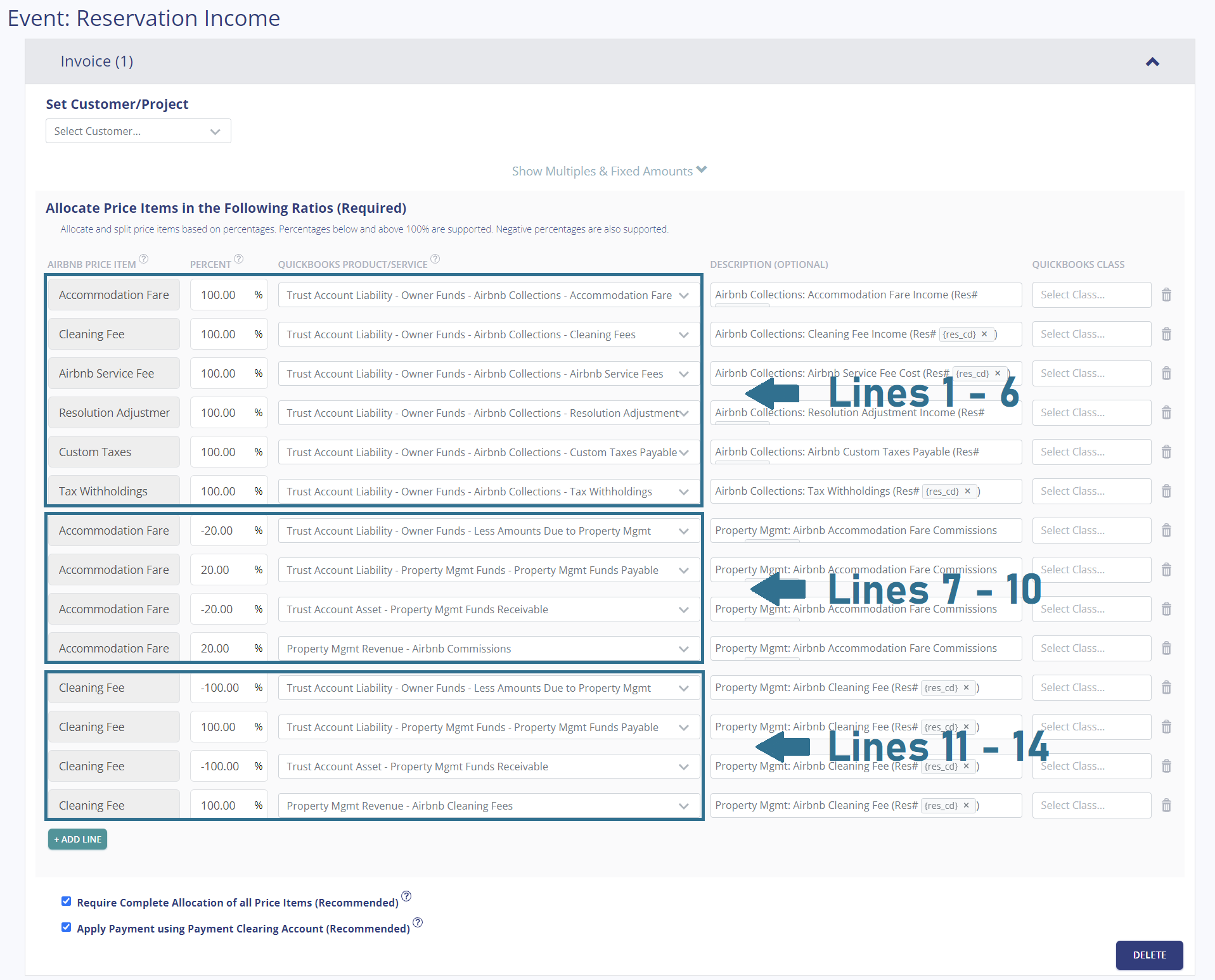
In Tallybreeze, once you’ve connected your Airbnb and QuickBooks accounts, you’ll be guided through setting up the trust accounting rules for each Airbnb listing. When you edit the rules for a specific listing, Tallybreeze provides preset options based on our chart of accounts template, allowing for a quick and efficient setup. These presets are organized into three groups: Lines 1–6, Lines 7–10, and Lines 11–14.
Explanation of Preset Lines
Click to expand and learn more about each preset.
Lines 1-6: All amounts received by Airbnb are 100% allocated to the owner in the trust account
This group of lines allocates 100% of all income from Airbnb to the owner within the Trust Account Liability under Airbnb Collections. This includes the accommodation fare, cleaning fee, Airbnb service fee (subtracted), any resolution adjustments, custom taxes (optional) and tax withholdings (if they exist)
| Airbnb Price Item | % | Account |
|---|---|---|
| Accommodation Fare | 100% | 23330 – Trust Account Liability: Owner Funds: Airbnb Collections: Accommodation Fare |
| Cleaning Fee | 100% | 23340 – Trust Account Liability: Owner Funds: Airbnb Collections: Cleaning Fees |
| Airbnb Service Fee | 100% | 23360 – Trust Account Liability: Owner Funds: Airbnb Collections: Airbnb Service Fees |
| Resolution Adjustment | 100% | 23350 – Trust Account Liability: Owner Funds: Airbnb Collections: Resolution Adjustments |
| Custom Taxes | 100% | 23380 – Trust Account Liability: Owner Funds: Airbnb Collections: Custom Taxes Payable |
| Tax Withholdings | 100% | 23390 – Trust Account Liability: Owner Funds: Airbnb Collections: Tax Withholdings |
Lines 7-10: A 20% commission is received from the owner to the property manager
This group of lines transfers 20% of the accommodation fare out of the owner funds of the trust account and allocates it to the property manager.
| Airbnb Price Item | % | Account |
|---|---|---|
| Accommodation Fare | -20% | 23500 – Trust Account Liability: Owner Funds: Less Amounts Due to Property Mgmt |
| Accommodation Fare | 20% | 23140 – Trust Account Liability: Property Mgmt Funds: Property Mgmt Funds Payable |
| Accommodation Fare | -20% | 12200 – Trust Account Asset: Property Mgmt Funds Receivable |
| Accommodation Fare | 20% | 41100 – Property Mgmt Revenue: Airbnb Commissions |
Lines 11-14: The entire Airbnb cleaning fee is received from the owner to the property manager
This group of lines transfers 100% of the cleaning fee out of the owner funds of the trust account and allocates it entirely to the property manager.
| Airbnb Price Item | % | Account |
|---|---|---|
| Cleaning Fee | -100% | 23500 – Trust Account Liability: Owner Funds: Less Amounts Due to Property Mgmt |
| Cleaning Fee | 100% | 23140 – Trust Account Liability: Property Mgmt Funds: Property Mgmt Funds Payable |
| Cleaning Fee | -100% | 12200 – Trust Account Asset: Property Mgmt Funds Receivable |
| Cleaning Fee | 100% | 41100 – Property Mgmt Revenue: Airbnb Commissions |
Example Reservation
Let’s say you’ve configured Tallybreeze for this listing using the preset settings above. Now imagine Airbnb sends a payout for a reservation with the following itinerary price items:
- Accommodation Fare: $2000
- Cleaning Fee: $300
- Airbnb Service Fee: -$60
- Airbnb Transient Occupancy Taxes: $200
- Reservation Total: $2440
First, Tallybreeze records all income received from Airbnb, separating each price item. The total amount due from Airbnb for this reservation is $2,440, which is allocated to the Airbnb Payment Clearing Account and later reconciled with the corresponding bank deposit.
| Account | Debit | Credit |
|---|---|---|
| 23330 – Trust Account Liability: Owner Funds: Airbnb Collections: Accommodation Fare | $2000 | |
| 23340 – Trust Account Liability: Owner Funds: Airbnb Collections: Cleaning Fees | $300 | |
| 23360 – Trust Account Liability: Owner Funds: Airbnb Collections: Airbnb Service Fees | $60 | |
| 23380 – Trust Account Liability: Owner Funds: Airbnb Collections: Custom Taxes Payable | $200 | |
| 11000 – Airbnb Payment Clearing Account (Asset) | $2440 |
Next, Tallybreeze calculates 20% of the accommodation fare ($2,000 × 20% = $400). It then reallocates this amount as payable from the trust account and records it as revenue receivable by the property management company:
| Account | Debit | Credit |
|---|---|---|
| 23500 – Trust Account Liability: Owner Funds: Less Amounts Due to Property Mgmt | $400 | |
| 23140 – Trust Account Liability: Property Mgmt Funds: Property Mgmt Funds Payable | $400 | |
| 12200 – Trust Account Asset: Property Mgmt Funds Receivable | $400 | |
| 41100 – Property Mgmt Revenue: Airbnb Commissions | $400 |
Then, Tallybreeze allocates 100% of the Cleaning Fee ($400) as payable from the trust account and records it as revenue receivable by the property management company:
| Account | Debit | Credit |
|---|---|---|
| 23500 – Trust Account Liability: Owner Funds: Less Amounts Due to Property Mgmt | $300 | |
| 23140 – Trust Account Liability: Property Mgmt Funds: Property Mgmt Funds Payable | $300 | |
| 12200 – Trust Account Asset: Property Mgmt Funds Receivable | $300 | |
| 41100 – Property Mgmt Revenue: Airbnb Cleaning Fees | $300 |
Finally, on the date the reservation payout is deposited by Airbnb into the Trust Bank Account (typically 3 to 5 days later), a bank rule in QuickBooks can automatically reconcile the deposit to the Airbnb Payment Clearing Account:
| Account | Debit | Credit |
|---|---|---|
| 1XXXX – Trust Bank Account | $2440 | |
| 11000 – Airbnb Payment Clearing Account (Asset) | $2440 |
Set Invoice Customer & Class Categories
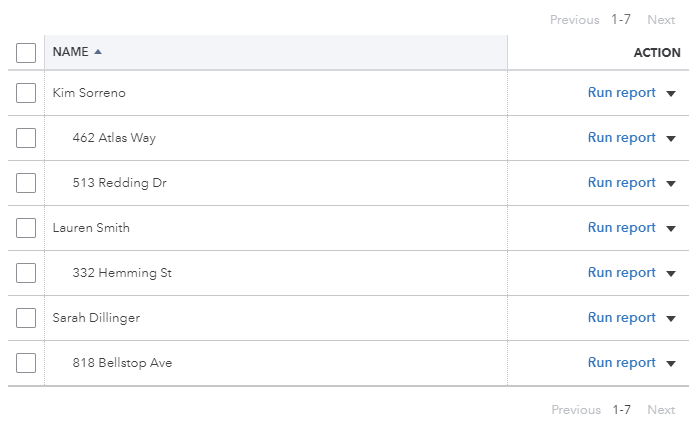
Finally, in your Tallybreeze listing rules, we recommend setting the owner as the customer on the invoice. We also suggest assigning the class category for each line item as ‘Owner Name: Listing Address.’ To do this, create two class categories in QuickBooks for the listing: one parent class for the owner and one sub-class for the listing address.
Automate Additional Bills & Invoices (Optional)
With Tallybreeze, you’re also able to automate the creation of additional bills and invoices for each reservation. Consider the following:
- Create a bill to set payouts payable to the property owner for each reservation.
- Create a bill to set amounts payable to a tax authority for each reservation.
- Create a bill to set amounts payable to a cleaning service for turnover of each reservation.
- Create additional invoice to set amounts receivable by any third party for each reservation.
Quick Setup Steps
All of the above settings can be quickly set up using Tallybreeze’s presets for your listings. Here’s how to set up these presets…
- If you haven’t already, Sign Up to Tallybreeze.
- After logging into Tallybreeze, set up your connections, then go to Listing Rules.
- Select any listing you’d like to automate that hasn’t already been set up.
- Select “Load Presets”.
- Select your business model from the options.
From here, presets will be loaded as your listing accounting rules and you can edit as needed.
Execute Common Transaction Workflows in QuickBooks
In this section, we outline the common transaction workflows required for trust accounting of Airbnb listings for property managers.
Paying the Property Manager (yourself) from the Trust Account
Over the course of a month, an accumulation of commissions occur. The first common transaction workflow to mention is paying yourself, the property manager, from the Trust Bank Account. Assuming you’ve reconciled any expenses, the amount to be paid can be found in the balance sheet under Property Mgmt Funds Payable and Property Mgmt Funds Receivable (both of these account balances should match).
Over the course of a month, property management commissions accumulate. The first common transaction workflow to address is paying yourself, the property manager, from the Trust Bank Account. After reconciling any related expenses, the amount you should receive can be found on the balance sheet under Property Management Funds Payable and Property Management Funds Receivable, these two account balances should always match.
Example Transaction
You, as the property manager, have $10,000 recorded in the Property Management Funds Receivable account for the owner, Kim Sorreno, related to the listing at 462 Atlas Way. You now want to pay yourself this amount from the trust account.
First, initiate the transfer between your bank accounts at your financial institution. Once the transfer has posted, record the outgoing transaction from the Trust Bank Account using the following entry:
| Debit | Credit | Class Category | |
|---|---|---|---|
| 1XXXX – Trust Bank Account (Asset) | $10,000 | Kim Sorreno: 462 Atlas Way | |
| 23140 – Trust Account Liability: Property Mgmt Funds: Property Mgmt Funds Payable | $10,000 | Kim Sorreno: 462 Atlas Way |
Next, record the incoming transaction to your Operating Bank Account with the following entry:
| Debit | Credit | Class Category | |
|---|---|---|---|
| 1XXXX – Operations Bank Account (Asset) | $10,000 | Kim Sorreno: 462 Atlas Way | |
| 12200 – Trust Account Asset: Property Mgmt Funds Receivable | $10,000 | Kim Sorreno: 462 Atlas Way |
Detailed instructions for QuickBooks Online
1. Find the amount to pay
Assuming you’ve reconciled any expenses, the amount that needs to be paid can be found in the balance sheet under Property Mgmt Funds Payable or Property Mgmt Funds Receivable (both of these account balances should match).
2. Transfer the amount from the trust bank account to your operations account
Once you’ve verified the amount, go to your bank and transfer this amount from the trust bank account to your business operations bank account.
3. Categorize/reconcile the Trust bank feed transaction in QuickBooks
| Payee | Category | Class |
|---|---|---|
| Your Property Mgmt Company | Property Mgmt Funds Payable | Kim Sorreno: 462 Atlas Way |
- Set the Payee to the name of your property management company
- Set Category to Property Mgmt Funds Payable
- Set the Amount to the balance found under Property Mgmt Funds Payable
- Set the Class to the Owner Name: Listing
4. Transfer/reconcile the Operations bank feed transaction in QuickBooks
Under the Trust Bank Account, find the amount transferred.
- Select “Record as transfer”
- Set Transfer account to Property Mgmt Funds Receivable
Paying Owners from the Trust Account
The next common transaction workflow to identify is paying Owners from the Trust Bank Account. The amount that needs to be paid to each owner can be found in the balance sheet by filtering the class for each owner. The amount can be found under the “Owner Funds” account. You can also cross-check this by looking at the transaction report for any particular month.
Example Transaction
You, the property management company, are holding funds under “Owner Funds” in the amount of $20,000 for the owner, Kim Sorreno, for the listing 462 Atlas Way. You’d like to pay this amount to the owner from the trust account as a result of a month-end report.
First, you’ll need to send the owner the money via bank transfer, ACH, check or other means. Once the transfer is posted and complete, record the outgoing transaction from the Trust Bank Account using the following entry:
| Debit | Credit | Class Category | |
|---|---|---|---|
| 1XXXX – Trust Bank Account (Asset) | $20,000 | Kim Sorreno: 462 Atlas Way | |
| 23600 – Trust Account Liability: Owner Funds: Less Owner Payouts | $20,000 | Kim Sorreno: 462 Atlas Way |
Detailed instructions for QuickBooks Online
1. Find the amount to pay
The amount that needs to be paid to each owner can be found in the balance sheet. Filtering the balance sheet by the class for each owner, look up the total amount under the “Owner Funds” account. You can also cross-check this by looking at the transaction report for any particular time period.
2. Create Bill
| Vendor | Category | Description | Class |
|---|---|---|---|
| Kim Sorreno | Less Owner Payouts | “Owner Payout” | Kim Sorreno: 462 Atlas Way |
- Set Vendor to the name of the owner
- Set Product/Service to Less Owner Payouts
- Set Description to “Owner Payout”
- Set Amount to the balance found in Owner Funds for the specific owner
- Set Class to owner’s name
3. Transfer the amount from the trust bank account to the owner
Once you’ve verified the amount, go to your bank and send the money via bank transfer, ACH, check or other means.
4. Reconcile trust bank account amount with bill
Reconcile the bill with the trust bank feed in QuickBooks
Paying Expenses on Behalf of Owners Directly from the Trust Account
Sometimes an owner may ask you to purchase items on their behalf, paid directly from their funds in the trust account. For larger expenses, such as a new water heater or major repairs, first confirm that the owner has sufficient funds in their Owner Funds Reserved account. If they do not, you’ll need to allocate additional funds to that account. Otherwise, you risk commingling funds from other owners within the trust account and violating proper trust accounting practices.
Example Transaction
The owner, Kim Sorreno, would like you to purchase a new water heater using the funds she has in the trust account for her property at 462 Atlas Way. The total cost is $2,000, which includes installation by a professional maintenance company.
First, you’ll need to pay the maintenance company from the Trust Bank Account.. whether by bank transfer, ACH, check, or another approved method. Once the payment has cleared, record the outgoing transaction from the Trust Bank Account using the following entry:
| Debit | Credit | Class Category | |
|---|---|---|---|
| 1XXXX – Trust Bank Account (Asset) | $2,000 | Kim Sorreno: 462 Atlas Way | |
| 23310 – Trust Account Liability: Owner Funds: Owner Funds Reserved | $2,000 | Kim Sorreno: 462 Atlas Way |
Detailed instructions for QuickBooks Online
1. Check how much exists in the Owner Funds Reserved account for the owner
Make sure the owner has enough funds allocated in their Owner Funds Reserved account, which you can find in the balance sheet filtered by class. If there’s not enough funds, you’ll need to allocate funds into this account from another trust liability account, else you’ll run the risk of commingling funds of other owners within the trust account.
2. Create Bill
| Vendor | Category | Description | Class |
|---|---|---|---|
| Name of Vendor | Owner Funds Reserved | “Owner Expense: <description>” | Kim Sorreno: 462 Atlas Way |
- Set the vendor of the bill to the one you’re paying the expense to
- Create as many lines as necessary, but set the Product/Service to Owner Funds Reserved
- Set a detailed description for each line, starting with “Owner Expense: ”
- Set the class to the owner’s name and sub-class to the listing
3. Transfer the amount from the trust bank account to the vendor
Send the money via bank transfer, ACH, check or other means.
4. Reconcile trust bank account amount with bill
Reconcile the bill with the trust bank feed in QuickBooks
Paying Expenses on Behalf of Owners from your Operations Bank Account
In many cases, you’ll purchase items for an owner’s property from your operations bank account, especially for smaller maintenance issues that need quick attention. These amounts will be reimbursed to you after month-end, when you report the expenses and retrieve the corresponding funds from the trust account.
Example
A property owned by Kim Sorreno needs a bathroom faucet replaced by a professional plumber. The service costs $200 and must be completed quickly, as guests are checking in later today.
First, pay the plumbing company from your Operations Account, whether by bank transfer, ACH, check, or another approved method. Once the payment has posted, record the outgoing transaction from your Operations Bank Account using the following entry:
| Debit | Credit | Class Category | |
|---|---|---|---|
| 1XXXX – Operations Bank Account (Asset) | $200 | Kim Sorreno: 462 Atlas Way | |
| 7XXXX – Billable Expenses (Expense) | $200 | Kim Sorreno: 462 Atlas Way |
Next, record the amount owed to you from the trust account so it can be included in the next month-end payout. You may also choose to include a 10% markup for coordinating and funding the service. Use the following entry:
| Debit | Credit | Class Category | |
|---|---|---|---|
| 23500 – Trust Account Liability: Owner Funds: Less Amounts Due to Property Mgmt | $220 | Kim Sorreno: 462 Atlas Way | |
| 23140 – Trust Account Liability: Property Mgmt Funds: Property Mgmt Funds Payable | $220 | Kim Sorreno: 462 Atlas Way | |
| 12200 – Trust Account Asset: Property Mgmt Funds Receivable | $220 | Kim Sorreno: 462 Atlas Way | |
| 4XXXX – Billable Expenses Income (Revenue) | $220 | Kim Sorreno: 462 Atlas Way |
When the next month-end payout occurs, the amount of $220 will be included in the Property Mgmt Funds Receivable and Payable accounts.
Detailed instructions for QuickBooks Online
1. After paying the service provider, categorize and reconcile the transaction in your operations bank feed
| Payee | Category | Description | Amount | Class |
|---|---|---|---|---|
| Plumber Pro | Billable Expenses | “Billable Expense: Bathroom Faucet Replaced” | $200 | Kim Sorreno: 462 Atlas Way |
2. Create a Journal Entry
Include a 10% markup ($220 total)
| Account | Debit | Credit | Description | Name | Class |
|---|---|---|---|---|---|
| Less Amounts to Property Manager (Liability) | $220 | “Billable Expense: Bathroom Faucet Replaced” | Kim Sorreno | Kim Sorreno: 462 Atlas Way | |
| Property Mgmt Funds Payable (Liability) | $220 | “Billable Expense: Bathroom Faucet Replaced” | Kim Sorreno | Kim Sorreno: 462 Atlas Way | |
| Property Mgmt Funds Receivable (Asset) | $220 | “Billable Expense: Bathroom Faucet Replaced” | Kim Sorreno | Kim Sorreno: 462 Atlas Way | |
| Billable Expenses – Income (Revenue) | $220 | “Billable Expense: Bathroom Faucet Replaced” | Kim Sorreno | Kim Sorreno: 462 Atlas Way |
Remitting Taxes from the Trust Account
In many jurisdictions, Airbnb will collect taxes and remit to local tax authorities on the owner’s behalf. However, you can opt to collect these taxes from Airbnb and remit them directly. If you’re using Tallybreeze, the Custom Taxes line item found in our presets will take care of the allocation of custom taxes for each reservation. This section is about paying the local tax authorities the amounts owed.
In many jurisdictions, Airbnb collects taxes and remits them to the local tax authorities on the owner’s behalf. However, you can opt to collect these taxes from Airbnb and remit them directly. If you’re using Tallybreeze, the Custom Taxes line item in our presets will automatically allocate these taxes for each reservation. This section covers how to remit the amounts owed to local tax authorities.
Example
The owner, Kim Sorreno, has a listing at 462 Atlas Way, where Airbnb is configured to collect custom taxes for all reservations. In Tallybreeze, these amounts are allocated to the Custom Taxes Payable account. After running a balance sheet report for this listing in QuickBooks, you see that $1,000 is owed in transient occupancy taxes under Custom Taxes Payable.
First, send your payment to the tax authority, whether by bank transfer, ACH, check, or another accepted method. Once the payment has posted, record the outgoing transaction from the Trust Bank Account using the following entry:
| Debit | Credit | Class Category | |
|---|---|---|---|
| 1XXXX – Trust Bank Account (Asset) | $1,000 | Kim Sorreno: 462 Atlas Way | |
| 23380 – Trust Account Liability: Owner Funds: Airbnb Collections: Custom Taxes Payable | $1,000 | Kim Sorreno: 462 Atlas Way |
Detailed instructions for QuickBooks Online
1. Check how much exists in the Custom Taxes Payable account for the owner
2. Create Bill
| Vendor | Category | Description | Class |
|---|---|---|---|
| Tax Authority | Custom Taxes Payable | “Taxes Paid: 11% City TOT” | Kim Sorreno: 462 Atlas Way |
- Set the vendor of the bill to the the name of the tax authority
- Set the Product/Service to Custom Taxes Payable
- Set a detailed description, starting with “Taxes: ” and describe the tax
- Set the class to the owner’s name
3. Transfer the amount from the trust bank account to the vendor
Send the money via bank transfer, ACH, check or other means.
4. Reconcile trust bank account amount with bill
Reconcile the bill with the trust bank feed in QuickBooks
Generate Monthly Reports and Owner Statements in QuickBooks
Now that your data is automatically processed from Airbnb and seamlessly synced into QuickBooks, producing clear and professional owner statements and reports each month becomes simple, especially after reconciling any additional expenses.
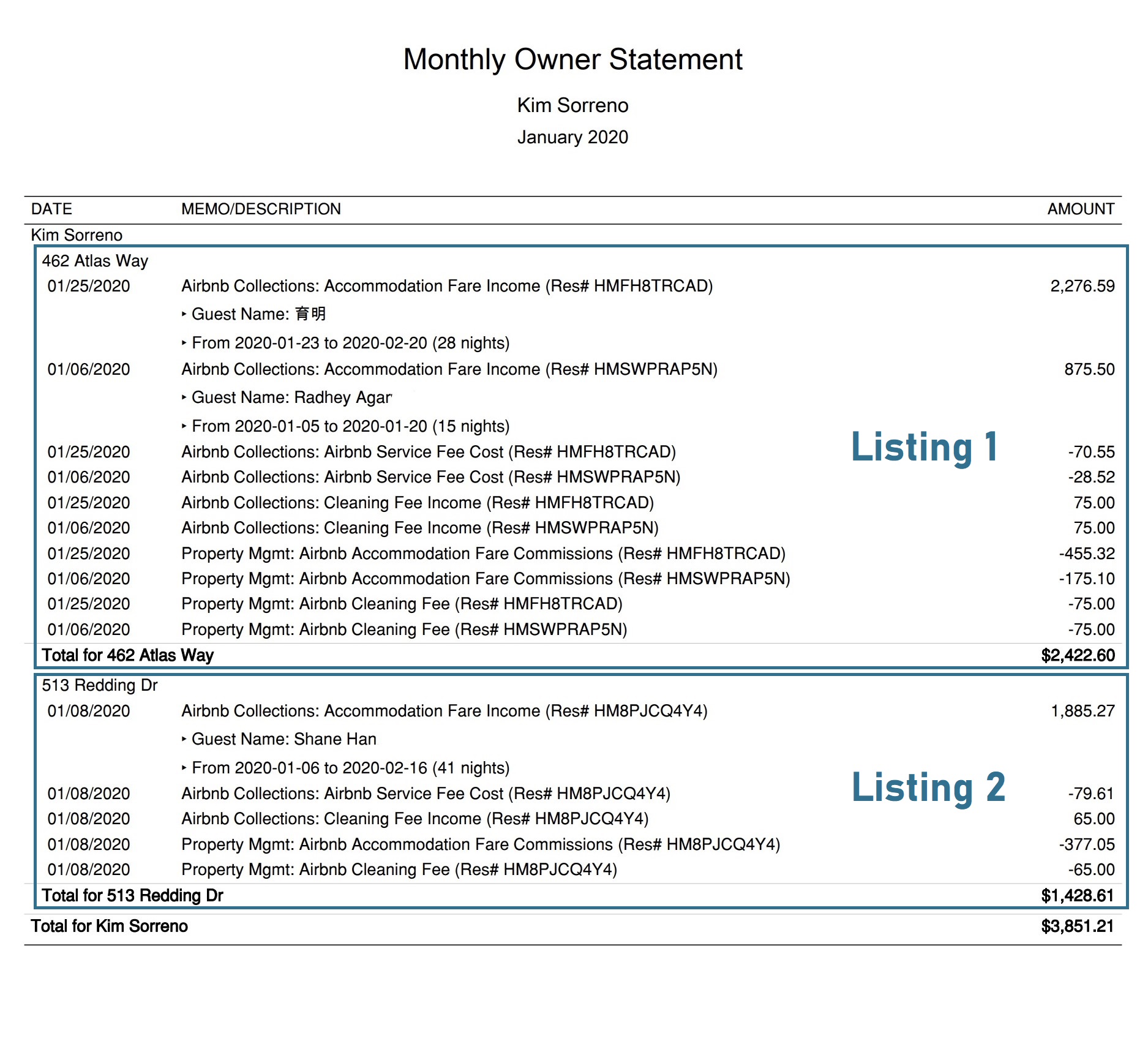
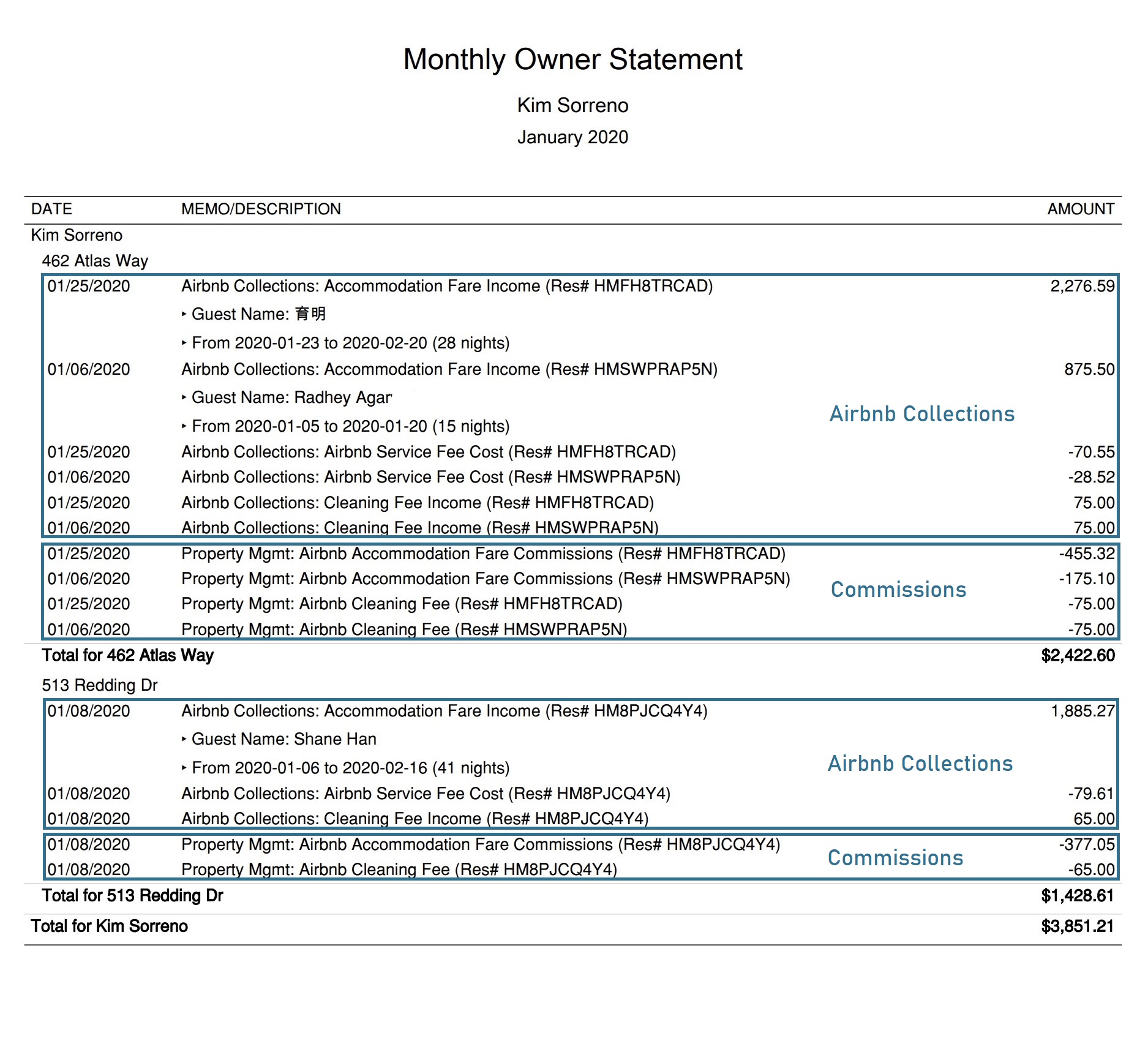
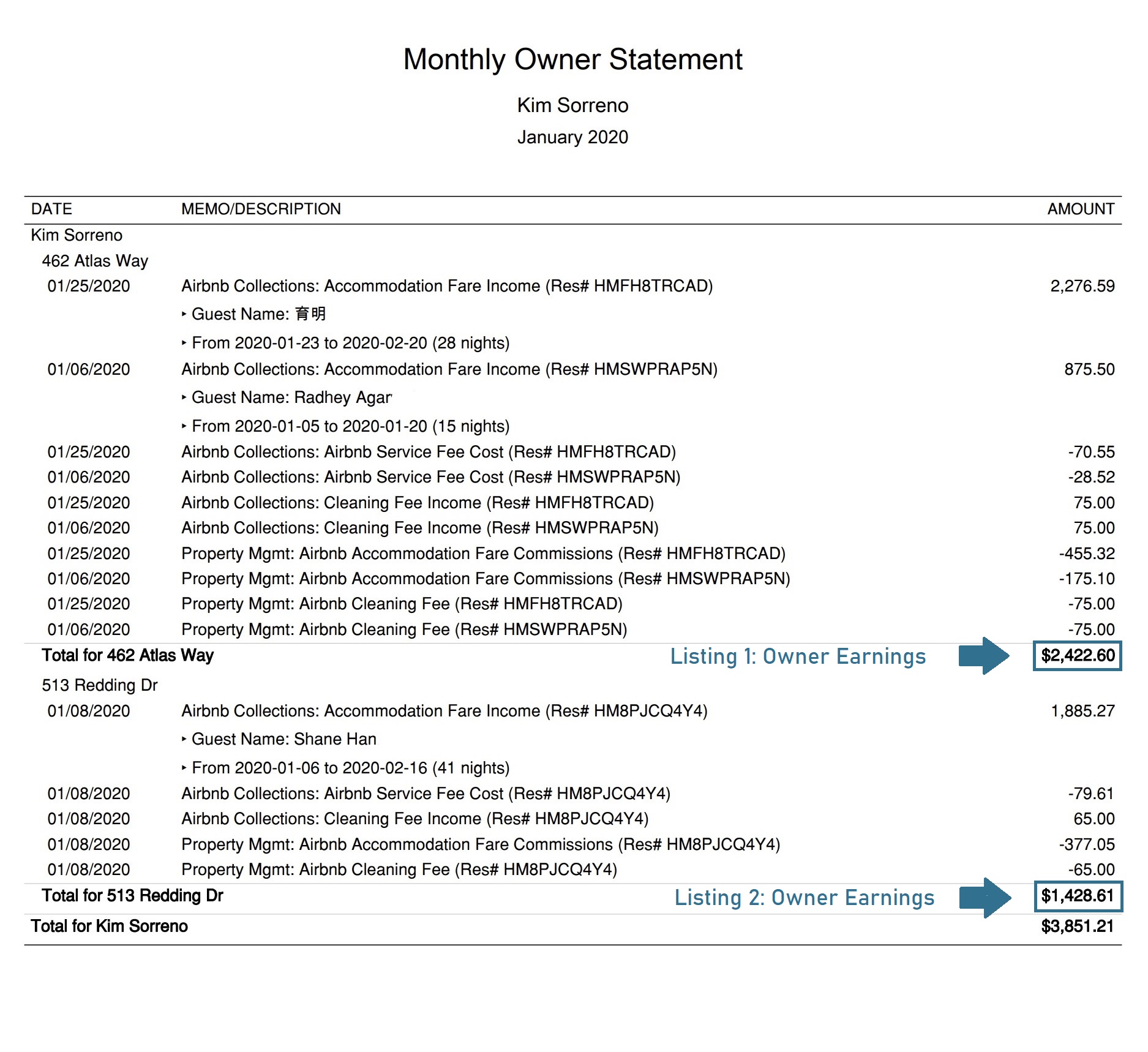
Monthly Owner Statement by Listing
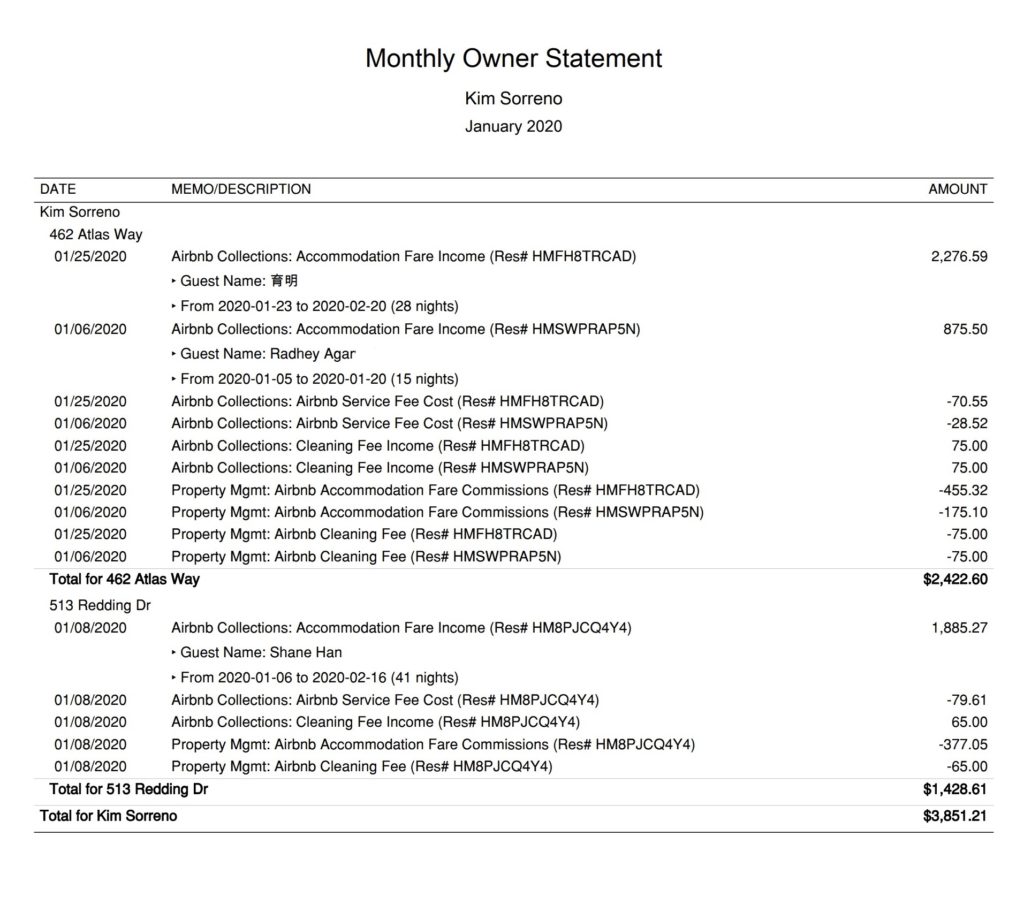
This statement can be sent to owners each month. It is grouped by class, meaning it presents activity on a per-listing, per-owner basis. This allows owners to clearly see their earnings for each listing, along with all movements in and out of the trust account. Every line created by Tallybreeze includes a reservation code and transaction details. A final grand total due to the owner appears at the bottom.
In the example below, we’re displaying an owner statement for a single owner, Kim Sorreno:
Quick Setup Steps
Here’s how to create this Owner Statement by Listing in QuickBooks Online:
- In QuickBooks Online, go to Reports, select “Transaction Detail by Account”
- Select the report period (perhaps the previous month)
- Select “Customize” and select the following
- Under “Rows/Columns” select to Group by “Class”
- Select “Change columns” and remove all columns except “Date”, “Memo/Description” and “Amount”
- Under “Filter” select “Distribution Account” and select only the accounts starting with “Trust Account Liability:Owner Funds…”
- Under “Filter” select “Class” and select the owner and their respective listings you want to report
- Sort by “Memo/Description” ascending order
- Select “Run Report”
From here this statement can be saved as a custom report and re-used every month for the owner.
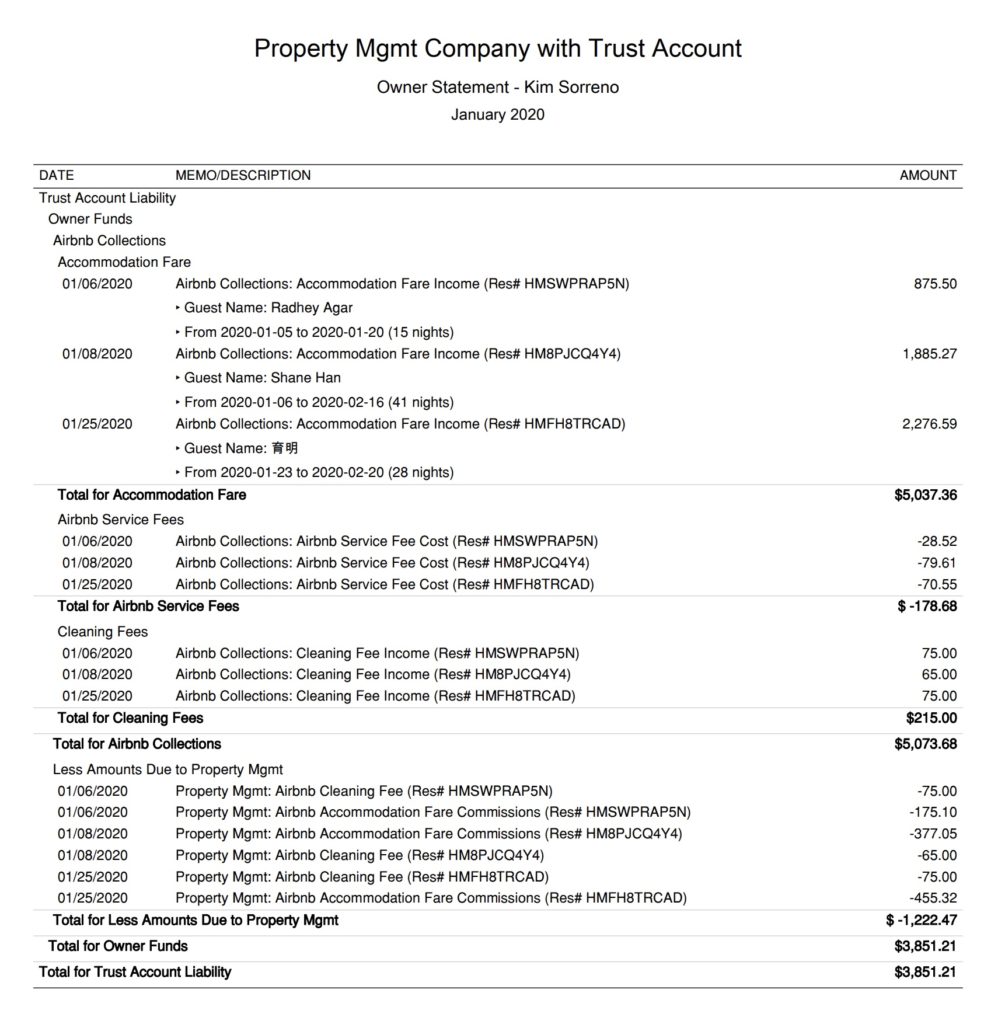
Monthly Owner Statement by Account
If you prefer an owner statement that more closely resembles a profit and loss report, this option can also be sent to owners each month. It is similar to the previous statement, but grouped by account rather than by class. It shows the flow of money coming in from Airbnb, as well as the outflow of funds allocated to the property manager for commissions and cleaning fees. Any billable expenses you’ve incurred will also appear on this statement.
Quick Setup Steps
Here’s how to create this Owner Statement by Account in QuickBooks Online:
- In QuickBooks Online, go to Reports, select “Transaction Detail by Account”
- Select the report period (perhaps the previous month)
- Select “Customize” and select the following
- Under “Rows/Columns” select to Group by “Account”
- Select “Change columns” and remove all columns except “Date”, “Memo/Description” and “Amount”
- Under “Filter” select “Distribution Account” and select only the accounts starting with “Trust Account Liability:Owner Funds…”
- Under “Filter” select “Class” and select the owner and their respective listings you want to report
- Sort by “Date” ascending order
- Select “Run Report”
From here this statement can be saved as a custom report and re-used every month for the owner.
Profit & Loss by Customer
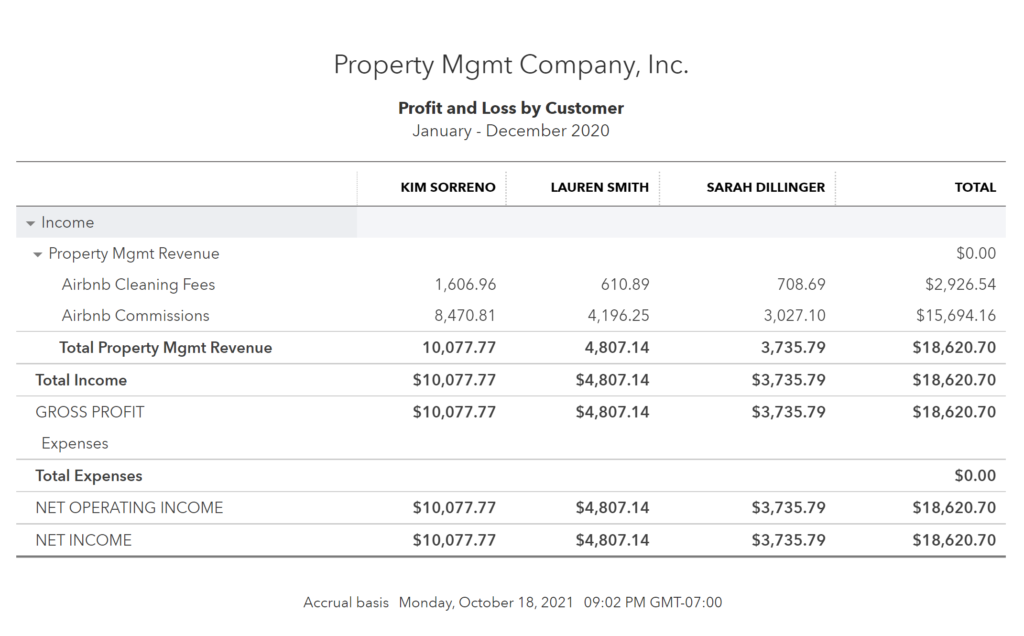
Keeping all Airbnb trust accounting activity separate from your company’s operational activity makes it easy to generate a profit and loss report at any time and see how much you’re earning from each customer over any period. This report can be found in QuickBooks under “Reports” as “Profit and Loss by Customer”:
Conclusion
Managing other people’s funds with integrity requires a high level of diligence. Even when it’s not legally required, following trust accounting standards for Airbnb listings has a significant impact on how clients perceive your services. Proper trust accounting provides maximum transparency for owners, and transparency builds trust. The more your owners trust you, the more likely they are to recommend your services to others. And with an automated system in place, you’ll be prepared to scale quickly as you grow.
Finally, there are other business models that are not covered in this guide but are covered better in the following guides. Be sure to check these out :
- QuickBooks for Airbnb Listings: Property Management without Trust Accounting
- QuickBooks for Airbnb Listings: Co-Host Accounting
- QuickBooks for Airbnb Listings: Rental Arbitrage Accounting
- QuickBooks for Airbnb Listings: Investment Property Accounting
- All QuickBooks Templates for Airbnb
- Airbnb Accounting & Bookkeeping: A Comprehensive Guide
10 thoughts on “QuickBooks for Airbnb: Trust Accounting for Property Managers”
Comments are closed.