This guide is written for owners of one or more investment properties listed on Airbnb who manage their accounting in QuickBooks. An investment property on Airbnb is a business model in which an operator purchases one or more properties and lists them on Airbnb with the goal of building equity far more quickly than through traditional long-term rentals. This model performs best in markets where short-term rental income significantly exceeds local long-term rental rates.
Because of this, your accounting decisions matter. Staying attentive to your financials can make a substantial difference in the performance and long-term success of your operation.
In this guide, we’ll focus on how to properly account for all income received from Airbnb from an investor’s perspective, along with how to automate your Airbnb revenue accounting using QuickBooks.
Note: For a complete guide to QuickBooks for Airbnb, see Airbnb & QuickBooks: A Comprehensive Guide.
Here’s what you’ll get from this guide:
There are other business models that may be more suitable in your particular scenario, which are covered better in the following guides:
Here we’ll describe our QuickBooks chart of accounts template for Airbnb income in great detail:
| No. | Account | Type |
|---|---|---|
| 24000 | Rental Liability | Liability |
| 24200 | Rental Liability: Airbnb Custom Taxes Payable | Liability |
| 42000 | Rental Revenue | Revenue |
| 42100 | Rental Revenue: Airbnb Income – Accommodation Fare | Revenue |
| 42200 | Rental Revenue: Airbnb Income – Cleaning Fee | Revenue |
| 42300 | Rental Revenue: Airbnb Income – Resolution Adjustment | Revenue |
| 42400 | Rental Revenue: Airbnb Refund – Accommodation Fare | Revenue |
| 42500 | Rental Revenue: Airbnb Refund – Cleaning Fee | Revenue |
| 42600 | Rental Revenue: Airbnb Refund – Resolution Adjustment | Revenue |
| 51000 | Rental Costs | Cost of Service |
| 51100 | Rental Costs: Airbnb Service Fee | Cost of Service |
| 61100 | Airbnb Tax Withholdings | Expense |
NOTE: In this guide, we only cover income accounting, not costs. For a guide about Airbnb costs and chart of accounts to consider, check out this guide instead: Accounting for Costs to Operate Airbnb Listings: Best Chart of Accounts
Click to expand and learn more about any particular account type.
Rental Liability
24000 – Rental Liability – This is a parent account with child accounts that account for rental liabilities.
24200 – Rental Liability: Airbnb Custom Taxes Payable – This represents all Custom Taxes collected from Airbnb and payable to a tax authority.
Rental Revenue
42000 – Rental Revenue – This is a parent account with child accounts that account for rental revenue.
42100 – Rental Revenue: Airbnb Income – Accommodation Fare – This account tracks the accommodation fare portion of each Airbnb reservation. The accommodation fare is equal to the number of nights multiplied by the average nightly rate of each reservation.
42200 – Rental Revenue: Airbnb Income – Cleaning Fee – This account tracks the cleaning fee portion of each Airbnb reservation.
42300 – Rental Revenue: Airbnb Income – Resolution Adjustment – This account tracks any resolution adjustments collected from Airbnb.
42400 – Rental Revenue:Airbnb Refund – Accommodation Fare – This account tracks accommodation fare refunds executed by Airbnb.
42500 – Rental Revenue: Airbnb Refund – Cleaning Fee – This account tracks cleaning fee refunds executed by Airbnb.
42600 – Rental Revenue: Airbnb Refund – Resolution Adjustment – This account tracks resolution adjustment refunds executed by Airbnb.
Rental Costs
51000 – Rental Costs – This is a parent account with child accounts that account for rental costs.
51100 – Rental Costs: Airbnb Service Fee – This account tracks service fee costs from Airbnb for each reservation, which is subtracted from the income.
61100 – Airbnb Tax Withholdings – This account tracks any taxes withheld by Airbnb for income tax obligations. This is very rare and usually due to the Airbnb account holder lacking tax identification information. Ideally, this account should not contain any balance and is seldom (if ever) used. To avoid income tax withholdings from Airbnb, be sure to update your Airbnb account with your tax identification information and verify your account.
For the scope of this guide, we’re mainly focused on Airbnb revenue recognition. It is important to point out that our template does not include many general accounts. We also make reference to some accounts not included in this particular template, which we’ll list here:
Here’s how to import the above chart of accounts template. The chart of accounts discussed in this article can be imported into QuickBooks automatically using Tallybreeze setup tools. Here’s how to access this utility…
Airbnb can become a significant source of revenue for property investors. And with Tallybreeze, automating the reconciliation of your Airbnb reservations in QuickBooks has never been easier. In the following section, we’ll walk through how to automate revenue accounting for investment properties on Airbnb, including how to set up your chart of accounts and configure your presets.
The Tallybreeze team has built an easy-to-use interface that simplifies managing your Airbnb listings. Once connected to QuickBooks, the system guides you through creating accounting rules for each property, allowing you to optimize your setup quickly and efficiently.
Explanation of Preset Lines
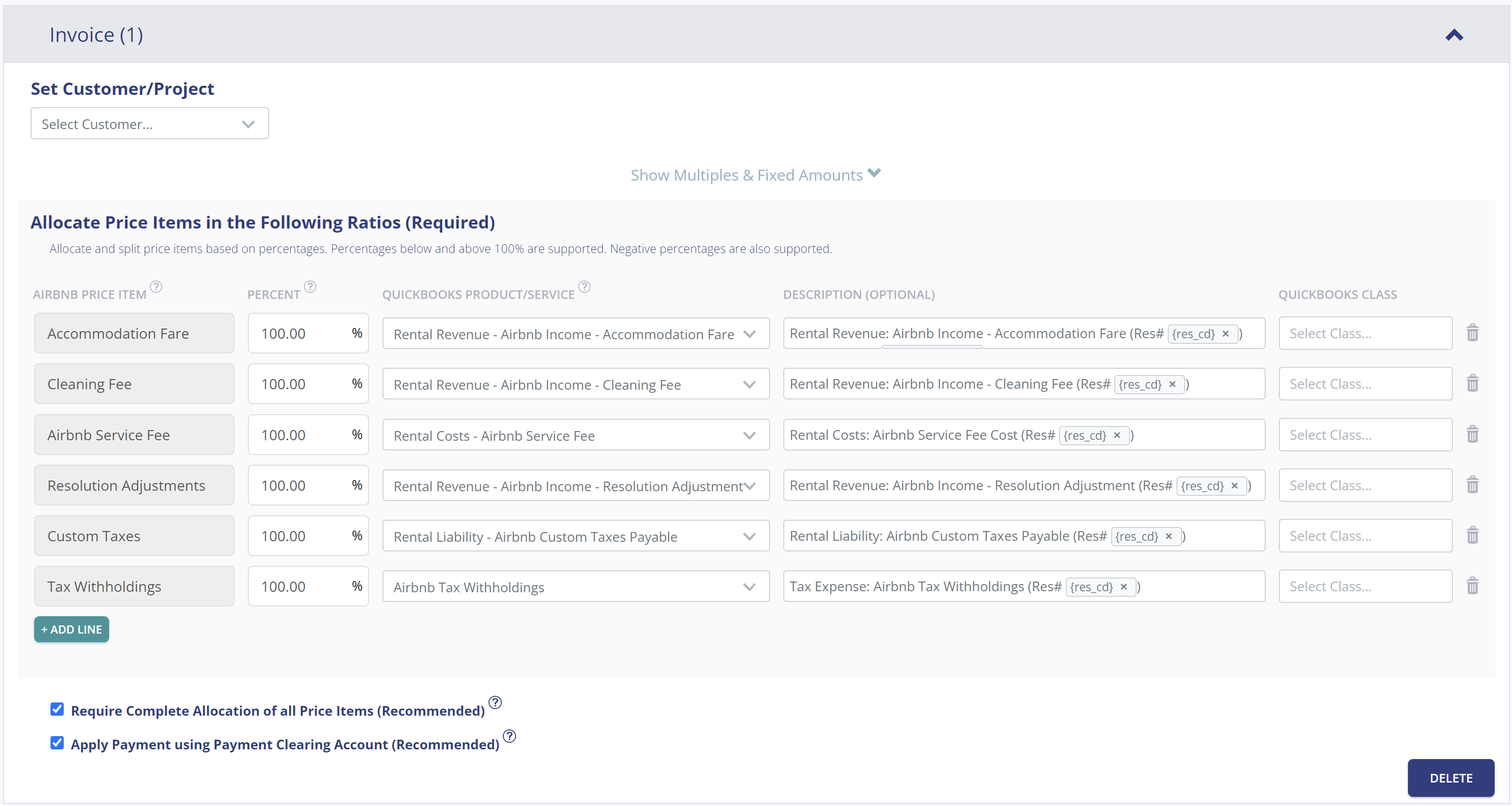
In this business model, everything collected through Airbnb belongs to you. This includes the accommodation fare, cleaning fees, Airbnb’s service fee (deducted), resolution adjustments, optional custom taxes, and any applicable tax withholdings.
| Airbnb Price Item | % | Account |
|---|---|---|
| Accommodation Fare | 100% | 42100 – Rental Revenue: Airbnb Income – Accommodation Fare |
| Cleaning Fee | 100% | 42200 – Rental Revenue: Airbnb Income – Cleaning Fee |
| Airbnb Service Fee | 100% | 51100 – Rental Costs: Airbnb Service Fee |
| Resolution Adjustment | 100% | 42300 – Rental Revenue: Airbnb Income – Resolution Adjustment |
| Custom Taxes | 100% | 24200 – Rental Liability: Airbnb Custom Taxes Payable |
| Tax Withholdings | 100% | 61100 – Airbnb Tax Withholdings |
Let’s assume you’ve set up Tallybreeze for this listing using the preset settings above. Now, imagine Airbnb issues a payout for a current reservation with the following itinerary price items:
Tallybreeze records all income received from Airbnb, separating each price item individually. The total amount to be received by Airbnb for this reservation is $2,440, which is posted to the Airbnb Payment Clearing Account. This amount will later be reconciled against the corresponding bank deposit.
| Account | Debit | Credit |
|---|---|---|
| 42100 – Rental Revenue: Airbnb Income – Accommodation Fare | $2000 | |
| 42200 – Rental Revenue: Airbnb Income – Cleaning Fee | $300 | |
| 51100 – Rental Costs: Airbnb Service Fee | $60 | |
| 24200 – Rental Liability: Airbnb Custom Taxes Payable | $200 | |
| 11000 – Airbnb Payment Clearing Account (Asset) | $2440 |
When the reservation payout is deposited into your Operations Bank Account (typically 3–5 days later), a bank rule in QuickBooks can automatically match and reconcile the amount to the Airbnb Payment Clearing Account:
| Account | Debit | Credit |
|---|---|---|
| 1XXXX – Operations Bank Account | $2440 | |
| 11000 – Airbnb Payment Clearing Account (Asset) | $2440 |
Finally, consider setting up a general customer (e.g., “Airbnb Guests”) within your Tallybreeze listing rules. If you prefer, you can instead assign the individual guest as the customer to store guest information directly in QuickBooks.
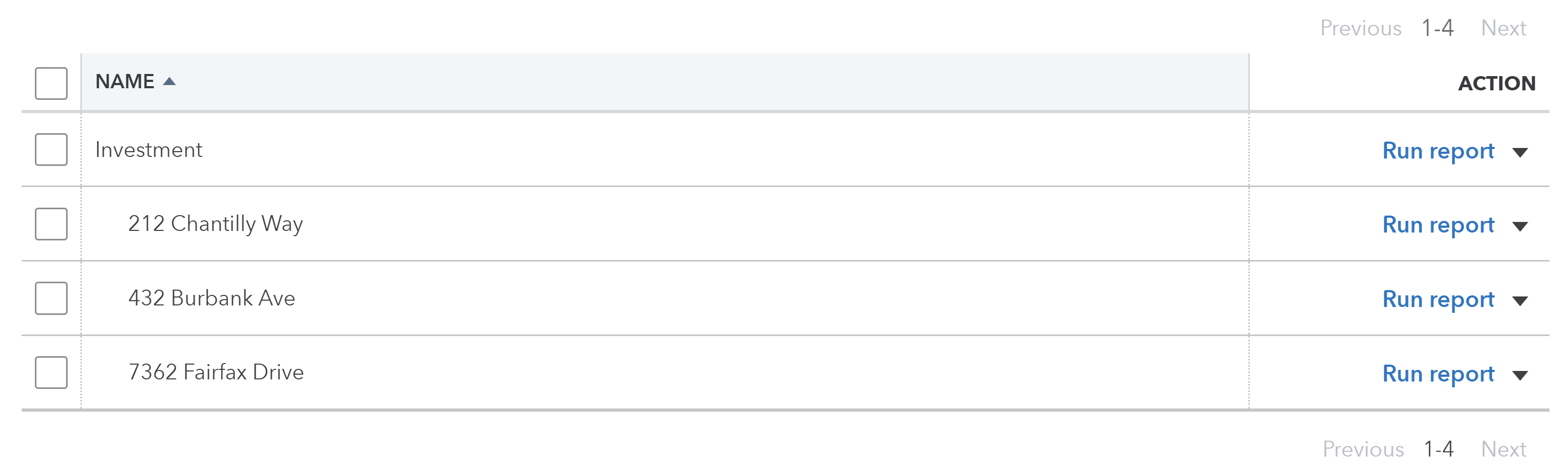
It’s also helpful to categorize each line item using a class such as “Investment: .” To do this, create two class categories in QuickBooks for the listing: one parent class named “Investment” and a sub-class for the specific property address. See the example below:
With Tallybreeze, you’re also able to automate the creation of additional bills and invoices for each reservation. Consider the following:
All of the above settings can be quickly set up using Tallybreeze’s presets for your listings. Here’s how to set up these presets…
From here, presets will be loaded as your listing accounting rules and you can edit as needed.
In this section, we explore the nuances of transactions for investment properties. The most common workflows for investors are outlined below:
A common transaction workflow to identify is paying your mortgage, which includes a principal amount plus interest.
As an real estate investor, you make a monthly mortgage payment of $2,000 for the property at 212 Chantilly Way, of which $500 is interest. This payment is processed automatically each month through a recurring bank transaction. Once the transaction posts, you can reconcile the outgoing amount from your Operations Bank Account using the following entry:
| Debit | Credit | Class Category | |
|---|---|---|---|
| 1XXXX – Operations Bank Account (Asset) | $2,000 | Investment: 212 Chantilly Way | |
| 2XXXX – Mortgage Principal | $1,500 | Investment: 212 Chantilly Way | |
| 7XXXX – Mortgage Interest | $500 | Investment: 212 Chantilly Way |
Detailed instructions for QuickBooks Online
1. Create a Recurring Bill
| Vendor | Category | Description | Amount | Class |
|---|---|---|---|---|
| Mortgage Company | 2XXXX – Mortgage Principal | “Mortgage Principal Payment” | $1,500 | Investment: 212 Chantilly Way |
| Mortgage Company | 7XXXX – Mortgage Interest | “Mortgage Interest Payment” | $500 | Investment: 212 Chantilly Way |
2. Pay the Bill
Pay the Bill directly in QuickBooks or reconcile the Bill against the payment made in your bank feed.
In many regions, Airbnb collects transient occupancy taxes and remits them directly to local tax authorities on your behalf. If that applies to you, this section won’t be relevant. However, many operators of Airbnbs choose to receive the taxes themselves and remit payment directly, giving them more control over their funds.
If you’re using Tallybreeze, the Custom Taxes line item in your presets will automatically capture these taxes. All you need to do is remit the amount collected to the appropriate tax authority. Here’s how to handle that process:
The listing at 462 Atlas Way is configured in Airbnb to collect custom taxes for all reservations. In Tallybreeze, these amounts are posted to “24200 – Rental Liability: Airbnb Custom Taxes Payable.” After running a Balance Sheet report for this listing in QuickBooks, you determine that $200 is owed in transient occupancy taxes.
To remit this amount, send your payment to the appropriate tax authority via bank transfer, ACH, check, or another accepted method. Once the payment has posted, record the outgoing transaction from your Operations Bank Account using the following entry:
| Debit | Credit | Class Category | |
|---|---|---|---|
| 1XXXX – Operations Bank Account (Asset) | $200 | Investment: 462 Atlas Way | |
| 24200 – Rental Liability: Airbnb Custom Taxes Payable | $200 | Investment: 462 Atlas Way |
Detailed instructions for QuickBooks Online
1. Check how much exists in the Custom Taxes Payable account for the property
The amount that needs to be paid to the tax authority can be found in the balance sheet. Filtering the balance sheet by the class for each listing, look up the total amount under “24200 – Rental Liability: Airbnb Custom Taxes Payable”.
2. Create Bill
| Vendor | Category | Description | Class |
|---|---|---|---|
| Tax Authority | 24200 – Rental Liability: Airbnb Custom Taxes Payable | “Taxes Paid: 11% City TOT” | Investment: 462 Atlas Way |
3. Transfer the amount from your operations bank account to the tax authority
Send the money via bank transfer, ACH, check or other means.
4. Reconcile operations bank account statement line amount with bill
Reconcile the bill with the bank feed in QuickBooks
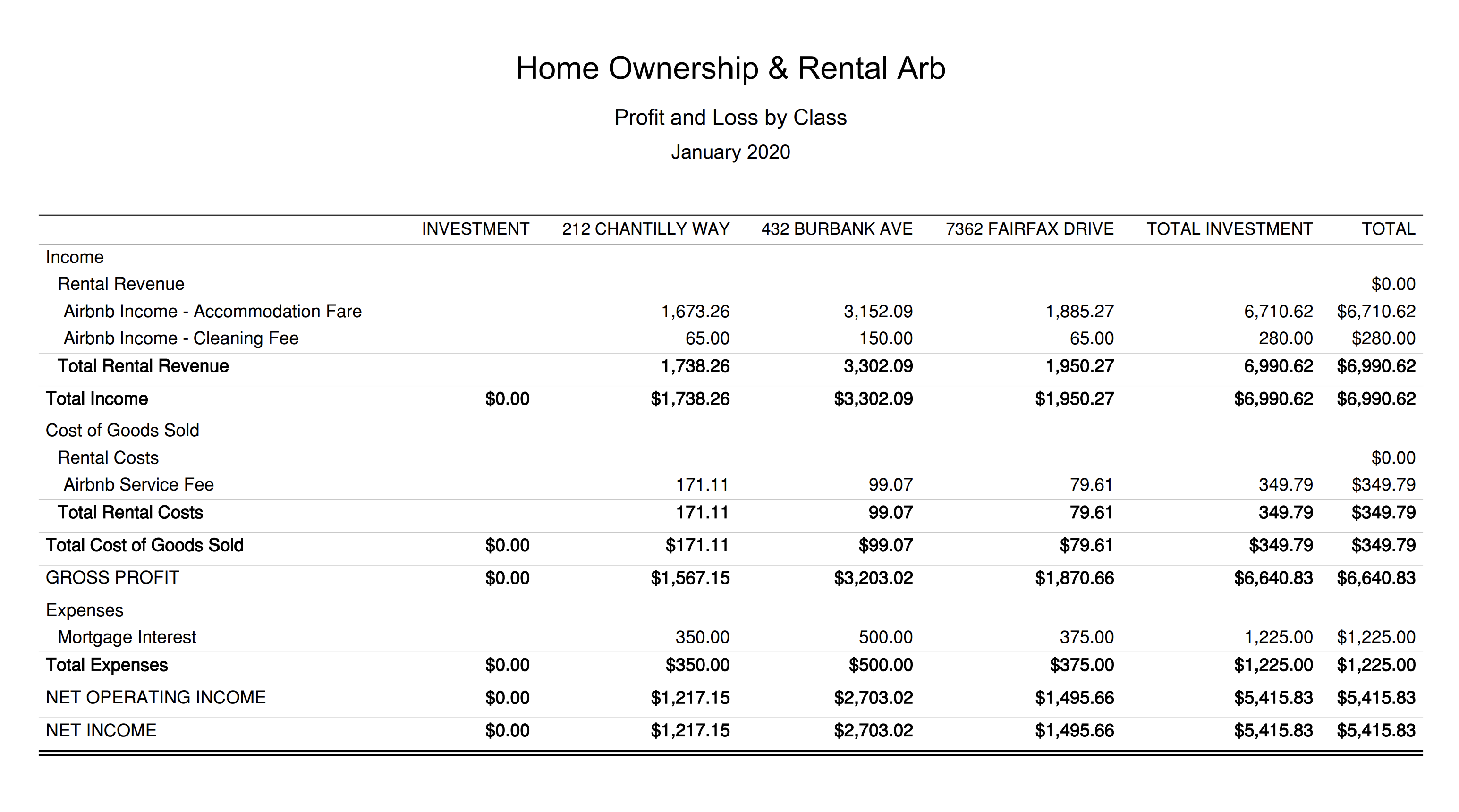
Now that your reservation data is automatically processed from Airbnb and accurately synced into QuickBooks, you can generate clear, professional monthly reports for your Airbnb listings. After reconciling your expenses, you’ll be able to review the detailed performance of each listing with confidence.
This report is meant for internal purposes to view side-by-side, displaying the profitability of each listing for your Airbnb operations. This report is found under QuickBooks “Reports” as “Profit and Loss by Class”:
In the right market and under the right conditions, Airbnb can be a powerful way to accelerate equity growth in your investment properties. The accounting approach outlined in this guide offers clear visibility into the performance of your Airbnb operations, helping you make informed decisions as your real estate portfolio grows.
We hope this guide has been valuable, but there are still important choices ahead—especially around how you’ll manage your financials. What will your accounting workflow look like? How will you stay organized as your portfolio expands? If you’re seriously considering—or already operating—an investment property listed on Airbnb, the numbers matter. A reliable accounting system ensures that even if one property hits a rough patch, the others remain stable and profitable.
Finally, there are other business models that are not covered in this guide but are covered better in the following guides. Be sure to check these out:
An in-depth discussion about HostAway accounting and bookkeeping using popular accounting software, QuickBooks. Accordingly, we…
This guide is a comprehensive method of accounting for those who need to follow thorough…
For short-term rentals, many jurisdictions do not require licensing or strict trust accounting rules for…
Rental Arbitrage is a business model where an operator rents a property from an owner…
A vacation rental investment property is a business model in which an operator purchases a…
This guide provides an in-depth discussion of using QuickBooks for Airbnb. We include chart of…