

Who should read this guide?
This guide covers Airbnb Co-Host accounting and automation for operators who use QuickBooks. An Airbnb Co-Host manages one or more listings on behalf of a property owner without a formal property management agreement. In other words, the Co-Host does not handle the owner’s funds as a traditional property manager would. Instead, the owner receives payouts directly from Airbnb and then pays the Co-Host separately. Because the Co-Host never collects or distributes the owner’s funds, this arrangement avoids fiduciary responsibility and is a suitable solution for operators who are not licensed property managers, especially in jurisdictions that require a license to handle owner funds.
This article describes a cash-flow model for Co-Hosting that existed before Airbnb introduced its current feature allowing payouts to both the owner and the Co-Host. Under the old structure, Airbnb paid the entire reservation amount to the owner, who then paid the Co-Host manually. If you are a Co-Host being paid directly by Airbnb today, you will need to modify the template accordingly.
Regardless of payout structure, this overall model is still preferred by many Airbnb operators who want to avoid managing owner funds due to local licensing or regulatory requirements.
Co-Hosting on Airbnb can be highly rewarding, but only when your financial tracking is accurate and organized. To succeed, you need a streamlined accounting system that clearly tracks earnings for each listing and each owner. In this guide, we’ll walk you through how to set up, implement, and automate Airbnb Co-Host accounting using QuickBooks Online.
Note: For a complete guide to QuickBooks for Airbnb, see Airbnb & QuickBooks: A Comprehensive Guide.
Table of Contents
What you’ll get from this guide:
- QuickBooks Chart of Accounts Template for an Airbnb Co-Host
- How to Automate Accounting for Airbnb Listings
- Execute Common Transaction Workflows in QuickBooks
- Generate Monthly Reports in QuickBooks
Cash Flow Diagram
In this guide, we’ll focus on the following scenario:
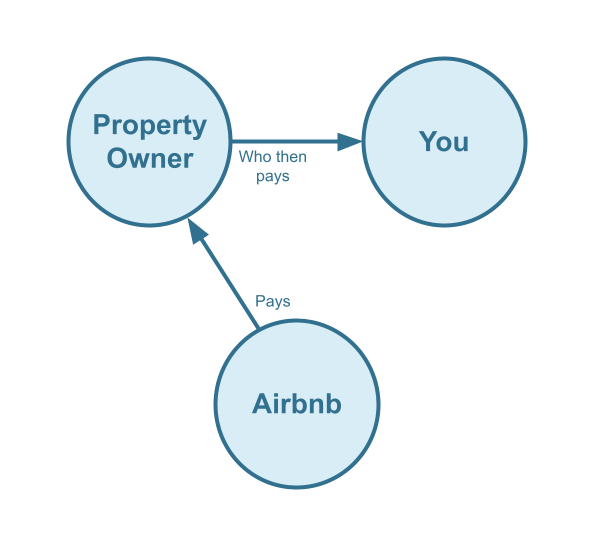
- The property owner receives all payouts from Airbnb,
- The Airbnb Co-Host invoices the owner for commissions and cleaning fees, and
- The owner pays the Co-Host at a later date.
Note: Airbnb also supports a split-payment model in which both the Co-Host and the property owner are paid directly by Airbnb. However, that model is outside the scope of this guide and will be covered separately.
Here is the cash-flow diagram we’ll be focusing on in this guide:
Who should not read this guide?
There are other business models that may be more suitable for your specific situation. These are covered in greater detail in the following guides:
- QuickBooks for Airbnb Listings: Rental Arbitrage Accounting
- QuickBooks for Airbnb Listings: Property Management without Trust Accounting
- QuickBooks for Airbnb Listings: Trust Accounting for Property Managers
- QuickBooks for Airbnb Listings: Investment Property Accounting
- All QuickBooks Templates for Airbnb
- Airbnb Accounting & Bookkeeping: A Comprehensive Guide
QuickBooks Chart of Accounts Template for an Airbnb Co-Host
Airbnb Co-Hosts can take advantage of our QuickBooks Chart of Accounts template, which makes it easy to organize and track all earnings from Airbnb reservations.
Account Codes
| No. | Account | Type |
|---|---|---|
| 43000 | Co-Host Revenue | Revenue |
| 43100 | Co-Host Revenue: Airbnb Income – Accommodation Fare | Revenue |
| 43200 | Co-Host Revenue: Airbnb Income – Cleaning Fee | Revenue |
| 43300 | Co-Host Revenue: Airbnb Income – Resolution Adjustment | Revenue |
| 43400 | Co-Host Revenue: Airbnb Refund – Accommodation Fare | Revenue |
| 43500 | Co-Host Revenue: Airbnb Refund – Cleaning Fee | Revenue |
| 43600 | Co-Host Revenue: Airbnb Refund – Resolution Adjustment | Revenue |
| 52000 | Co-Host Costs | Cost of Service |
| 52100 | Co-Host Costs: Airbnb Service Fee | Cost of Service |
NOTE: We only cover income accounting in this guide, not costs. For a guide about Airbnb costs and chart of accounts to consider, check out this guide instead: Accounting for Costs to Operate Airbnb Listings: Best Chart of Accounts
Detailed Explanation of Accounts
For a detailed understanding of accounts, we’ve defined each here.
Co-Host Revenue
43000 – Co-Host Revenue – This is a parent account with child accounts that account for Co-Host revenue.
43100 – Co-Host Revenue: Airbnb Income – Accommodation Fare – This account tracks Co-Host commissions earned from the accommodation fare line item of an Airbnb reservation.
43200 – Co-Host Revenue: Airbnb Income – Cleaning Fee – This account tracks Co-Host cleaning fees earned from the cleaning fee line item of an Airbnb reservation and is separate from the Accommodation Fare.
43300 – Co-Host Revenue: Airbnb Income – Resolution Adjustment – This account tracks Co-Host amounts earned from the Resolution Adjustment claims related to an Airbnb reservation.
43400 – Co-Host Revenue: Airbnb Refund – Accommodation Fare – This account tracks refunds of Co-Host commissions earned from the Accommodation Fare line item of an Airbnb reservation.
43500 – Co-Host Revenue: Airbnb Refund – Cleaning Fee – This account tracks refunds of Co-Host cleaning fees earned from the Cleaning Fee line item of an Airbnb reservation.
43600 – Co-Host Revenue: Airbnb Refund – Resolution Adjustment – This account tracks refunds of Co-Host amounts due to Resolution Adjustment claims against the Co-Host for any particular reservation.
Co-Host Costs
52000 – Co-Host Costs – This is a parent account with child accounts that account for Co-Host costs.
52100 – Rental Costs: Airbnb Service Fee – This account tracks the Co-Host portion of the Airbnb Service Fee (also known as “host fee”) charged by Airbnb for each reservation and a direct cost of obtaining the reservation.
Accounts not included in this template
For the purposes of this guide, we’re primarily focused on tracking amounts owed by owners and invoiced to them. It’s important to note that our template does not include many general accounts. We also reference a few accounts that are not included in this template, which we’ve listed below:
- 11000 – Airbnb Payment Clearing Account – This account is created by Tallybreeze but is not included in this template in particular. This account is used to apply payments to Airbnb invoices upon the day the Airbnb reservation payout is posted. Payouts can take 3-5 days (or longer) to arrive in the bank account after posted from Airbnb. Monies owed are held in this clearing account until the payouts are received in the bank. This account also helps to automate the reconciliation process in QuickBooks.
- 1XXXX – Operations Bank Account – This is your business operations bank account set up with your financial institution. It’s a cash asset account to facilitate your Airbnb Co-Host company’s day-to-day business operations.
- 4XXXX – Billable Expenses Income – This is a general account for capturing income received for the payment of billable expenses by owners, which may include a markup.
- 7XXXX – Billable Expenses – This is a general account for tracking billable expenses for any owners.
Quick Setup Steps
Here’s how to import the above chart of accounts template. All of the accounts discussed in this article can be imported into QuickBooks automatically using Tallybreeze’s setup tools. Here’s how to access this utility…
- If you haven’t already, Sign Up to Tallybreeze. It includes free use of this template.
- Once registered, go to the Connections manager in Tallybreeze. Connect your Airbnb account, connect your QuickBooks Online account and then create a connection between the two.
- Within the Connection settings, select “Set Up QuickBooks”
- Select your business model from the drop-down list at the top and select “Import Template to QuickBooks”.
How to Automate Accounting for Airbnb Co-Hosts
Imagine being able to automatically trace every penny from each reservation. With Tallybreeze, you’ll know exactly how much each owner receives, how much is allocated to you as the Airbnb Co-Host, and you can automate detailed billing for every reservation. In this section, we’ll walk through the automation presets designed specifically for the Airbnb Co-Host business model, so you never have to worry about missing a payment again.
Once your Airbnb and QuickBooks accounts are connected to Tallybreeze, you can set custom accounting rules for each listing. When a reservation comes in from Airbnb, Tallybreeze can automatically create an invoice in QuickBooks Online with precise allocations for co-host commissions, cleaning fees, and any other distributions you need.
Tallybreeze Listing Presets
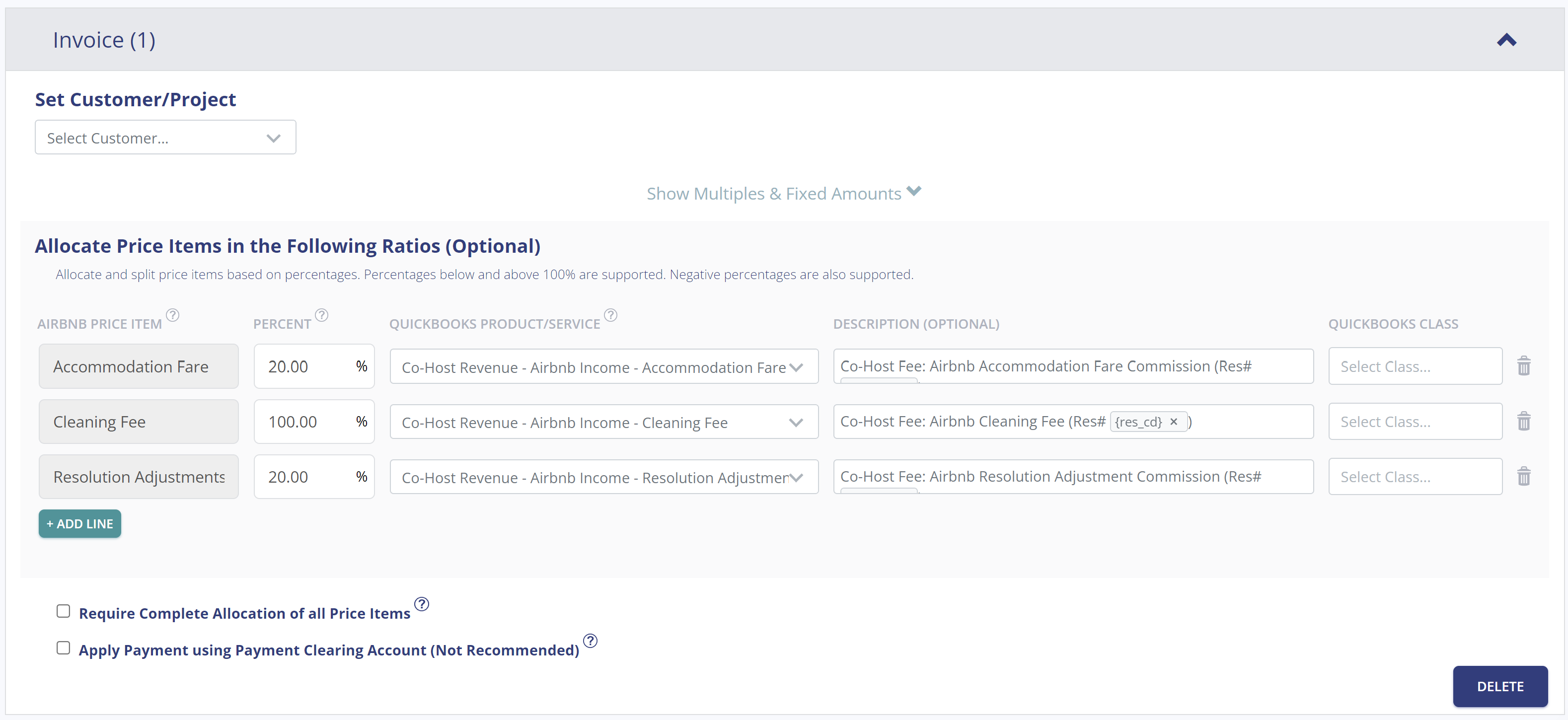
For convenience, Tallybreeze includes chart of accounts templates and presets for various business models. When editing the accounting rules for a specific listing, you can quickly preload the Airbnb Co-Host preset to streamline your setup. Here’s an example:
Explanation of Preset Lines
In this example, for each reservation Tallybreeze will create an invoice. We recommend that you set the owner as the customer. The first line of the invoice allocates 20% of Accommodation Fare to be received as a co-host fee from the owner. The second line allocates the entire the Cleaning Fee to be received from the owner. Finally, the third line takes 20% of any Resolution Adjustments to be received by the owner.
| Airbnb Price Item | % | Account |
|---|---|---|
| Accommodation Fare | 20% | 43100 – Co-Host Revenue: Airbnb Income – Accommodation Fare |
| Cleaning Fee | 100% | 43200 – Co-Host Revenue: Airbnb Income – Cleaning Fee |
| Resolution Adjustment | 20% | 43300 – Co-Host Revenue: Airbnb Income – Resolution Adjustment |
Example Reservation
Let’s say you’ve configured Tallybreeze for this listing using the preset settings above. Now imagine Airbnb sends a payout for a reservation with the following itinerary price items:
- Accommodation Fare: $2000
- Cleaning Fee: $300
With the presets above, Tallybreeze calculates and allocates 20% of the accommodation fare ($2,000 × 20% = $400) and allocates the full cleaning fee of $300. The invoice is not marked as paid automatically, since the payment will be collected from the owner. The total amount due from the owner is $700.
| Account | Debit | Credit |
|---|---|---|
| 43100 – Co-Host Revenue: Airbnb Income – Accommodation Fare | $400 | |
| 43200 – Co-Host Revenue: Airbnb Income – Cleaning Fee | $300 | |
| 1XXXX – Accounts Receivable (Asset) | $700 |
Set Invoice Customer & Class Categories
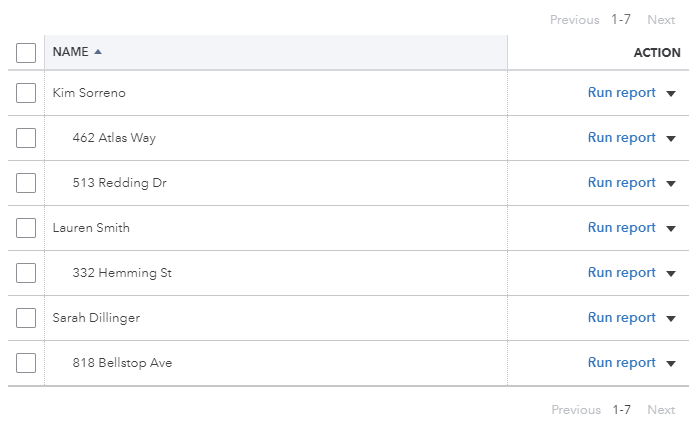
In your Tallybreeze listing rules, you’ll typically want to set the property owner as the customer on the invoice, since they are the one paying you. We also recommend creating a class in QuickBooks for each listing so you can generate detailed reports on amounts owed per listing. For better organization, you can set each listing as a sub-class under a parent class for each owner. Click the example below to see an illustration.
Automate Additional Bills & Invoices (Optional)
With Tallybreeze, you’re also able to automate the creation of additional bills and invoices for each reservation. Consider the following:
- Create a bill to set amounts payable to a cleaning service for turnover of each reservation.
- Create additional invoice to set amounts receivable by any third party for each reservation.
Quick Setup Steps
All of the above settings can be quickly set up using Tallybreeze’s presets for your listings. Here’s how to set up these presets…
- If you haven’t already, Sign Up to Tallybreeze.
- After logging into Tallybreeze, set up your connections, then go to Listing Rules.
- Select any listing you’d like to automate that hasn’t already been set up.
- Select “Load Presets”.
- Select your business model from the options.
From here, presets will be loaded as your listing accounting rules and you can edit as needed.
Execute Common Transaction Workflows in QuickBooks
In this section, we go over the most common transaction workflows in QuickBooks for an Airbnb Co-Host.
Receiving Payment from Owners
Invoices for each reservation have already been generated for each owner. The amounts due from each owner can be found on the balance sheet under Accounts Receivable. QuickBooks automatically aggregates all outstanding invoices by owner, making it easy for you to request payment.
Example Transaction
You, as the Airbnb Co-Host, have received a $2,000 payment from the property owner, Theresa Reese. You now want to reconcile this amount correctly from your Operations Bank Account using the following entry:
| Debit | Credit | Class Category | |
|---|---|---|---|
| 1XXXX – Operations Bank Account (Asset) | $2,000 | Theresa Reese | |
| 1XXXX – Accounts Receivable (Asset) | $2,000 | Theresa Reese |
Detailed instructions for QuickBooks Online
1. Find the amount to receive
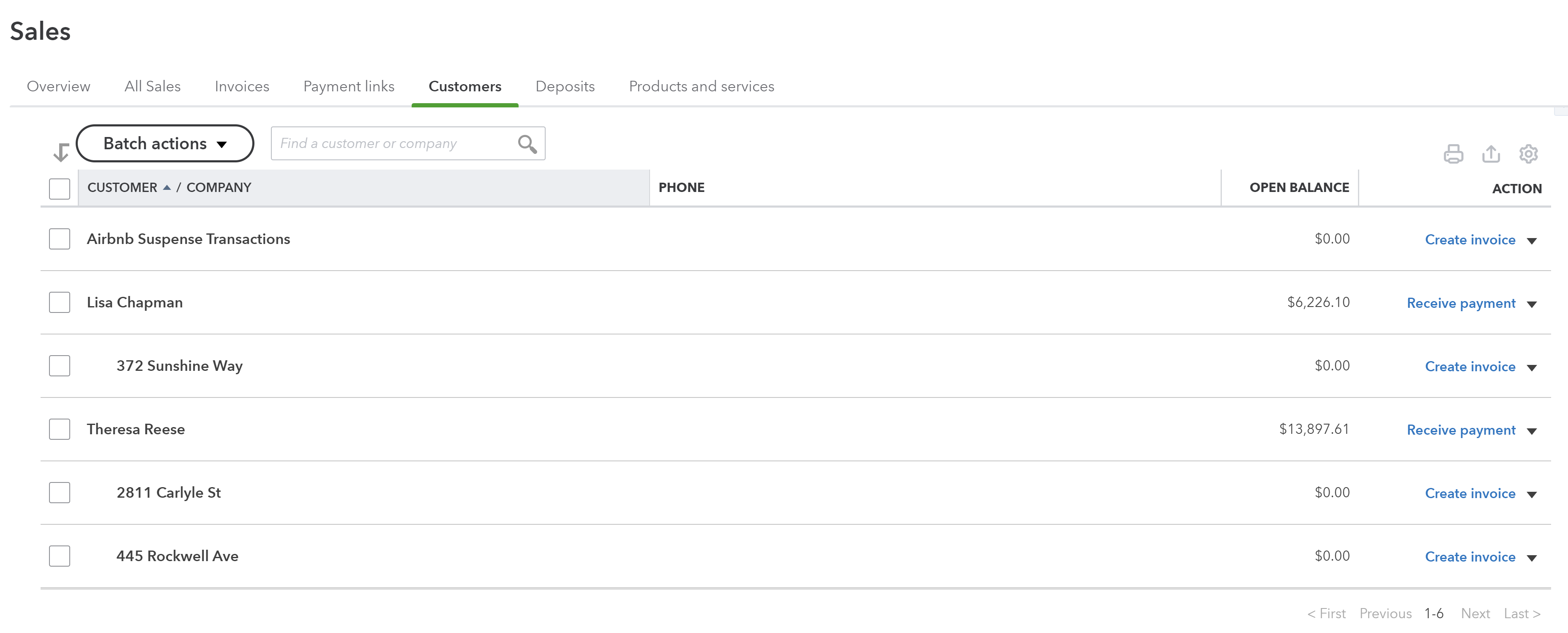
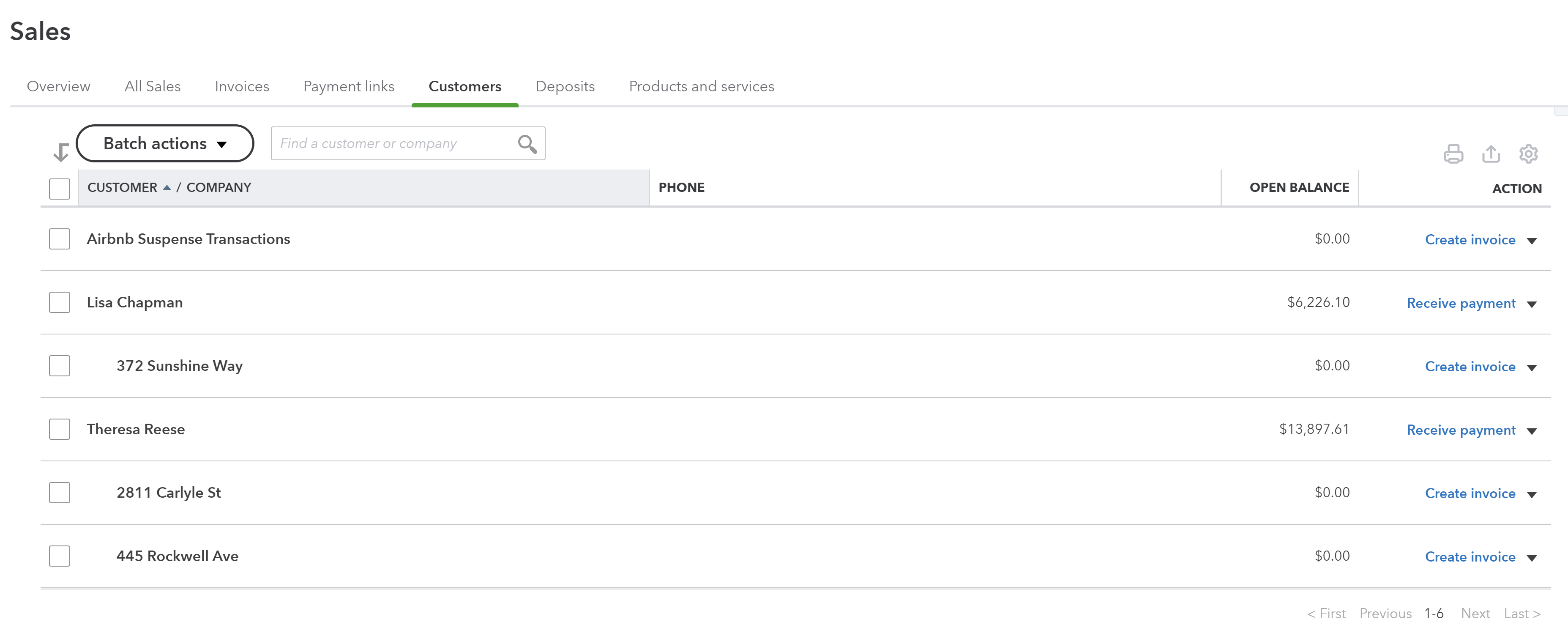
The amount that needs to be received from each owner can be found on the left menu under “Sales -> Customers”, the amount owed is listed for each customer.
2. Select Receive Payment
Select the “Receive Payment” button next to the customer. A list of open invoices will show for the customer. From there select “Save and Close”.
3. Reconcile bank deposit with receive payment
When the bank deposit is received, reconcile it with the payment created in step 2.
Paying Expenses on Behalf of Owners
In some cases, you may purchase items on the owner’s behalf using funds from your operations bank account. This often occurs during sudden or minor maintenance issues. If this is permitted under your agreement, you can proceed with the purchase and then bill the owner for reimbursement.
Example
A property owned by Theresa Reese needs a bathroom faucet replaced by a professional plumber. The service costs $200 and must be handled quickly, as guests are checking in later that day. You also charge a 10% markup for allocating funds and managing these types of issues on the owner’s behalf.
First, you’ll pay the plumbing company from your Operations Bank Account, whether by bank transfer, ACH, check, Venmo, or another method. Once the payment is posted and cleared, record the outgoing transaction from your Operations Bank Account using the following entry:
| Debit | Credit | Class Category | |
|---|---|---|---|
| 1XXXX – Operations Bank Account (Asset) | $200 | Theresa Reese | |
| 7XXXX – Billable Expenses (Expense) | $200 | Theresa Reese |
Next, create an invoice for the amount owed by the owner. Be sure to include the 10% markup for coordinating and funding the service, and allocate it to your Billable Expenses income account. Use the following entry:
| Debit | Credit | Class Category | |
|---|---|---|---|
| 4XXXX – Billable Expenses Income (Revenue) | $220 | Theresa Reese | |
| 1XXXX – Accounts Receivable (Asset) | $220 | Theresa Reese |
Detailed instructions for QuickBooks Online
1. After paying the service provider, categorize and reconcile the transaction in your operations bank feed
Be sure to mark the Bill line item as billable to the owner.
| Payee | Category | Description | Amount | Class |
|---|---|---|---|---|
| Plumber Pro | 7XXXX – Billable Expenses (Expense) | “Billable Expense: Bathroom Faucet Replaced” | $200 | Theresa Reese |
2. Receive Payment from Owner
Include a 10% markup ($220 total)
Generate Monthly Reports in QuickBooks
With Tallybreeze, once your Airbnb data has been processed and accurately synced into QuickBooks—and after you’ve reconciled any remaining expenses—producing clear, professional owner statements each month becomes effortless.
Monthly Owner Statement by Listing
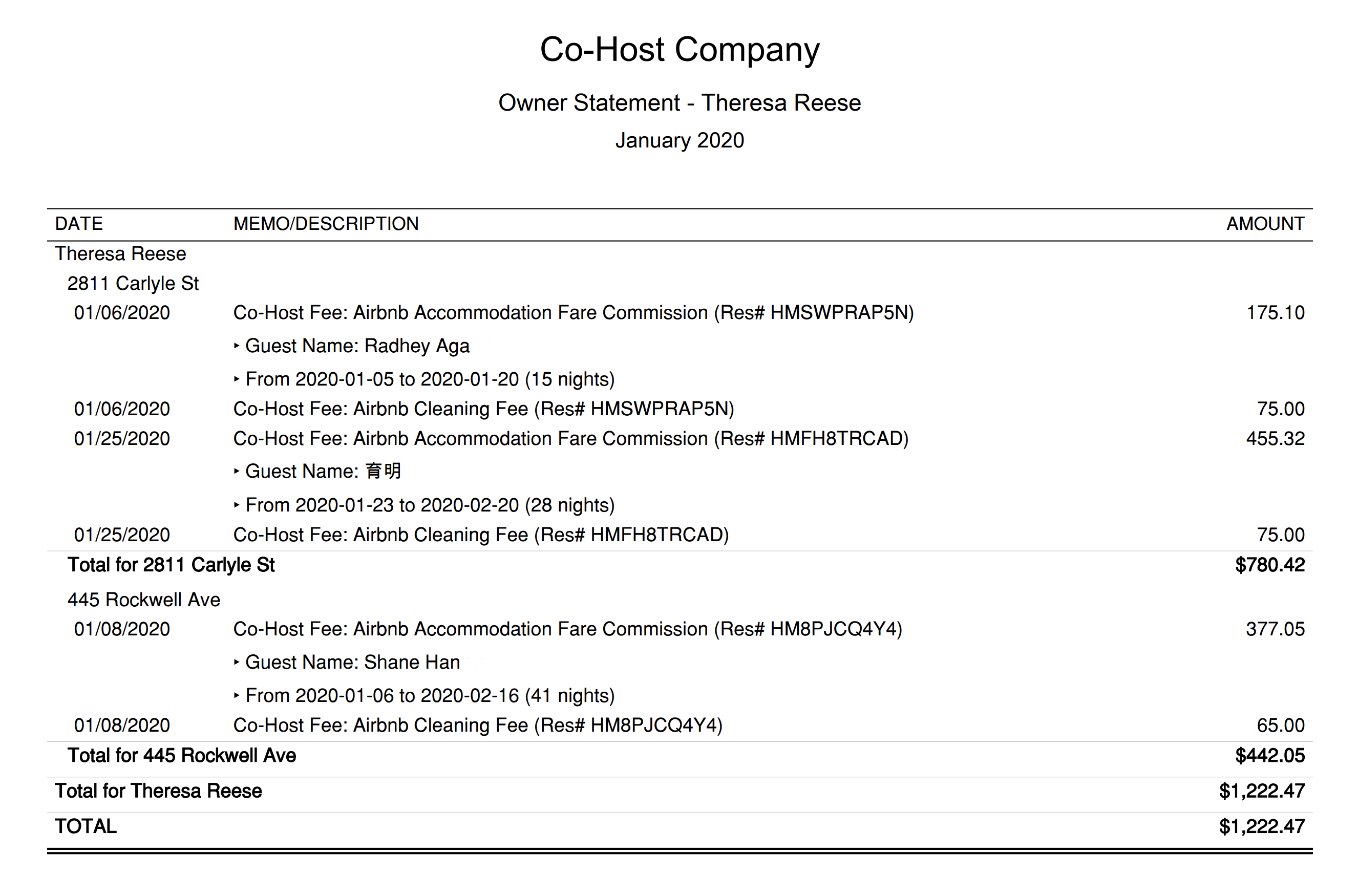
This statement can be sent to owners each month. It is grouped by class, allowing you to present activity on a per-listing, per-owner basis. This layout shows owners exactly what is owed from each reservation. Each line created by Tallybreeze includes the reservation code and full transaction details, followed by a grand total due from the owner at the bottom.
In the example below, we’re showing an owner statement for a single owner, Theresa Reese:
Quick Setup Steps
Here’s how to create this Owner Statement by Listing in QuickBooks Online:
- In QuickBooks Online, go to Reports, select “Transaction Detail by Account”
- Select the report period (perhaps the previous month)
- Select “Customize” and select the following
- Under “Rows/Columns” select to Group by “Class”
- Select “Change columns” and remove all columns except “Date”, “Memo/Description” and “Amount”
- Under “Filter” select “Distribution Account” and select only the account “Rental Liability: Airbnb Owner Funds Payable”
- Under “Filter” select “Class” and select the owner and their respective listings you want to report
- Sort by “Date” ascending order
- Select “Run Report”
From here this statement can be saved as a custom report and re-used every month for the owner.
Profit & Loss by Customer
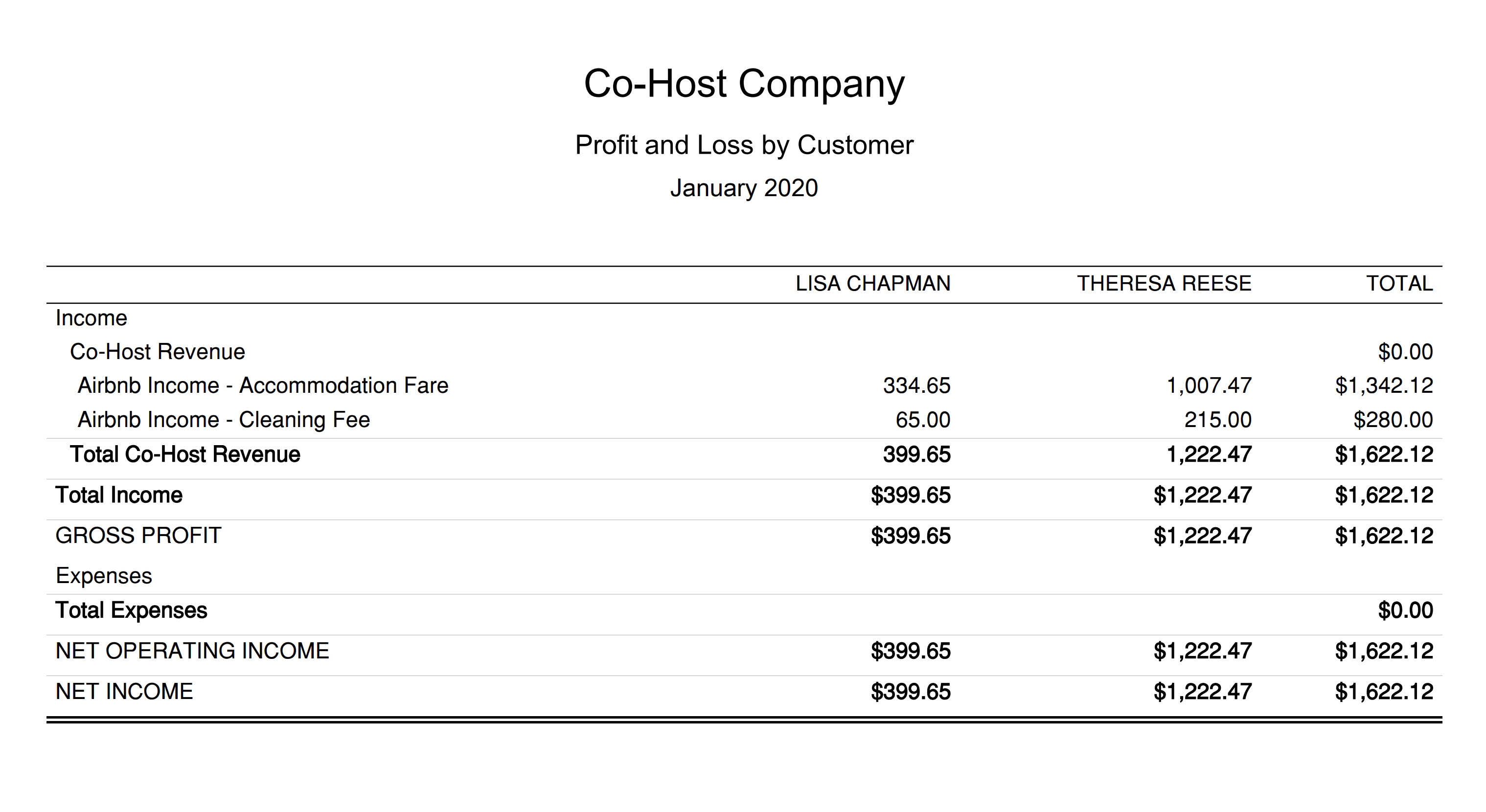
This report is meant for internal purposes to view side-by-side, displaying the profitability of each customer for the Airbnb Co-Host firm. This report is found under QuickBooks “Reports” as “Profit and Loss by Customer”:
This report is intended for internal use, providing a side-by-side view of the profitability of each customer for your Airbnb Co-Host business. You can access this report in QuickBooks under ‘Reports’ as ‘Profit and Loss by Customer.’
Receive Payment from Each Customer
QuickBooks provides a simple way to receive payments from customers for multiple outstanding invoices. Go to “Sales” in the left menu and select “Customers”. There, you’ll see a list of the total amounts owed by each customer, along with options to request payment from each one:
Conclusion
This article has provided you with the tools to streamline your accounting process as an Airbnb Co-Host. As you can see, setting up a manual accounting system requires a fair amount of diligence. However, once automated, your workflow becomes seamless and offers a level of transparency that greatly benefits both owners and co-hosts.
We hope these tips help you more easily track your Airbnb reservations, along with the associated taxes and hosting fees. If an accounting automation sounds like something that would be useful in helping you scale up your business, be sure to check the link below:
Finally, there are other business models not covered in this guide that are explained in more detail in the resources below. Be sure to check them out:
- QuickBooks for Airbnb Listings: Rental Arbitrage Accounting
- QuickBooks for Airbnb Listings: Property Management without Trust Accounting
- QuickBooks for Airbnb Listings: Trust Accounting for Property Managers
- QuickBooks for Airbnb Listings: Investment Property Accounting
- All QuickBooks Templates for Airbnb
- Airbnb Accounting & Bookkeeping: A Comprehensive Guide
11 thoughts on “QuickBooks for Airbnb: Co-Host Accounting”
Comments are closed.