This guide covers Airbnb Co-Host accounting and automation for operators using Xero. An Airbnb Co-Host manages one or more listings on behalf of a property owner without entering into a formal property management agreement. In this model, the Co-Host does not handle the owner’s funds as a traditional property manager would. Instead, the owner receives payouts directly from Airbnb and pays the Co-Host separately. Because the Co-Host never collects or distributes owner funds, this arrangement avoids fiduciary responsibility and is ideal for operators who are not licensed property managers, especially in jurisdictions that require a license to manage client funds.
This article describes the original cash-flow structure used before Airbnb introduced its dual-payout feature. Under the previous system, Airbnb paid the full reservation amount to the owner, who then paid the Co-Host manually. If you are now receiving payouts directly from Airbnb as a Co-Host, you will need to adjust the template accordingly.
Regardless of payout setup, this model continues to be preferred by many operators who want to avoid managing owner funds due to local licensing or regulatory requirements.
USING QUICKBOOKS? READ THIS ARTICLE INSTEAD
Co-Hosting can be highly profitable, but only when your financial tracking is organized and accurate. To succeed, you need a streamlined accounting system that clearly separates earnings by listing and by owner. In this guide, we’ll walk you through how to set up, manage, and automate Airbnb Co-Host accounting using Xero.
Note: If you haven’t already, be sure to review our stellar integration for Airbnb & Xero.
What you’ll get from this guide:
In this guide, we’ll focus on the following cash-flow scenario:
Note: Airbnb also offers a split-payment model in which both the Co-Host and the owner are paid directly by Airbnb. That scenario is outside the scope of this guide and will be covered separately.
Here is the cash-flow diagram we’ll be using in this guide:
There are other business models that may be more suitable in your particular scenario, which are covered better in the following guides:
Airbnb Co-Hosts find our chart of accounts template extremely helpful. It’s straightforward, easy to use, and makes it simple to track the amounts paid by guests as well as the corresponding amounts owed by property owners.
| No. | Account | Type |
|---|---|---|
| 43100 | Co-Host Revenue – Airbnb Income – Accommodation Fare | Revenue |
| 43200 | Co-Host Revenue – Airbnb Income – Cleaning Fee | Revenue |
| 43300 | Co-Host Revenue – Airbnb Income – Resolution Adjustment | Revenue |
| 43400 | Co-Host Revenue – Airbnb Refund – Accommodation Fare | Revenue |
| 43500 | Co-Host Revenue – Airbnb Refund – Cleaning Fee | Revenue |
| 43600 | Co-Host Revenue – Airbnb Refund – Resolution Adjustment | Revenue |
| 52100 | Co-Host Costs – Airbnb Service Fee | Cost of Service |
NOTE: We only cover income accounting in this guide, not costs. For a guide about Airbnb costs and chart of accounts to consider, check out this guide instead: Accounting for Costs to Operate Airbnb Listings: Best Chart of Accounts
For a detailed understanding of accounts, we’ve defined each here.
Co-Host Revenue
43100 – Co-Host Revenue – Airbnb Income – Accommodation Fare – This account tracks Co-Host commissions earned from the accommodation fare line item of an Airbnb reservation.
43200 – Co-Host Revenue – Airbnb Income – Cleaning Fee – This account tracks Co-Host cleaning fees earned from the cleaning fee line item of an Airbnb reservation and is separate from the Accommodation Fare.
43300 – Co-Host Revenue – Airbnb Income – Resolution Adjustment – This account tracks Co-Host amounts earned from the Resolution Adjustment claims related to an Airbnb reservation.
43400 – Co-Host Revenue – Airbnb Refund – Accommodation Fare – This account tracks refunds of Co-Host commissions earned from the Accommodation Fare line item of an Airbnb reservation.
43500 – Co-Host Revenue – Airbnb Refund – Cleaning Fee – This account tracks refunds of Co-Host cleaning fees earned from the Cleaning Fee line item of an Airbnb reservation.
43600 – Co-Host Revenue – Airbnb Refund – Resolution Adjustment – This account tracks refunds of Co-Host amounts due to Resolution Adjustment claims against the Co-Host for any particular reservation.
Co-Host Costs
52100 – Co-Host Costs – Airbnb Service Fee – This account tracks the Co-Host portion of the Airbnb Service Fee (also known as “host fee”) charged by Airbnb for each reservation and a direct cost of obtaining the reservation.
For the scope of this guide, we’re mainly focused on tallying amounts owed by and invoiced to owners. It is important to point out that our template does not include many general accounts. We also make reference to some accounts not included in this particular template, which we’ll list here:
Here’s how to import the above chart of accounts template. All of the accounts discussed in this article can be imported into Xero automatically using Tallybreeze’s setup tools. Here’s how to access this utility…
With Tallybreeze, you can track every dollar from Airbnb with precision. This level of detail is essential, as you must be able to show owners exactly how the amounts you bill them are calculated. In this section, we’ll walk through the automation presets tailored for the Airbnb Co-Host business model.
After connecting your Airbnb and Xero accounts in Tallybreeze, you can configure specific accounting rules for each listing. From there, whenever a reservation comes in, Tallybreeze can automatically generate an invoice in Xero with accurate allocations for co-host commissions, cleaning fees, and any other required amounts.
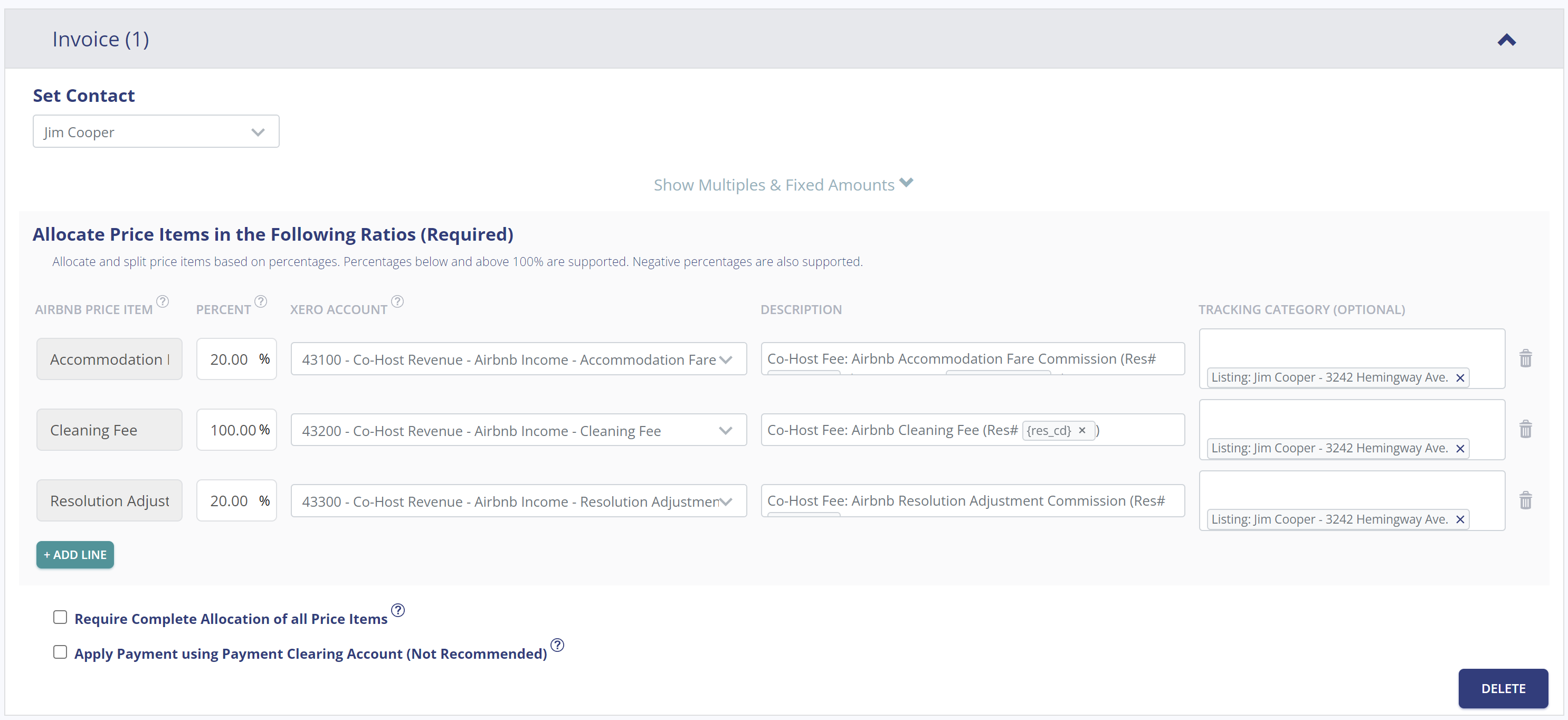
To help you get started quickly, Tallybreeze provides a free chart of accounts template and preset specifically for Airbnb Co-Hosts. When selecting your listing, simply choose the option to preload the Airbnb Co-Host preset. Here’s an example:
Explanation of Preset Lines
In this example, for each reservation Tallybreeze will create an invoice. We recommend that you set the owner as the customer. The first line of the invoice allocates 20% of Accommodation Fare to be received as a co-host fee from the owner. The second line allocates the entire the Cleaning Fee to be received from the owner. Finally, the third line takes 20% of any Resolution Adjustments to be received by the owner.
| Airbnb Price Item | % | Account |
|---|---|---|
| Accommodation Fare | 20% | 43100 – Co-Host Revenue – Airbnb Income – Accommodation Fare |
| Cleaning Fee | 100% | 43200 – Co-Host Revenue – Airbnb Income – Cleaning Fee |
| Resolution Adjustment | 20% | 43300 – Co-Host Revenue – Airbnb Income – Resolution Adjustment |
Suppose you have Tallybreeze configured for this listing using the preset settings above. Now imagine Airbnb issues a payout for a current reservation with the following itinerary price items:
Using the presets above, Tallybreeze calculates and allocates 20% of the accommodation fare ($1,750 × 20% = $350) and allocates the full cleaning fee of $150. The invoice is not marked as paid automatically, since payment will come directly from the owner. The total amount owed by the owner is $500.
| Account | Debit | Credit |
|---|---|---|
| 43100 – Co-Host Revenue – Airbnb Income – Accommodation Fare | $350 | |
| 43200 – Co-Host Revenue – Airbnb Income – Cleaning Fee | $150 | |
| 1XXXX – Accounts Receivable (Asset) | $500 |
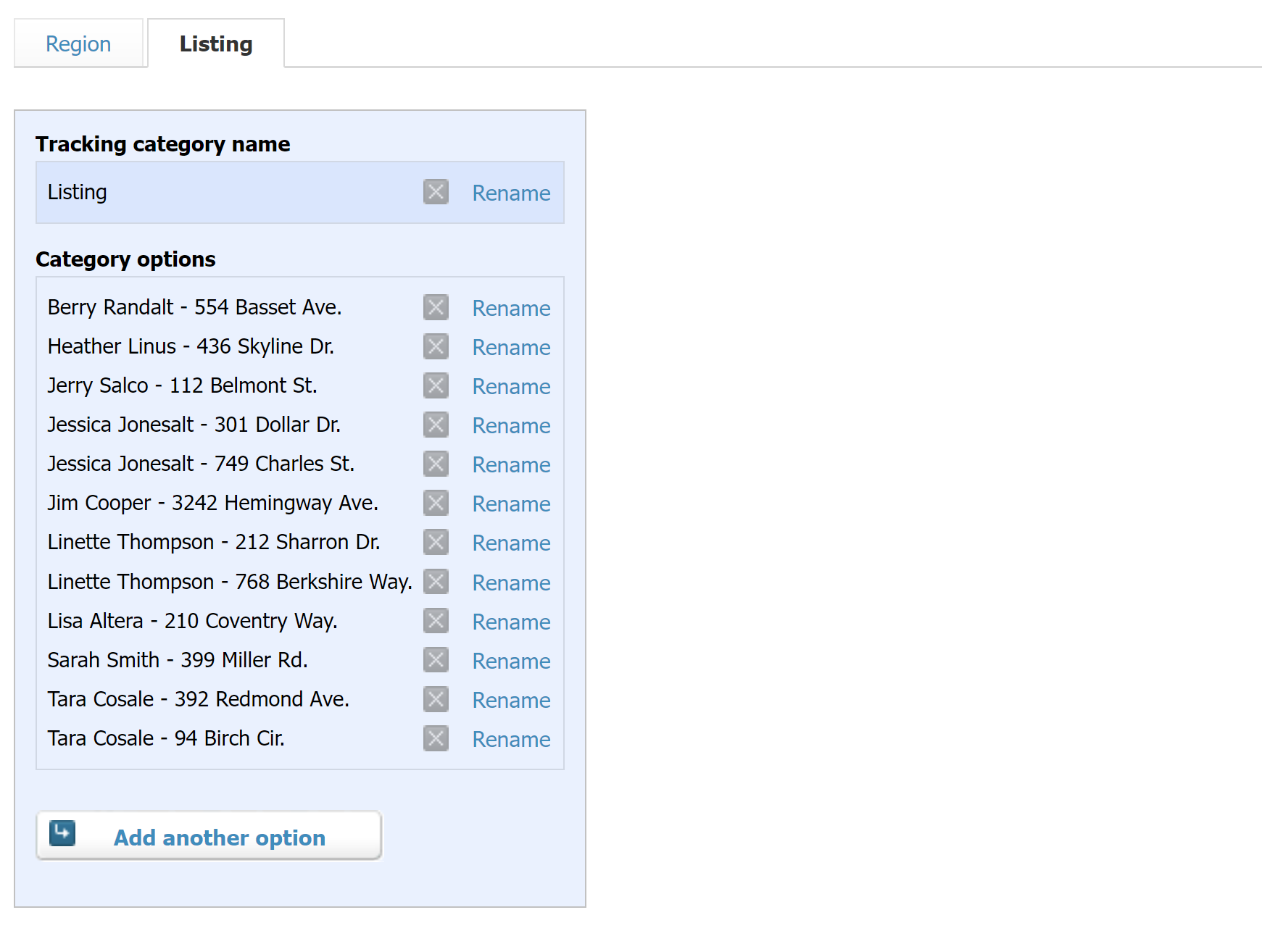
In Tallybreeze, it’s best practice to set the property owner as the customer for each listing. You can configure this within the invoice rules for that listing. It’s also a good idea to create a tracking category in Xero for each property to keep reporting organized and accurate.
With Tallybreeze, you’re also able to automate the creation of additional bills and invoices for each reservation. Consider the following:
All of the above settings can be quickly set up using Tallybreeze’s presets for your listings. Here’s how to set up these presets…
From here, presets will be loaded as your listing accounting rules and you can edit as needed.
Once your Tallybreeze setup is complete, your Airbnb reservation accounting will run automatically. In this section, we’ll cover additional common transaction workflows related to operating an Airbnb Co-Host business.
With Tallybreeze, invoices for each reservation are automatically created for each owner. As a result, the amounts owed by each owner can be found in the balance sheet under Accounts Receivable. Xero automatically groups and totals all outstanding invoices per owner, making it easy to track what is due and request payment.
You, as the Airbnb Co-Host, have received a payment of $3,130 from the property owner, Tara Cosale. You can now reconcile this amount in your Operations Bank Account using the following entry:
| Debit | Credit | Tracking Category | |
|---|---|---|---|
| 1XXXX – Operations Bank Account (Asset) | $3,130 | Tara Cosale | |
| 1XXXX – Accounts Receivable (Asset) | $3,130 | Tara Cosale |
Detailed instructions for Xero
1. Find the amount to receive
The amount that needs to be received from each owner can be found under “Business” -> “Sales Overview” -> “Send Statements”. From there select the date range and the amount owed is listed for each customer. Select any specific customer for a detailed list of invoices outstanding:
2. Receive Payment
Email the above statement to the owner to receive a payment.
3. Reconcile bank deposit with receive payment
When the bank deposit is received, reconcile it with the invoices listed in step 1.
If an issue arises that requires immediate attention or on-site repair, you may need to cover the expense from your business operations bank account. If your agreement with the owner allows for it, you can bill the owner for reimbursement at a later time. Here’s an example:
A property owned by Tara Cosale needs a bathroom faucet replaced by a professional plumber. The service costs $450 and must be handled quickly, as guests are checking in later the same day. You also charge a 10% markup for allocating funds and managing the repair on the owner’s behalf.
First, pay the plumbing company from your Operations Bank Account using your preferred method, bank transfer, ACH, check, Venmo, or another option. Once the transaction posts and clears, record the outgoing payment from your Operations Bank Account using the following entry:
| Debit | Credit | Tracking Category | |
|---|---|---|---|
| 1XXXX – Operations Bank Account (Asset) | $450 | Tara Cosale | |
| 7XXXX – Billable Expenses (Expense) | $450 | Tara Cosale |
Next, create an invoice for the amount owed by the owner. Include a 20% markup for coordinating and funding the service, and allocate it to your Billable Expenses Income account. Use the following entry:
| Debit | Credit | Tracking Category | |
|---|---|---|---|
| 4XXXX – Billable Expenses Income (Revenue) | $540 | Tara Cosale | |
| 1XXXX – Accounts Receivable (Asset) | $540 | Tara Cosale |
Detailed instructions for Xero
1. After paying the service provider, categorize and reconcile the transaction in your operations bank feed
Be sure to mark the Bill line item as billable to the owner.
| Payee | Category | Description | Amount | Tracking Category |
|---|---|---|---|---|
| Plumber Pro | 7XXXX – Billable Expenses (Expense) | “Billable Expense: Bathroom Faucet Replaced” | $450 | Tara Cosale |
2. Receive Payment from Owner
Include a 20% markup ($540 total)
With Tallybreeze, Airbnb data syncs seamlessly into Xero. Once you’ve processed and reconciled any remaining expenses, generating clear, professional owner statements each month becomes quick and effortless.
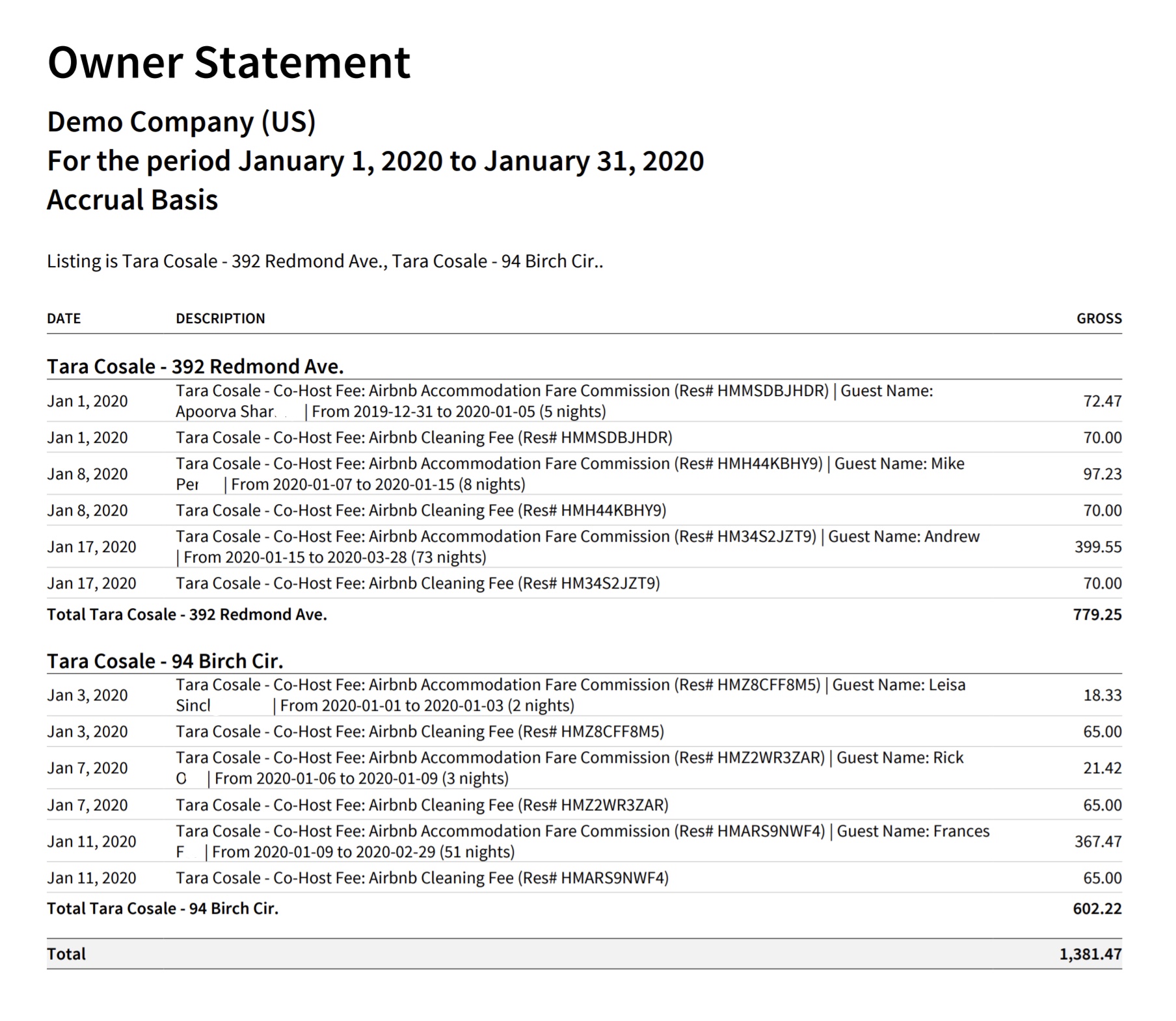
Each month in Xero, you can generate an owner statement that clearly shows what the owner owes for each listing. The report is grouped by listing and details the amount due for every reservation, followed by a total for that property. A final grand total owed by the owner appears at the bottom.
In the example below, we’re displaying an owner statement for a single owner, Tara Cosale:
Here’s how to create this Owner Statement by Listing in Xero:
From here this statement can be saved as a custom report and re-used every month for the owner.
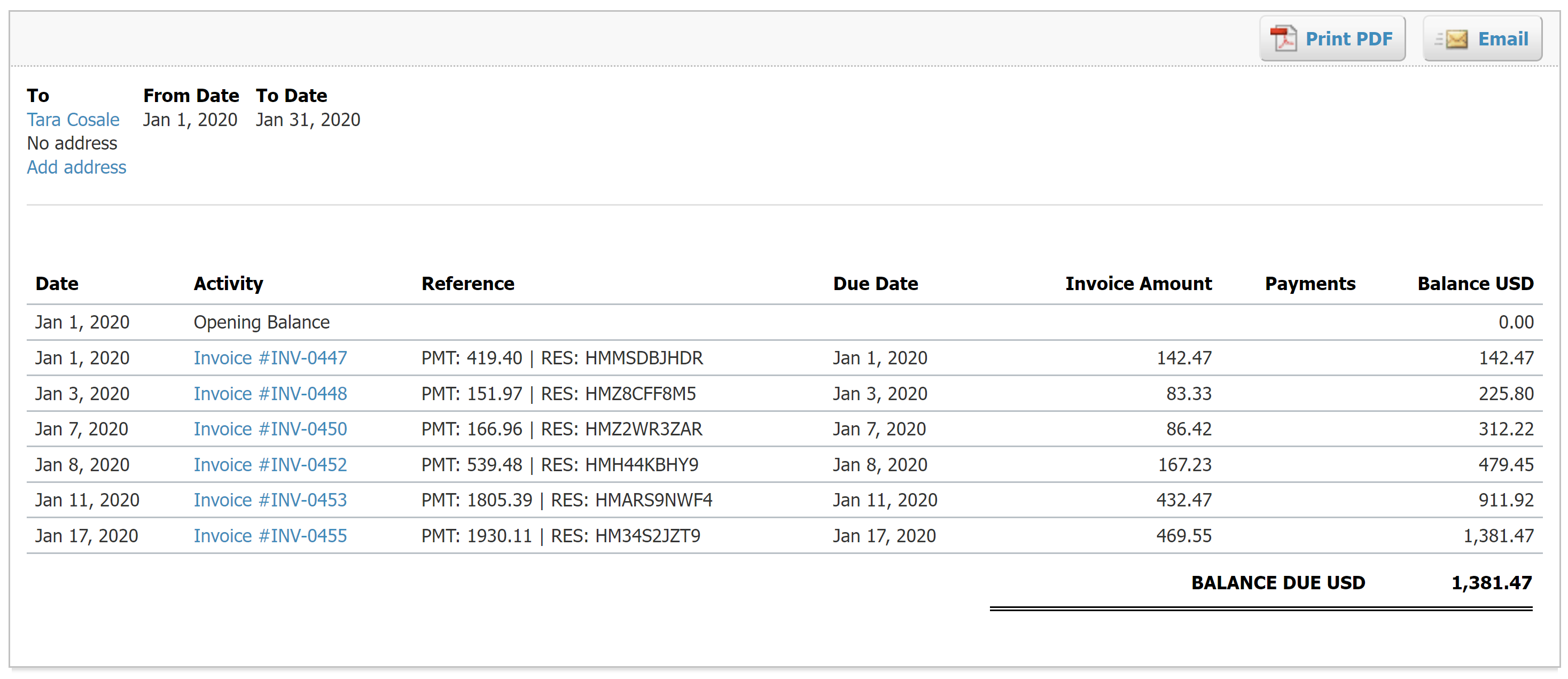
Xero also offers a more formal way to generate owner statements, complete with your company logo for a more professional presentation. These statements summarize all outstanding invoices. To access them, go to Business → Sales Overview → Send Statements. Select the date range and choose the specific owner you’d like to review. From there, you can print or email the statement along with a request for payment:
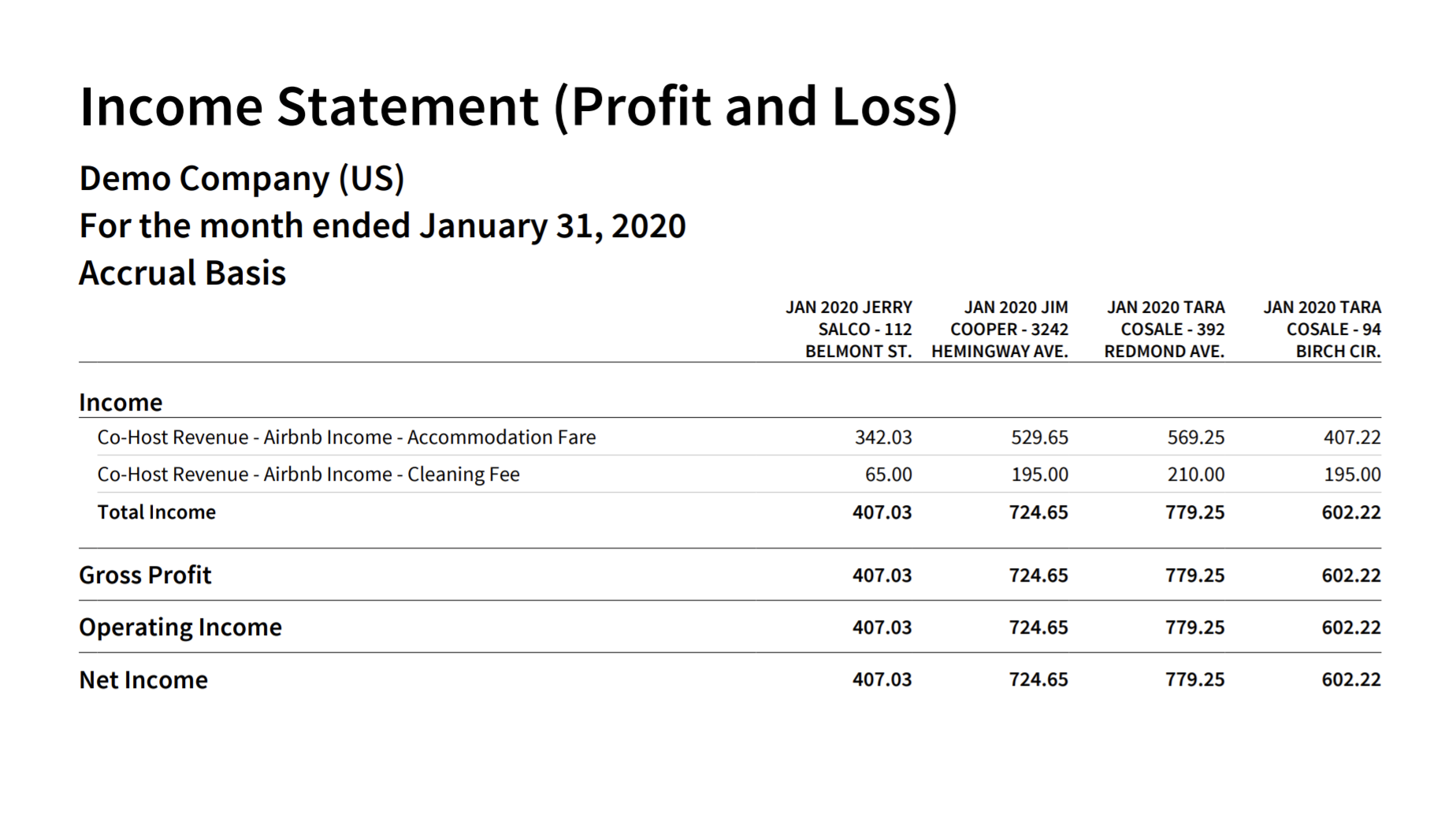
The purpose of the income statement by listing is to help you understand the performance of your Airbnb Co-Host business and compare results across different properties. This report is for internal use and gives you insight into which owners and listings are generating the strongest earnings relative to one another.
Xero provides a simple way to generate a receivables statement for each owner, making it easy to show what they owe and collect payment for outstanding invoices. To access this feature, go to Business → Sales Overview → Send Statements and select the desired date range.
You’ll then see a list of all customers, the total amounts owed, and the option to email each owner directly with a payment request:
Operating as an Airbnb Co-Host can be highly rewarding, but success depends on having a streamlined, accurate accounting process that clearly communicates financials to property owners and helps you stay on the right track. With the proper setup and a bit of diligence, automating your accounting workflow can significantly reduce manual work while giving both you and your clients the transparency and confidence needed to operate effectively.
We hope this guide makes it easier for you to manage your Airbnb reservations, including all related taxes, fees, and owner payments, as you continue to grow your Co-Hosting business.
Finally, there are other business models that are not covered in this guide but are covered better in the following guides. Be sure to check these out :
An in-depth discussion about HostAway accounting and bookkeeping using popular accounting software, QuickBooks. Accordingly, we…
This guide is a comprehensive method of accounting for those who need to follow thorough…
For short-term rentals, many jurisdictions do not require licensing or strict trust accounting rules for…
Rental Arbitrage is a business model where an operator rents a property from an owner…
A vacation rental investment property is a business model in which an operator purchases a…
This guide provides an in-depth discussion of using QuickBooks for Airbnb. We include chart of…