

Who should read this guide?
This guide is designed for operators running rental arbitrage listings on Airbnb who use Xero for their accounting. Rental arbitrage on Airbnb is a business model in which an operator leases a property from an owner under a master lease and then subleases it to guests on Airbnb. This model performs best in markets where short-term rental income exceeds the local long-term rental rates. Maintaining clear, accurate financials, especially with automated accounting, can significantly impact the success of your operation. In this guide, you’ll learn how to set up and automate your accounting for the rental arbitrage business model using Xero.
USING QUICKBOOKS? READ THIS ARTICLE INSTEAD
Note: If you haven’t already, be sure to review our stellar integration for Airbnb & Xero.
About Rental Arbitrage on Airbnb
The rental arbitrage business model on Airbnb offers several key benefits. First, in markets where short-term travel demand is strong and long-term rental rates are relatively low, operators can often achieve gross profit margins of 30–50% (and sometimes even higher). This far exceeds the typical 15–20% commission earned in the standard property-management model of Airbnb listings. Second, the arbitrage operator has greater control over the property because they hold a master lease and therefore have legal possession. This reduces the overhead of dealing with the property owner – no monthly financial reporting, no shared decision-making – allowing the operator to simply pay rent and manage the property with maximum flexibility, all without owning it.
However, the model does come with notable risks. The primary risk is the lease obligation itself. In a market downturn or when travel demand weakens, revenue can decline quickly while rent remains a fixed cost, causing profit margins to tighten. Additionally, during strong market conditions, owners may raise rents (unless safeguards are included in the master lease) which can also erode profitability. Operators typically bear the full cost of furnishing and equipping the property as well, resulting in higher upfront expenses compared to traditional property managers, who often split or pass these costs to the property owner.
Table of Contents
Here’s what you’ll get from this guide:
- Xero Chart of Accounts Template for Rental Arbitrage on Airbnb
- How to Automate Accounting for Airbnb Listings
- Execute Common Transaction Workflows in Xero
- Generate Monthly Reports in Xero
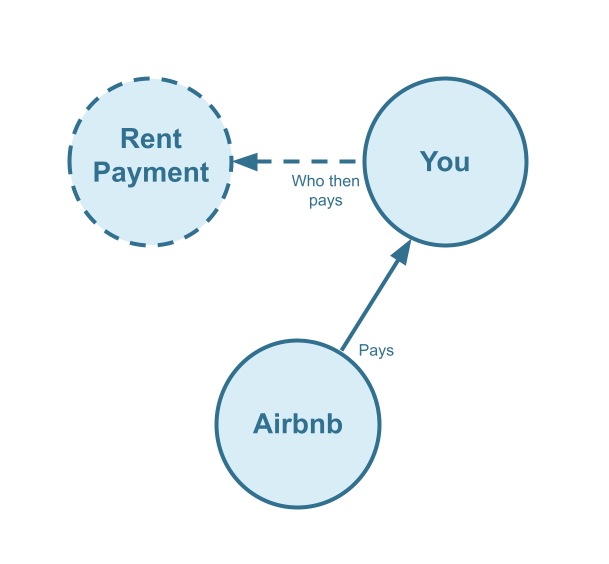
Cash Flow Diagram
Who should not read this guide?
There are other business models that may be more suitable in your particular scenario, which are covered better in the following guides:
- Xero for Airbnb Listings: Co-Host Accounting
- Xero for Airbnb Listings: Investment Property Accounting
- Xero for Airbnb Listings: Property Management without Trust Accounting
- Xero for Airbnb Listings: Trust Accounting for Property Managers
- All Xero Templates for Airbnb
- Airbnb Accounting & Bookkeeping: A Comprehensive Guide
Xero Chart of Accounts Template for Rental Arbitrage on Airbnb
In this section, we’ll go over the details of our Xero chart of accounts template for the rental arbitrage business model on Airbnb:
Account Codes
| No. | Account | Type |
|---|---|---|
| 24200 | Rental Liability – Airbnb Custom Taxes Payable | Liability |
| 42100 | Rental Revenue – Airbnb Income – Accommodation Fare | Revenue |
| 42200 | Rental Revenue – Airbnb Income – Cleaning Fee | Revenue |
| 42300 | Rental Revenue – Airbnb Income – Resolution Adjustment | Revenue |
| 42400 | Rental Revenue – Airbnb Refund – Accommodation Fare | Revenue |
| 42500 | Rental Revenue – Airbnb Refund – Cleaning Fee | Revenue |
| 42600 | Rental Revenue – Airbnb Refund – Resolution Adjustment | Revenue |
| 51100 | Rental Costs – Airbnb Service Fee | Direct Cost |
| 61100 | Airbnb Tax Withholdings | Expense |
NOTE: In this guide, we only cover income accounting, not costs. For a guide about Airbnb costs and chart of accounts to consider, check out this guide instead: Accounting for Costs to Operate Airbnb Listings: Best Chart of Accounts
Detailed Explanation of Accounts
To learn more about each specific account code, we’ve listed each definition here:
Rental Liabilities
24200 – Rental Liability – Airbnb Custom Taxes Payable – This represents all Custom Taxes collected from Airbnb and payable to a tax authority.
Rental Revenues
42100 – Rental Revenue – Airbnb Income – Accommodation Fare – This account tracks the accommodation fare portion of each Airbnb reservation. The accommodation fare is equal to the number of nights multiplied by the average nightly rate of each reservation.
42200 – Rental Revenue – Airbnb Income – Cleaning Fee – This account tracks the cleaning fee portion of each Airbnb reservation.
42300 – Rental Revenue – Airbnb Income – Resolution Adjustment – This account tracks any resolution adjustments collected from Airbnb.
42400 – Rental Revenue – Airbnb Refund – Accommodation Fare – This account tracks accommodation fare refunds executed by Airbnb.
42500 – Rental Revenue – Airbnb Refund – Cleaning Fee – This account tracks cleaning fee refunds executed by Airbnb.
42600 – Rental Revenue – Airbnb Refund – Resolution Adjustment – This account tracks resolution adjustment refunds executed by Airbnb.
Rental Costs
51100 – Rental Costs – Airbnb Service Fee – This account tracks service fee costs from Airbnb for each reservation, which is subtracted from the income.
61100 – Airbnb Tax Withholdings – This account tracks any taxes withheld by Airbnb for income tax obligations. This is very rare and usually due to the Airbnb account holder lacking tax identification information. Ideally, this account should not contain any balance and is seldom (if ever) used. To avoid income tax withholdings from Airbnb, be sure to update your Airbnb account with your tax identification information and verify your account.
Accounts not included in this template
For the scope of this guide, we’re mainly focused on Airbnb revenue recognition. It is important to point out that our template does not include many general accounts. We also make reference to some accounts not included in this particular template, which we’ll list here:
- 11000 – Airbnb Payment Clearing Account – This account is created by Tallybreeze but is not included in this template in particular. This account is used to apply payments to Airbnb invoices upon the day the Airbnb reservation payout is posted. Payouts can take 3-5 days (or longer) to arrive in the bank account after posted from Airbnb. Monies owed are held in this clearing account until the payouts are received in the bank. This account also helps to automate the reconciliation process in Xero.
- 1XXXX – Operations Bank Account – This is your business operations bank account set up with your financial institution. It’s a cash asset account to facilitate your rental arbitrage day-to-day business operations with Airbnb.
- 5XXXX – Master Lease Rent Payments – This is an account used to track the amounts you’re paying to owners for master leases.
- 4XXXX – Billable Expenses Income – This is a general account for capturing income received for the payment of billable expenses by owners, which may include a markup.
- 7XXXX – Billable Expenses – This is a general account for tracking billable expenses for any owners.
Quick Setup Steps
Here’s how to import the above chart of accounts template. The chart of accounts discussed in this article can be imported into Xero automatically using Tallybreeze’s setup tools. Here’s how to access this utility…
- If you haven’t already, Sign Up to Tallybreeze. It includes free use of this template.
- Once registered, go to the Connections manager in Tallybreeze. Connect your Airbnb account, connect your Xero account and then create a connection between the two.
- Within the Connection settings, select “Set Up Xero”
How to Automate Accounting for Airbnb Listings
With Tallybreeze, you can automate your rental arbitrage accounting for Airbnb and focus on building a more profitable business. In this section, we’ll walk through how to use the preset settings specifically designed for syncing reservations under the rental arbitrage model for Airbnb listings. These settings work in conjunction with the chart of accounts outlined above.
Tallybreeze Listing Presets
Once your Airbnb and Xero accounts are connected, Tallybreeze will guide you through configuring the accounting rules for your Airbnb listing. You can also adjust these preset settings as needed before turning on automation.

Explanation of Preset Lines
100% of all income received from Airbnb is recognized as business revenue. This includes the accommodation fare, cleaning fees, Airbnb service fees (deducted), resolution adjustments, custom taxes (if applicable), and any tax withholdings.
| Airbnb Price Item | % | Account |
|---|---|---|
| Accommodation Fare | 100% | 42100 – Rental Revenue – Airbnb Income – Accommodation Fare |
| Cleaning Fee | 100% | 42200 – Rental Revenue – Airbnb Income – Cleaning Fee |
| Airbnb Service Fee | 100% | 51100 – Rental Costs – Airbnb Service Fee |
| Resolution Adjustment | 100% | 42300 – Rental Revenue – Airbnb Income – Resolution Adjustment |
| Custom Taxes | 100% | 24200 – Rental Liability – Airbnb Custom Taxes Payable |
| Tax Withholdings | 100% | 61100 – Airbnb Tax Withholdings |
Example Reservation
Suppose you have Tallybreeze configured for this listing using the preset settings above. Now imagine Airbnb issues a payout for a current reservation with the following itinerary price items:
- Accommodation Fare: $2540
- Cleaning Fee: $310
- Airbnb Service Fee: -$70
- Airbnb Transient Occupancy Taxes: $230
- Reservation Total: $3010
Tallybreeze records all income received through Airbnb, separating each price item accordingly. The total amount due from Airbnb for this reservation is $2,440, which is posted to the Airbnb Payment Clearing Account and later reconciled against the corresponding bank deposit.
| Account | Debit | Credit |
|---|---|---|
| 42100 – Rental Revenue – Airbnb Income – Accommodation Fare | $2540 | |
| 42200 – Rental Revenue – Airbnb Income – Cleaning Fee | $310 | |
| 51100 – Rental Costs – Airbnb Service Fee | $70 | |
| 24200 – Rental Liability – Airbnb Custom Taxes Payable | $230 | |
| 11000 – Airbnb Payment Clearing Account (Asset) | $3010 |
Finally, when the reservation payout is deposited into your Operations Bank Account (typically 3–5 days later) a bank rule in Xero can automatically reconcile the deposit against the Airbnb Payment Clearing Account.
| Account | Debit | Credit |
|---|---|---|
| 1XXXX – Operations Bank Account | $3010 | |
| 11000 – Airbnb Payment Clearing Account (Asset) | $3010 |
Set Invoice Customer & Tracking Categories
The most efficient way to manage guests in Xero is to create a single general contact for all guest-related transactions. We recommend naming this contact “Airbnb Guests”. However, if you prefer to track guests individually, you can set Tallybreeze to use the actual guest as the contact. In that case, Tallybreeze will create each guest as a separate contact in Xero and assign them as the customer on the invoice for their reservation.
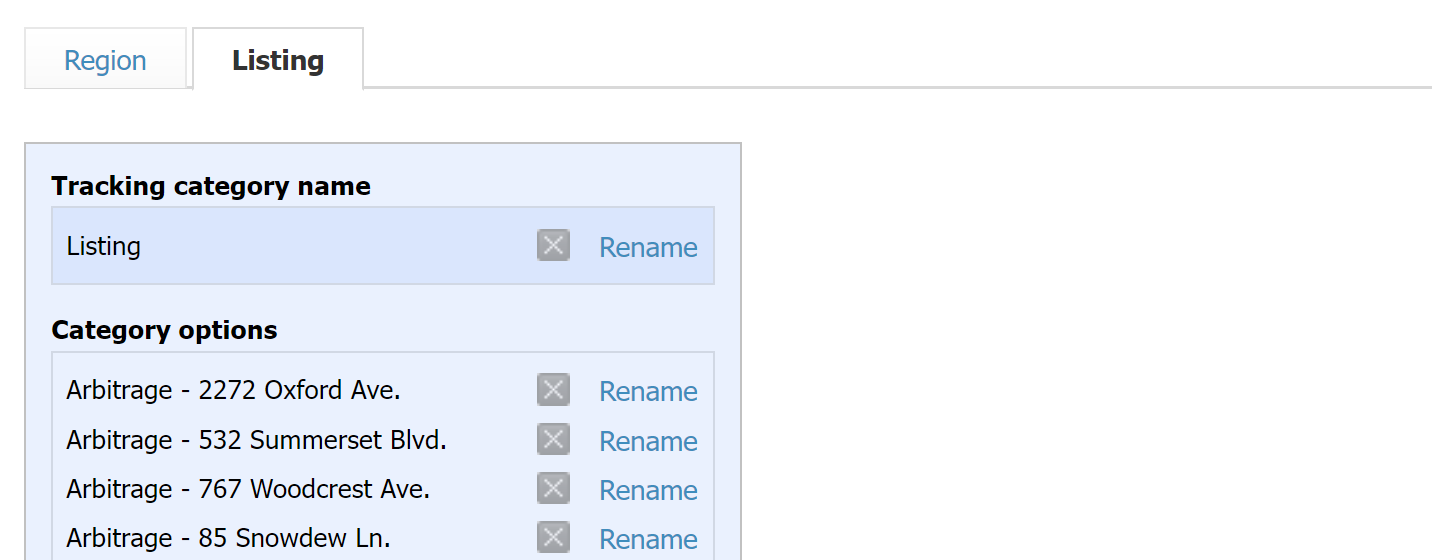
If you operate more than one listing, you should also create a tracking category in Xero for each property. Many users name their tracking categories “Arbitrage – [Property Address]” or something similar. Here’s an example:
Automate Additional Bills & Invoices (Optional)
With Tallybreeze, you’re also able to automate the creation of additional bills and invoices for each reservation. Consider the following:
- Create a bill for each reservation to automate amounts payable to a tax authority.
- Create a bill for each reservation to automate amounts payable to a cleaning service for turnover of each reservation.
- Create additional invoice for each reservation to automate amounts receivable by any third party.
Quick Setup Steps
All of the above settings can be quickly set up using Tallybreeze’s presets for your listings. Here’s how to set up these presets…
- If you haven’t already, Sign Up to Tallybreeze.
- After logging into Tallybreeze, set up your connections, then go to Listing Rules.
- Select any listing you’d like to automate that hasn’t already been set up.
- Select “Load Presets”.
From here, presets will be loaded as your listing accounting rules and you can edit as needed.
Execute Common Transaction Workflows in Xero
The following is a list of common transaction workflows for rental arbitrage of Airbnb listings in Xero.
Paying Rent to Owners
Owners receive a fixed rent each month, making it simple to set up a recurring payment. Each rent payment can then be reconciled to “5XXXX – Master Lease Rent Payments”.
Example Transaction
As the rental arbitrage operator, you pay the owner, Heather Rosa, a monthly rent of $1,575 for the property at 1171 Ashburn Ln through a recurring bank transfer. Once the transfer posts to your Operations Bank Account, reconcile the outgoing transaction using the following entry:
| Debit | Credit | Tracking Category | |
|---|---|---|---|
| 1XXXX – Operations Bank Account (Asset) | $1,575 | Arbitrage – 1171 Ashburn Ln | |
| 5XXXX – Master Lease Rent Payments (Cost) | $1,575 | Arbitrage – 1171 Ashburn Ln |
Detailed instructions for Xero
1. Create a Recurring Bill
| Vendor | Category | Description | Tracking Category |
|---|---|---|---|
| Claudia Smith | 5XXXX – Master Lease Rent Payments | “Master Lease Rent Payment” | Arbitrage – 1171 Ashburn Ln |
- Set Contact to the name of the owner “Claudia Smith”
- Set Category to “5XXXX – Master Lease Rent Payments”
- Set Description to “Master Lease Rent Payment”
- Set Amount to the rent amount
- Set Tracking Category to the listing address
2. Pay the Bill
Pay the Bill directly in Xero or reconcile the Bill against the payment made in your bank feed.
Paying Expenses on Behalf of Owners
If you need to purchase maintenance items and pay for them quickly, you may need to use funds from your operations bank account. If your rental agreement allows, you can offset this expense by deducting the amount from the next month’s rent payment to the property owner(s).
Example
A property owned by Claudia Smith needs a bathroom faucet replaced by a professional plumber. The service costs $312 and must be completed quickly, as guests are checking in later the same day. You also charge a 25% markup for allocating funds and coordinating the service on the owner’s behalf.
First, pay the plumbing company from your Operations Bank Account using whichever method is appropriate, bank transfer, ACH, check, Venmo, or another option. Once the transaction posts to your account, record the outgoing payment using the following entry:
| Debit | Credit | Tracking Category | |
|---|---|---|---|
| 1XXXX – Operations Bank Account (Asset) | $312 | Arbitrage – 1171 Ashburn Ln | |
| 7XXXX – Billable Expenses (Expense) | $312 | Arbitrage – 1171 Ashburn Ln |
When you make your next rent payment of $1,575, deduct the amount billed plus the 25% markup ($312 × 1.25 = $390). This results in a reduced rent payment of $1,185 ($1,575 − $390 = $1,185). Once the payment posts to your Operations Bank Account, record the outgoing transaction using the following entry:
| Debit | Credit | Tracking Category | |
|---|---|---|---|
| 1XXXX – Operations Bank Account (Asset) | $1185 | Arbitrage – 1171 Ashburn Ln | |
| 5XXXX – Master Lease Rent Payments (Cost) | $1575 | Arbitrage – 1171 Ashburn Ln | |
| 4XXXX – Billable Expenses Income (Revenue) | $390 | Arbitrage – 1171 Ashburn Ln |
Detailed instructions for Xero
1. After paying the service provider, categorize and reconcile the transaction in your operations bank feed
| Payee | Category | Description | Amount | Tracking Category |
|---|---|---|---|---|
| Plumber Pro | 7XXXX – Billable Expenses (Expense) | “Billable Expense: Bathroom Faucet Replaced” | $312 | Arbitrage – 1171 Ashburn Ln |
2. Subtract amount when making the next rent payment and reconcile as follows
Rent is $1575. Upon payment, subtract the amount billed plus a 25% markup. This equals a payment of $1185 ($1575 – $390 = $1185). Once the transaction is posted and complete, record the outgoing transaction from the Operations Bank Account using the following entry:
| Payee | Category | Description | Amount | Tracking Category |
|---|---|---|---|---|
| Claudia Smith (Owner) | 5XXXX – Master Lease Rent Payments (Cost) | “Rent Payment for 212 Chantilly Way” | $1575 | Arbitrage – 1171 Ashburn Ln |
| Claudia Smith (Owner) | 4XXXX – Billable Expenses Income (Revenue) | “Billable Expense: Bathroom Faucet Replaced” | -$390 | Arbitrage – 1171 Ashburn Ln |
Remitting Custom Taxes
In most areas, Airbnb collects and remits taxes to the local tax authority on your behalf. If that applies to you, you can skip this section. However, if you prefer greater control over your funds, you can opt to have Airbnb send custom taxes directly to you and remit them yourself. If you choose this option, Tallybreeze will automatically allocate any custom taxes for each reservation using the Custom Taxes line in the preset. You can then remit the taxes to the appropriate authority following the example below.
Example
The listing at 1171 Ashburn Ln is configured in Airbnb to receive custom taxes for all reservations. In Tallybreeze, these amounts are allocated to “24200 – Rental Liability – Airbnb Custom Taxes Payable”. After running a balance sheet report for this listing in Xero, you determine that $235 is owed in transient occupancy taxes.
To remit this amount, send your payment to the tax authority using your preferred method, bank transfer, ACH, check, or another option. Once the payment posts to your Operations Bank Account, record the outgoing transaction using the following entry:
| Debit | Credit | Tracking Category | |
|---|---|---|---|
| 1XXXX – Operations Bank Account (Asset) | $235 | Arbitrage – 1171 Ashburn Ln | |
| 24200 – Rental Liability – Airbnb Custom Taxes Payable | $235 | Arbitrage – 1171 Ashburn Ln |
Detailed instructions for Xero
1. Check how much exists in the Custom Taxes Payable account for the owner
The amount that needs to be paid to the tax authority can be found in the balance sheet. Filtering the balance sheet by tracking category for each listing, look up the total amount under “24200 – Rental Liability – Airbnb Custom Taxes Payable”.
2. Create Bill
| Vendor | Category | Description | Tracking Category |
|---|---|---|---|
| Tax Authority | 24200 – Rental Liability – Airbnb Custom Taxes Payable | “Taxes Paid: 11% City TOT” | Arbitrage – 1171 Ashburn Ln |
- Set the contact of the bill to the name of the tax authority
- Set the Product/Service to “24200 – Rental Liability – Airbnb Custom Taxes Payable”
- Set a detailed description, starting with “Taxes: ” and describe the tax
- Set the tracking category to the listing
3. Transfer the amount from your operations bank account to the tax authority
Send the money via bank transfer, ACH, check or other means.
4. Reconcile operations bank account statement line amount with bill
Reconcile the bill with the bank feed in Xero
Generate Monthly Reports in Xero for Rental Arbitrage
With Tallybreeze, Airbnb reservation data flows seamlessly into Xero. Once your expenses are recorded, you can generate clear, professional monthly reports with ease and evaluate the performance of each listing without any hassle.
Profit & Loss by Listing
This report is ideal for comparing the performance of your Airbnb listings side by side. In Xero, navigate to the “Reports” section in the left menu and select “Profit and Loss”. From there, edit the layout and add columns for each listing you want to track. This report will display the profitability of each property, making it easy to identify which listings are performing the best.

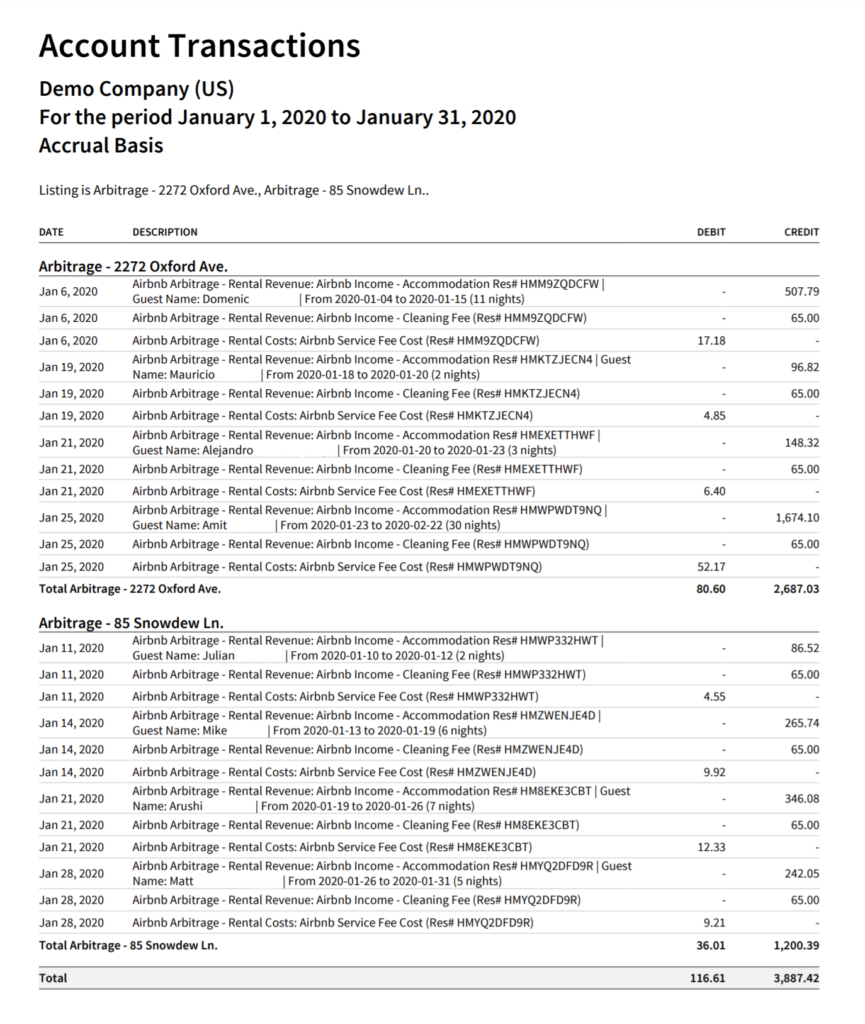
Account Transactions Grouped by Listing
To gain detailed insight into the transaction history of each listing for any selected time period, you can generate an Account Transactions report grouped by listing. In Xero, go to “Reports” and select “Account Transactions”. Then choose all Airbnb Income and Airbnb Cost accounts, set the report to group by listing, and use the filters to select only the listings you want to review. An example report is shown below:
Conclusion
Rental arbitrage on Airbnb can be a highly profitable business model, offering strong earning potential with relatively modest upfront costs, and without requiring ownership of the properties you manage. However, success depends on maintaining a clear understanding of your financials, especially as you acquire new listings and negotiate with current or future landlords. Consistently monitoring performance and recording accurate numbers is essential for evaluating how well your operations are running and for making informed, profitable decisions.
A streamlined accounting system brings transparency, confidence, and control to your business – qualities we hope this guide has helped you achieve as you continue to build and refine your operations.
Finally, there are other business models that are not covered in this guide but are covered better in the following guides. Be sure to check these out :
- Xero for Airbnb Listings: Co-Host Accounting
- Xero for Airbnb Listings: Investment Property Accounting
- Xero for Airbnb Listings: Property Management without Trust Accounting
- Xero for Airbnb Listings: Trust Accounting for Property Managers
- All Xero Templates for Airbnb
- Airbnb Accounting & Bookkeeping: A Comprehensive Guide
8 thoughts on “Xero for Airbnb: Rental Arbitrage Accounting”
Comments are closed.