This guide covers property management accounting for Airbnb listings using Xero. Airbnb continues to be a profitable channel within the short-term rental industry. In many regions, trust accounting requirements for short-term rental property management are minimal or nonexistent, allowing new operators to enter the industry without significant regulatory barriers.
In this guide, we explain how to automate your accounting, integrate your Airbnb listings with Xero, and use an alternative accounting method designed for property managers who want to avoid the complexity of traditional trust accounting. Instead of maintaining a trust account, which involves significant administrative and compliance overhead, all funds received from Airbnb are recorded as income to the property management company, while all payouts made to owners are recorded as expenses.
Compared to standard trust accounting, which demands extensive training and meticulous data entry, this simplified method is much easier to maintain. It is popular for two key reasons: first, it requires roughly one-third of the data entry and training needed for conventional trust accounting; and second, it allows the property management company to report higher revenue levels, which can support stronger financial statements and improve eligibility for larger business loans.
USING QUICKBOOKS? READ THIS ARTICLE INSTEAD
Disclaimer: If you operate in a jurisdiction that legally requires property managers for Airbnb to use a trust account, the accounting method outlined in this guide is not appropriate for your situation. Many regions classify property managers as fiduciaries who must safeguard owner funds, which necessitates a more rigorous and compliant trust accounting method.
Note: If you haven’t already, be sure to review our stellar integration for Airbnb & Xero.
What you’ll get from this guide:
Other business models exist. Some may be more suitable in your particular case. These are covered better in the following guides:
We will now walk through our chart of accounts template in detail. This structure will help you build a clear, well-organized system for tracking and managing all revenue from your Airbnb listings.
| No. | Account | Type |
|---|---|---|
| 24100 | Rental Liability – Airbnb Owner Funds Payable | Liability |
| 24200 | Rental Liability – Airbnb Custom Taxes Payable | Liability |
| 42100 | Rental Revenue – Airbnb Income – Accommodation Fare | Revenue |
| 42200 | Rental Revenue – Airbnb Income – Cleaning Fee | Revenue |
| 42300 | Rental Revenue – Airbnb Income – Resolution Adjustment | Revenue |
| 42400 | Rental Revenue – Airbnb Refund – Accommodation Fare | Revenue |
| 42500 | Rental Revenue – Airbnb Refund – Cleaning Fee | Revenue |
| 42600 | Rental Revenue – Airbnb Refund – Resolution Adjustment | Revenue |
| 51100 | Rental Costs – Airbnb Service Fee | Direct Cost |
| 51200 | Rental Costs – Airbnb Amounts Due to Owner | Direct Cost |
| 61100 | Airbnb Tax Withholdings | Expense |
NOTE: In this guide, we only cover income accounting, not costs. For a guide about Airbnb costs and chart of accounts to consider, check out this guide instead: Airbnb Costs and Chart of Accounts to Consider
Property management businesses that operate Airbnbs and who do not use a trust account—such as those described in this article—must instead rely on their operating accounts to collect Airbnb funds and issue payouts to owners. In this template, amounts paid to owners are treated as a business expense. These costs are recorded in “51200 – Rental Costs – Airbnb Amounts Due to Owner” and offset by the liability account “24100 – Rental Liability – Airbnb Owner Funds Payable.” Continue reading below for a detailed explanation of each account.
Rental Liabilities
24100 – Rental Liability – Airbnb Owner Funds Payable – This account tracks Airbnb funds payable to owners. This is for property management businesses that do not use a trust account to manage funds.
24200 – Rental Liability – Airbnb Custom Taxes Payable – This represents all Custom Taxes collected from Airbnb and payable to a tax authority.
Rental Revenues
42100 – Rental Revenue – Airbnb Income – Accommodation Fare – This account tracks the accommodation fare portion of each Airbnb reservation. The accommodation fare is equal to the number of nights multiplied by the average nightly rate of each reservation.
42200 – Rental Revenue – Airbnb Income – Cleaning Fee – This account tracks the cleaning fee portion of each Airbnb reservation.
42300 – Rental Revenue – Airbnb Income – Resolution Adjustment – This account tracks any resolution adjustments collected from Airbnb.
42400 – Rental Revenue – Airbnb Refund – Accommodation Fare – This account tracks accommodation fare refunds executed by Airbnb..
42500 – Rental Revenue – Airbnb Refund – Cleaning Fee – This account tracks cleaning fee refunds executed by Airbnb.
42600 – Rental Revenue – Airbnb Refund – Resolution Adjustment – This account tracks resolution adjustment refunds executed by Airbnb.
Rental Costs
51100 – Rental Costs – Airbnb Service Fee – This account tracks service fee costs from Airbnb for each reservation, which is subtracted from the income.
51200 – Rental Costs – Airbnb Amounts Due to Owner – This account tracks amounts paid to owners as a cost to the business. This account is for property management businesses that do not use a trust account to manage funds.
61100 – Airbnb Tax Withholdings – This account tracks any taxes withheld by Airbnb for income tax obligations. This is very rare and usually due to the Airbnb account holder lacking tax identification information. Ideally, this account should not contain any balance and is seldom (if ever) used. To avoid income tax withholdings from Airbnb, be sure to update your Airbnb account with your tax identification information and verify your account.
For the scope of this guide, we’re mainly focused on Airbnb revenue recognition. It is important to point out that our template does not include many general accounts. We also make reference to some accounts not included in this particular template, which we’ll list here:
Here’s how to import the above chart of accounts template. All of the accounts discussed in this article can be imported into Xero automatically using Tallybreeze’s setup tools. Here’s how to access this utility…
Tallybreeze accounting automation allows you to automatically process Airbnb payments and allocate payouts between the property management company and property owners, all while keeping detailed records of each reservation. When an Airbnb reservation is created, Tallybreeze automatically imports it and records it in Xero according to the rules you configure. We’ll cover this feature in more detail below, including how it works with the chart of accounts described above.
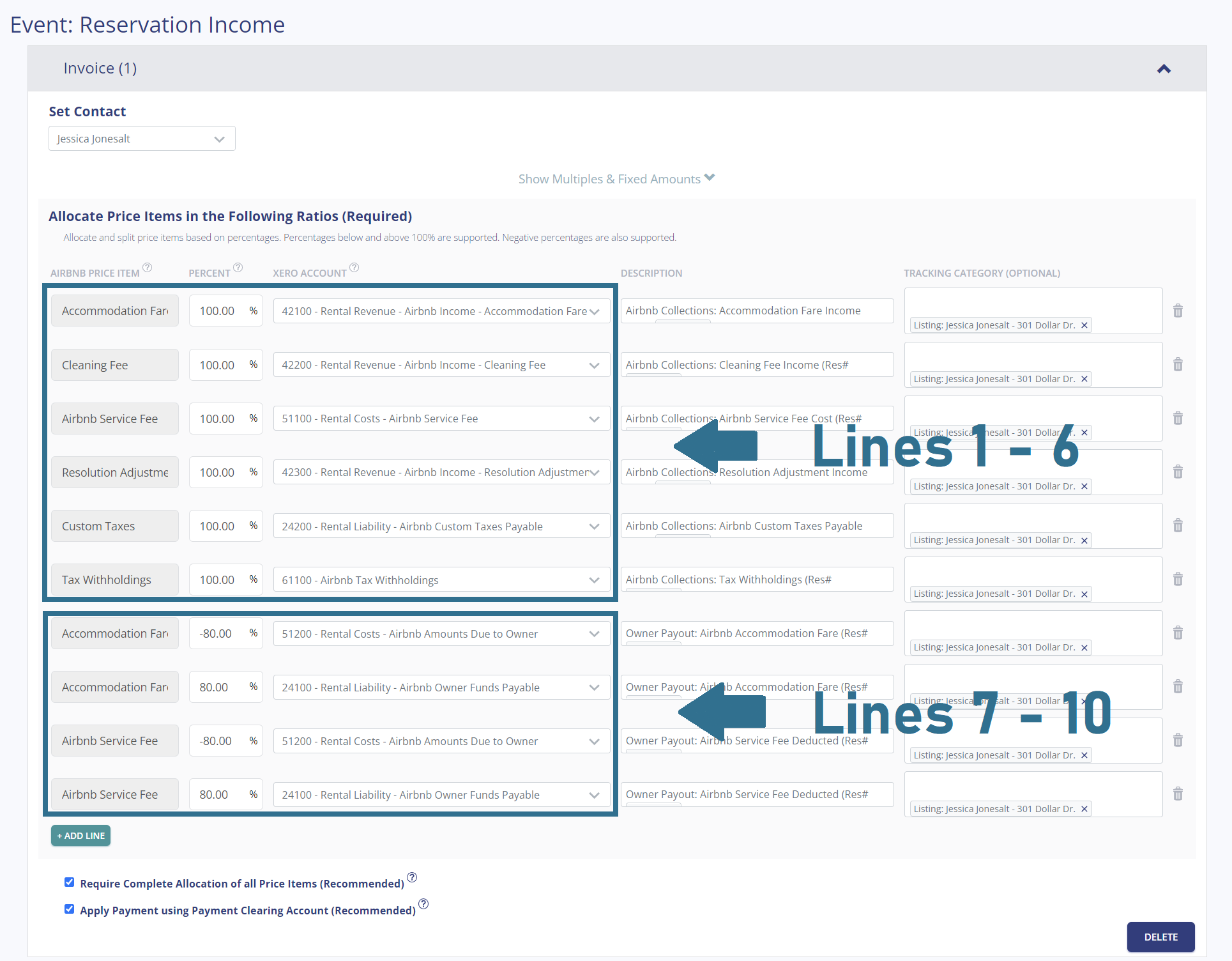
After connecting your Airbnb and Xero accounts, Tallybreeze will guide you through setting up accounting rules for each listing. To streamline this process, Tallybreeze provides a set of presets for quick configuration. Once you select the business model that matches your Airbnb property setup, the presets are organized into two main groups: Lines 1–6 and Lines 7–10.
To learn more about each preset group, click on the corresponding dropdown.
Lines 1-6: All amounts received by Airbnb are 100% allocated as revenue
This group of lines maps all line items from Airbnb as income and costs to the business. This includes the accommodation fare, cleaning fee, Airbnb service fee (cost), any resolution adjustments, custom taxes (optional) and tax withholdings (if they exist)
| Airbnb Price Item | % | Account |
|---|---|---|
| Accommodation Fare | 100% | 42100 – Rental Revenue – Airbnb Income – Accommodation Fare |
| Cleaning Fee | 100% | 42200 – Rental Revenue – Airbnb Income – Cleaning Fee |
| Airbnb Service Fee | 100% | 51100 – Rental Costs – Airbnb Service Fee |
| Resolution Adjustment | 100% | 42300 – Rental Revenue – Airbnb Income – Resolution Adjustment |
| Custom Taxes | 100% | 24200 – Rental Liability – Airbnb Custom Taxes Payable |
| Tax Withholdings | 100% | 61100 – Airbnb Tax Withholdings |
Lines 7-10: Allocate 80% of the accommodation fare and service fee as a cost payable to the owner.
This group of lines allocates 80% of the accommodation fare to the owner, it also allocates 80% of the Airbnb service fee, which is subtracted from the amounts owed to the owner.
| Airbnb Price Item | % | Account |
|---|---|---|
| Accommodation Fare | -80% | 51200 – Rental Costs – Airbnb Amounts Due to Owner |
| Accommodation Fare | 80% | 24100 – Rental Liability – Airbnb Owner Funds Payable |
| Airbnb Service Fee | -80% | 51200 – Rental Costs – Airbnb Amounts Due to Owner |
| Airbnb Service Fee | 80% | 24100 – Rental Liability – Airbnb Owner Funds Payable |
Suppose you’ve configured Tallybreeze for this listing using the preset settings above. Now, imagine Airbnb issues a payout for an active reservation that includes the following itinerary price items:
First, Tallybreeze records all income received from Airbnb, itemizing each price component. The total amount owed by Airbnb for this reservation is $3,600, which is posted to the Airbnb Payment Clearing Account. This balance will later be reconciled against the actual bank deposit.
| Account | Debit | Credit |
|---|---|---|
| 42100 – Rental Revenue – Airbnb Income – Accommodation Fare | $3,000 | |
| 42200 – Rental Revenue – Airbnb Income – Cleaning Fee | $400 | |
| 51100 – Rental Costs – Airbnb Service Fee | $100 | |
| 24200 – Rental Liability – Airbnb Custom Taxes Payable | $300 | |
| 11000 – Airbnb Payment Clearing Account (Asset) | $3600 |
Next, within the same invoice, Tallybreeze calculates the owner’s share by applying the 80% split to the Accommodation Fare ($3,000 × 80% = $2,400). This amount is recorded as a cost payable to the owner. Tallybreeze then applies the same 80% split to the Airbnb Service Fee (–$100 × 80% = –$80) and reduces the owner payout accordingly, ensuring the fee is properly deducted from the total amount owed to the owner.
| Account | Debit | Credit |
|---|---|---|
| 51200 – Rental Costs – Airbnb Amounts Due to Owner | $2400 | |
| 24100 – Rental Liability – Airbnb Owner Funds Payable | $2400 | |
| 51200 – Rental Costs – Airbnb Amounts Due to Owner | $80 | |
| 24100 – Rental Liability – Airbnb Owner Funds Payable | $80 |
Finally, when the reservation payout is deposited into your Operations Bank Account (typically 3 to 5 days later) a bank rule in Xero can automatically reconcile the deposit against the balance in the Airbnb Payment Clearing Account.
| Account | Debit | Credit |
|---|---|---|
| 1XXXX – Operations Bank Account | $3600 | |
| 11000 – Airbnb Payment Clearing Account (Asset) | $3600 |
In your Tallybreeze settings, we recommend assigning the property owner as the contact on each invoice. You should also create a tracking category called “Listing,” with an option for each individual listing that identifies both the listing and its respective owner. See the example below:
With Tallybreeze, you’re also able to automate the creation of additional bills and invoices for each reservation. Consider the following:
All of the above settings can be quickly set up using Tallybreeze’s presets for your listings. Here’s how to set up these presets…
From here, presets will be loaded as your listing accounting rules and you can edit as needed.
There are several additional types of transactions in Xero related to managing Airbnb properties, and each must be accounted for properly. Below, we outline some of the most common workflows.
To find out how much you owe to an owner, look at the balance sheet and filter it selecting the proper tracking category for the owner. Then check the balance found under “24100- Rental Liability – Airbnb Owner Funds Payable”, the amount that needs to be paid pertains specifically within this account.
You, the manager of Airbnb properties, are holding funds under “24100 – Rental Liability – Airbnb Owner Funds Payable” account in the amount of $15,000 for the owner, Jessica Lamb, for the listing 443 St. Adams Blvd. You’d like to pay this amount to the owner as a result of a month-end report.
First, you’ll need to send the owner the money via bank transfer, ACH, check or other means. Once the transfer is posted and complete, reconcile the outgoing transaction from the Operations Bank Account using the following entry:
| Debit | Credit | Tracking Category | |
|---|---|---|---|
| 1XXXX – Operations Bank Account (Asset) | $15,000 | Jessica Lamb – 443 St. Adams Blvd. | |
| 24100 – Rental Liability: Airbnb Owner Funds Payable | $15,000 | Jessica Lamb – 443 St. Adams Blvd. |
Detailed instructions for Xero
1. Find the amount to pay
The amount that needs to be paid to each owner can be found in the balance sheet. Filtering the balance sheet by the class for each owner, look up the total amount under “24100 – Rental Liability – Airbnb Owner Funds Payable”.
2. Create Bill
| Contact | Account | Description | Tracking Category |
|---|---|---|---|
| Jessica Lamb | 24100 – Rental Liability – Airbnb Owner Funds Payable | “Owner Payout” | Jessica Lamb – 443 St. Adams Blvd. |
3. Transfer the amount from your operations bank account to the owner
Once you’ve verified the amount, go to your bank and send the money via bank transfer, ACH, check or other means.
4. Reconcile bank account amount with bill
Reconcile the bill with the bank feed in Xero
When a guest checks in, sometimes problems can be found with the property which the owner is responsible to pay but is not around to purchase. This can happen when there is an issue with maintenance or something else needs fixed right away – such as a backed up sewage pipe or broken faucet.
If your contract with the owner allows, you can make the purchase for these items directly from your operations bank account and subtract the paid amount from what’s owed to the owner under “51200 – Rental Costs – Airbnb Amounts Due to Owner”. See example below:
A property owned by Jessica Lamb needs a bathroom faucet to be replaced by a professional plumber. The service costs a total of $300 and needs to be rectified quickly as there are guests checking in later in the day. You also charge a 20% markup for allocating funds and handling these kinds of issues for the owner.
First, you’ll need to pay the plumbing company from your Operations Bank Account either via bank transfer, ACH, check, Venmo or other means. Once the transaction is posted and complete, record the outgoing transaction from your Operations Bank Account using the following entry:
| Debit | Credit | Tracking Category | |
|---|---|---|---|
| 1XXXX – Operations Bank Account (Asset) | $300 | Jessica Lamb – 443 St. Adams Blvd. | |
| 7XXXX – Billable Expenses (Expense) | $300 | Jessica Lamb – 443 St. Adams Blvd. |
Next, make an entry to deduct the amounts from the amount you owe the owner under “51200 – Rental Costs – Airbnb Amounts Due to Owner”. Include a 10% markup for coordinating & funding the service, and allocate it to your billable expenses income account. Use the following entry:
| Debit | Credit | Tracking Category | |
|---|---|---|---|
| 51200 – Rental Costs: Airbnb Amounts Due to Owner | $360 | Jessica Lamb – 443 St. Adams Blvd. | |
| 4XXXX – Billable Expenses Income (Revenue) | $360 | Jessica Lamb – 443 St. Adams Blvd. |
Detailed instructions for Xero
After paying the service provider, categorize and reconcile the transaction in your operations bank feed. Everything can be allocated in one transaction, including the 20% markup for the billable expense reimbursement to the owner as follows:
| Payee | Account | Description | Amount | Tracking Category |
|---|---|---|---|---|
| Plumber Pro | 7XXXX – Billable Expenses (Expense) | “Billable Expense: Bathroom Faucet Replaced” | $300 | Jessica Lamb – 443 St. Adams Blvd. |
| Plumber Pro | 51200 – Rental Costs – Airbnb Amounts Due to Owner | “Billable Expense: Bathroom Faucet Replaced” | -$360 | Jessica Lamb – 443 St. Adams Blvd. |
| Plumber Pro | 4XXXX – Billable Expenses Income (Revenue) | “Billable Expense: Bathroom Faucet Replaced” | $360 | Jessica Lamb – 443 St. Adams Blvd. |
In most jurisdictions, Airbnb offers to collect transient occupancy taxes for remittance to local tax authorities on your behalf. However, in many regions Airbnb gives you the choice to receive these taxes yourself and have more control over the funds. The Custom Taxes line item in Tallybreeze will catch any taxes collected – our presets are designed for this purpose. You can then pay the local tax authority on your own terms following the below example:
The owner, Jessica Lamb, has a listing at 443 St. Adams Blvd., which the Airbnb listing is set up to receive custom taxes for all reservations. In Tallybreeze, these amounts are allocated to “24200 – Rental Liability – Airbnb Custom Taxes Payable”. After running a balance sheet report on this listing in Xero, you see that $1500 is owed for transient occupancy taxes.
First, you’ll need to send your payment to the tax authority either via bank transfer, ACH, check or other means. Once the transaction is posted and complete, record the outgoing transaction from the Operations Bank Account using the following entry:
| Debit | Credit | Class Category | |
|---|---|---|---|
| 1XXXX – Operations Bank Account (Asset) | $1,500 | Jessica Lamb – 443 St. Adams Blvd. | |
| 24200 – Rental Liability: Airbnb Custom Taxes Payable | $1,500 | Jessica Lamb – 443 St. Adams Blvd. |
Detailed instructions for Xero
1. Check how much exists in the Custom Taxes Payable account for the owner
The amount that needs to be paid to the tax authority can be found in the balance sheet. Filtering the balance sheet by the class for each owner, look up the total amount under “24200 – Rental Liability – Airbnb Custom Taxes Payable”.
2. Create Bill
| Contact | Account | Description | Amount | Tracking Category |
|---|---|---|---|---|
| Tax Authority | 24200 – Rental Liability – Airbnb Custom Taxes Payable | “Taxes: 11% City TOT” | $1,500 | Jessica Lamb – 443 St. Adams Blvd. |
3. Transfer the amount from your operations bank account to the tax authority
Send the money via bank transfer, ACH, check or other means.
4. Reconcile operations bank account statement line amount with bill
Reconcile the bill with the bank feed in Xero
Xero is a powerful tool for any small business owner, but it’s even better when you have all your financial data automatically pulled from Airbnb and precisely synced into Xero. Now that this is ready, producing beautiful statements or reports has never been easier!
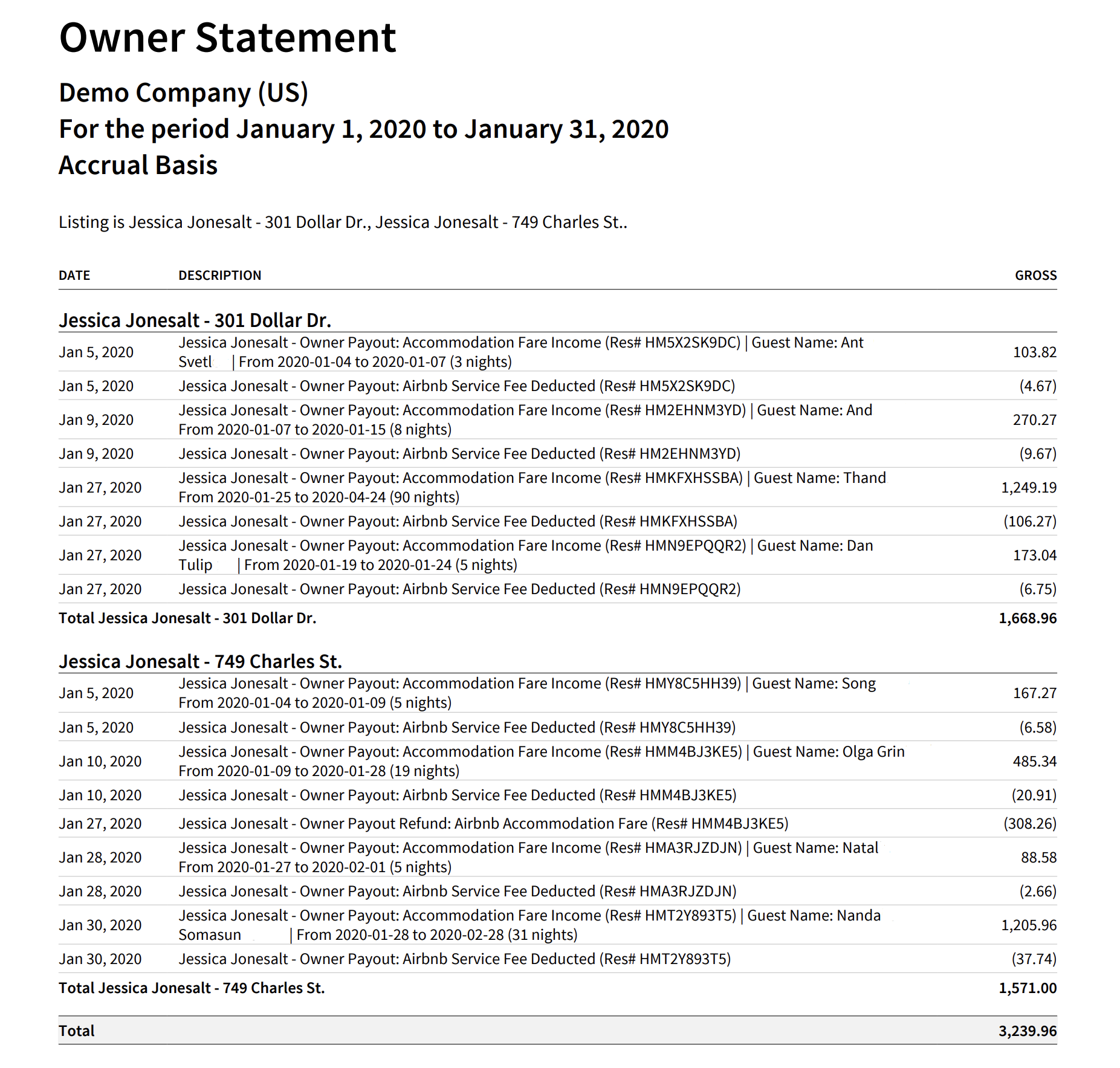
You will be able to show each owner, in great detail, precisely how much they’ve earned for each listing. The transaction report below provides a snapshot of what they’ve earned during a single month. This statement can be sent out each month so that owners can see how much they’re earning and the value of your services.
The example below is an owner statement for Berry Randalt, which has one listing:
Here’s how to create the above Owner Statement by Listing in Xero:
From here this statement can be saved as a custom report and re-used every month for the owner.
Integrity is the cornerstone of any successful property management business, and a well-designed accounting process is essential to operating with clarity and control. In this guide, we’ve introduced an alternative approach to trust accounting—one that many property managers of Airbnb listings are adopting because it requires significantly less administrative overhead while still delivering the level of diligence owners expect. This method also presents a clearer, more substantial revenue profile for the management company, supporting stronger financial positioning when seeking business loans.
Ultimately, this approach enhances transparency not only for your property owners but also for you as the management company, giving you deeper insight into the true performance of your business. We hope this guide has provided meaningful value as you continue to build and strengthen your firm.
Finally, there are other business models that are not covered in this guide but are covered better in the following guides. Be sure to check these out :
An in-depth discussion about HostAway accounting and bookkeeping using popular accounting software, QuickBooks. Accordingly, we…
This guide is a comprehensive method of accounting for those who need to follow thorough…
For short-term rentals, many jurisdictions do not require licensing or strict trust accounting rules for…
Rental Arbitrage is a business model where an operator rents a property from an owner…
A vacation rental investment property is a business model in which an operator purchases a…
This guide provides an in-depth discussion of using QuickBooks for Airbnb. We include chart of…