

Why should you read this guide?
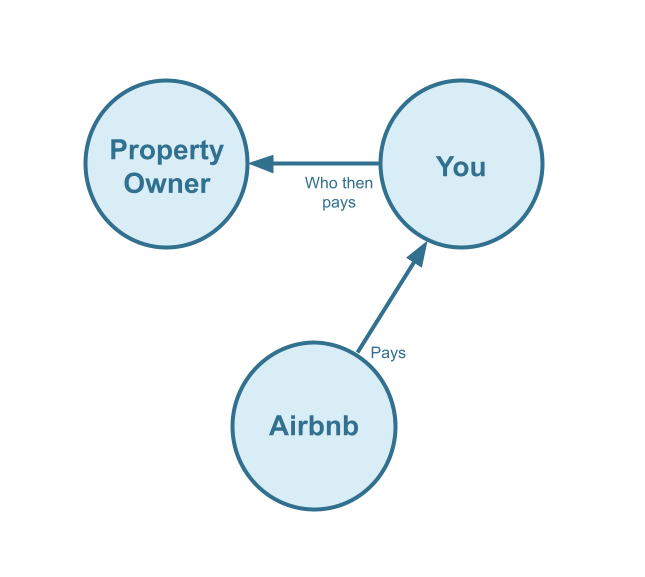
This guide explains property management accounting for Airbnb listings using QuickBooks. Many jurisdictions do not require licensing or strict trust accounting rules for short-term rental managers. For that reason, this guide presents an alternative accounting method designed for property managers who do not use a trust account. In this approach, all funds received from Airbnb are recorded as income by the property management company, and the owner’s share is treated as a direct cost.
Although this method is not the most traditional, it is widely used for two primary reasons. First, it is far simpler than trust accounting, requiring less data entry, setup, and ongoing training. Second, it allows the property management company to report higher income, which can be advantageous when applying for business loans. If your jurisdiction does not mandate trust accounting, this straightforward method may be worth considering.
DISCLAIMER: If you operate in a jurisdiction that legally requires short-term rental property managers to use a trust account, this accounting method is not appropriate. There are plenty of jurisdictions that consider property managers as custodians with a fiduciary responsibility to the property owner, which requires a more comprehensive trust accounting method.
Note: For a complete guide to QuickBooks for Airbnb, see Airbnb & QuickBooks: A Comprehensive Guide.
Table of Contents
What you’ll get from this guide:
- QuickBooks Chart of Accounts Template for Property Managers of Airbnb Listings
- How to Automate Accounting for Airbnb Listings
- Execute Common Transaction Workflows in QuickBooks
- Generate Monthly Reports and Owner Statements in QuickBooks
Cash Flow Diagram
Who should not read this guide?
There are other business models that may be a better fit for your situation, and these are covered in more detail in the following guides:
- QuickBooks for Airbnb Listings: Trust Accounting for Property Managers
- QuickBooks for Airbnb Listings: Co-Host Accounting
- QuickBooks for Airbnb Listings: Rental Arbitrage Accounting
- QuickBooks for Airbnb Listings: Investment Property Accounting
- All QuickBooks Templates for Airbnb
- Airbnb Accounting & Bookkeeping: A Comprehensive Guide
QuickBooks Chart of Accounts Template for Property Managers on Airbnb
We will now walk through our chart of accounts template in detail. Using this template, you can create a well-organized system for tracking and managing all Airbnb revenue.
Account Codes
| No. | Account | Type |
|---|---|---|
| 24000 | Rental Liability | Liability |
| 24100 | Rental Liability: Airbnb Owner Funds Payable | Liability |
| 24200 | Rental Liability: Airbnb Custom Taxes Payable | Liability |
| 42000 | Rental Revenue | Revenue |
| 42100 | Rental Revenue: Airbnb Income – Accommodation Fare | Revenue |
| 42200 | Rental Revenue: Airbnb Income – Cleaning Fee | Revenue |
| 42300 | Rental Revenue: Airbnb Income – Resolution Adjustment | Revenue |
| 42400 | Rental Revenue: Airbnb Refund – Accommodation Fare | Revenue |
| 42500 | Rental Revenue: Airbnb Refund – Cleaning Fee | Revenue |
| 42600 | Rental Revenue: Airbnb Refund – Resolution Adjustment | Revenue |
| 51000 | Rental Costs | Cost of Service |
| 51100 | Rental Costs: Airbnb Service Fee | Cost of Service |
| 51200 | Rental Costs: Airbnb Amounts Due to Owner | Cost of Service |
| 61100 | Airbnb Tax Withholdings | Expense |
NOTE: In this guide, we only cover income accounting, not costs. For a guide about Airbnb costs and chart of accounts to consider, check out this guide instead: Accounting for Costs to Operate Airbnb Listings: Best Chart of Accounts
Detailed Explanation of Accounts
Each account in this chart is clearly defined below. This accounting method is designed for property managers of Airbnb listings who do not use a trust account. Instead, the property manager’s operating account is used to collect Airbnb funds and issue payouts to owners. Because of this, amounts paid to owners are treated as a business expense and balanced against an Owner Funds Payable account. Read below for detailed explanations of each account.
Rental Liability
24000 – Rental Liability – This is a parent account with child accounts that account for rental liabilities.
24100 – Rental Liability: Airbnb Owner Funds Payable – This account tracks Airbnb funds payable to owners. This is for property management businesses that do not use a trust account to manage funds.
24200 – Rental Liability: Airbnb Custom Taxes Payable – This represents all Custom Taxes collected from Airbnb and payable to a tax authority.
Rental Revenue
42000 – Rental Revenue – This is a parent account with child accounts that account for rental revenue.
42100 – Rental Revenue: Airbnb Income – Accommodation Fare – This account tracks the accommodation fare portion of each Airbnb reservation. The accommodation fare is equal to the number of nights multiplied by the average nightly rate of each reservation.
42200 – Rental Revenue: Airbnb Income – Cleaning Fee – This account tracks the cleaning fee portion of each Airbnb reservation.
42300 – Rental Revenue: Airbnb Income – Resolution Adjustment – This account tracks any resolution adjustments collected from Airbnb.
42400 – Rental Revenue:Airbnb Refund – Accommodation Fare – This account tracks accommodation fare refunds executed by Airbnb..
42500 – Rental Revenue: Airbnb Refund – Cleaning Fee – This account tracks cleaning fee refunds executed by Airbnb.
42600 – Rental Revenue: Airbnb Refund – Resolution Adjustment – This account tracks resolution adjustment refunds executed by Airbnb.
Rental Costs
51000 – Rental Costs – This is a parent account with child accounts that account for rental costs.
51100 – Rental Costs: Airbnb Service Fee – This account tracks service fee costs from Airbnb for each reservation, which is subtracted from the income.
51200 – Rental Costs: Airbnb Amounts Due to Owner – This account tracks amounts paid to owners as a cost to the business. This account is for property management businesses that do not use a trust account to manage funds.
61100 – Airbnb Tax Withholdings – This account tracks any taxes withheld by Airbnb for income tax obligations. This is very rare and usually due to the Airbnb account holder lacking tax identification information. Ideally, this account should not contain any balance and is seldom (if ever) used. To avoid income tax withholdings from Airbnb, be sure to update your Airbnb account with your tax identification information and verify your account.
Accounts not included in this template
For the purposes of this guide, we focus primarily on Airbnb revenue recognition. It’s important to note that our template does not include many general accounts. We also reference several accounts that are not part of this specific template, which we’ve listed below:
- 11000 – Airbnb Payment Clearing Account – This account is created by Tallybreeze but is not included in this template in particular. This account is used to apply payments to Airbnb invoices upon the day the Airbnb reservation payout is posted. Payouts can take 3-5 days (or longer) to arrive in the bank account after posted from Airbnb. Monies owed are held in this clearing account until the payouts are received in the bank. This account also helps to automate the reconciliation process in QuickBooks.
- 1XXXX – Operations Bank Account – This is your business operations bank account set up with your financial institution. It’s a cash asset account to facilitate your property management company’s day-to-day business operations.
- 4XXXX – Billable Expenses Income – This is a general account for capturing income received for the payment of billable expenses by owners, which may include a markup.
- 7XXXX – Billable Expenses – This is a general account for tracking billable expenses for any owners.
Quick Setup Steps
Here’s how to import the above chart of accounts template. All of the accounts discussed in this article can be imported into QuickBooks automatically using Tallybreeze’s setup tools. Here’s how to access this utility…
- If you haven’t already, Sign Up to Tallybreeze. It includes free use of this template.
- Once registered, go to the Connections manager in Tallybreeze. Connect your Airbnb account, connect your QuickBooks Online account and then create a connection between the two.
- Within the Connection settings, select “Set Up QuickBooks”
- Select your business model from the drop-down list at the top and select “Import Template to QuickBooks”.
How to Automate Accounting for Airbnb Listings
Airbnb accounting can be automated using Tallybreeze, which allows property management companies to reconcile reservations in detail and allocate payments to owners on the fly. Each reservation made through Airbnb is automatically retrieved and processed according to the accounting rules you configure in Tallybreeze. In the following sections, we’ll explain how this automation works using the chart of accounts described above.
Tallybreeze Listing Presets
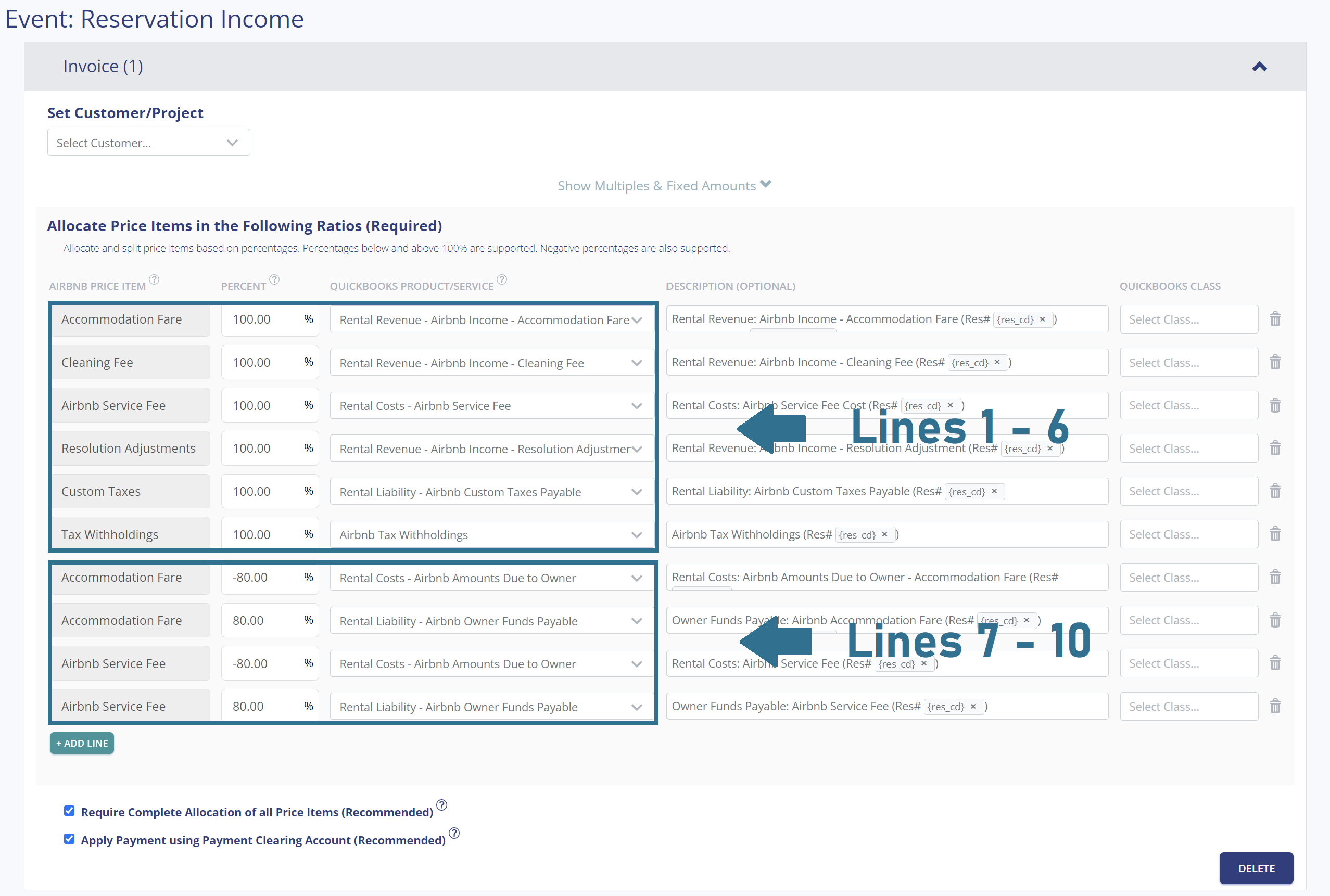
Once you connect your Airbnb and QuickBooks accounts, Tallybreeze guides you through setting up the accounting rules for each listing. When you select Edit on a property, Tallybreeze provides preset options and ready-made templates tailored to various Airbnb business models. After choosing the model for property management, the presets below can be organized into two main groups: Lines 1–6 and Lines 7–10, respectively:
Explanation of Preset Lines
To learn more about each preset group, click on the corresponding dropdown.
Lines 1-6: All amounts received by Airbnb are 100% allocated as revenue
This group of lines allocates 100% of all income from Airbnb as revenue to the business. This includes the accommodation fare, cleaning fee, Airbnb service fee (as a deduction), any resolution adjustments, custom taxes (if applicable), and any tax withholdings.
| Airbnb Price Item | % | Account |
|---|---|---|
| Accommodation Fare | 100% | 42100 – Rental Revenue: Airbnb Income – Accommodation Fare |
| Cleaning Fee | 100% | 42200 – Rental Revenue: Airbnb Income – Cleaning Fee |
| Airbnb Service Fee | 100% | 51100 – Rental Costs: Airbnb Service Fee |
| Resolution Adjustment | 100% | 42300 – Rental Revenue: Airbnb Income – Resolution Adjustment |
| Custom Taxes | 100% | 24200 – Rental Liability: Airbnb Custom Taxes Payable |
| Tax Withholdings | 100% | 61100 – Airbnb Tax Withholdings |
Lines 7-10: Allocate 80% of the accommodation fare and service fee as a cost payable to the owner.
This group of lines allocates 80% of the accommodation fare to the owner, it also allocates 80% of the Airbnb service fee, which is subtracted from the amounts owed to the owner.
| Airbnb Price Item | % | Account |
|---|---|---|
| Accommodation Fare | -80% | 51200 – Rental Costs: Airbnb Amounts Due to Owner |
| Accommodation Fare | 80% | 24100 – Rental Liability: Airbnb Owner Funds Payable |
| Airbnb Service Fee | -80% | 51200 – Rental Costs: Airbnb Amounts Due to Owner |
| Airbnb Service Fee | 80% | 24100 – Rental Liability: Airbnb Owner Funds Payable |
Example Reservation
Let’s say you’ve configured Tallybreeze for this listing using the preset settings above. Now imagine Airbnb sends a payout for a reservation with the following itinerary price items:
- Accommodation Fare: $2000
- Cleaning Fee: $300
- Airbnb Service Fee: -$60
- Airbnb Transient Occupancy Taxes: $200
- Reservation Total: $2440
First, Tallybreeze records all income received from Airbnb, separating each price item. The total amount due from Airbnb for this reservation is $2,440, which is allocated to the Airbnb Payment Clearing Account and later reconciled with the corresponding bank deposit.
| Account | Debit | Credit |
|---|---|---|
| 42100 – Rental Revenue: Airbnb Income – Accommodation Fare | $2000 | |
| 42200 – Rental Revenue: Airbnb Income – Cleaning Fee | $300 | |
| 51100 – Rental Costs: Airbnb Service Fee | $60 | |
| 24200 – Rental Liability: Airbnb Custom Taxes Payable | $200 | |
| 11000 – Airbnb Payment Clearing Account (Asset) | $2440 |
Next, within the same invoice, Tallybreeze calculates 80% of the accommodation fare ($2,000 × 80% = $1,600) and records it as a cost payable to the owner. It then calculates 80% of the Airbnb service fee (-$60 × 80% = -$48), subtracts this amount from the owner’s cost, and reduces the total owed accordingly:
| Account | Debit | Credit |
|---|---|---|
| 51200 – Rental Costs: Airbnb Amounts Due to Owner | $1600 | |
| 24100 – Rental Liability: Airbnb Owner Funds Payable | $1600 | |
| 51200 – Rental Costs: Airbnb Amounts Due to Owner | $48 | |
| 24100 – Rental Liability: Airbnb Owner Funds Payable | $48 |
Finally, on the date the reservation payout is deposited by Airbnb into your Operations Bank Account (typically 3–5 days later), a bank rule in QuickBooks can automatically reconcile the deposit to the Airbnb Payment Clearing Account:
| Account | Debit | Credit |
|---|---|---|
| 1XXXX – Operations Bank Account | $2440 | |
| 11000 – Airbnb Payment Clearing Account (Asset) | $2440 |
Set Invoice Customer & Class Categories
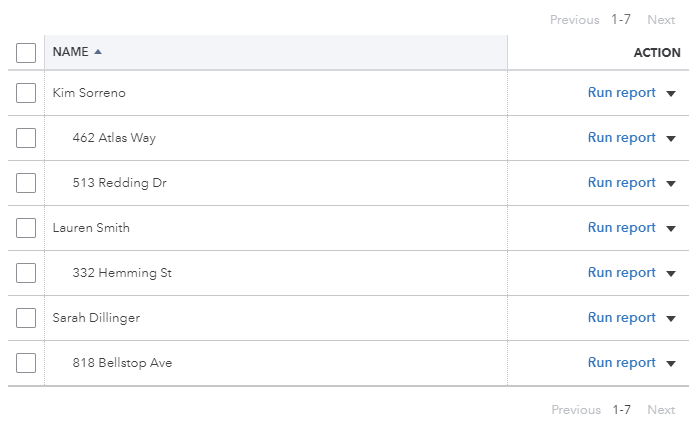
In your Tallybreeze listings, we recommend setting the owner as the customer for each invoice. We also suggest creating two classes in QuickBooks: a parent class for the owner and a sub-class for the specific listing. See the example below:
Automate Additional Bills & Invoices (Optional)
With Tallybreeze, you’re also able to automate the creation of additional bills and invoices for each reservation. Consider the following:
- Create a bill to set payouts payable to the property owner for each reservation.
- Create a bill to set amounts payable to a tax authority for each reservation.
- Create a bill to set amounts payable to a cleaning service for turnover of each reservation.
- Create additional invoice to set amounts receivable by any third party for each reservation.
Quick Setup Steps
All of the above settings can be quickly set up using Tallybreeze’s presets for your listings. Here’s how to set up these presets…
- If you haven’t already, Sign Up to Tallybreeze.
- After logging into Tallybreeze, set up your connections, then go to Listing Rules.
- Select any listing you’d like to automate that hasn’t already been set up.
- Select “Load Presets”.
- Select your business model from the options.
From here, presets will be loaded as your listing accounting rules and you can edit as needed.
Execute Common Transaction Workflows in QuickBooks
For property managers of Airbnb listings, there are several additional types of transactions in QuickBooks that you’ll need to incorporate into your accounting process for owners and other parties. This section outlines the most common workflows.
Paying Owners
To determine how much is owed to an owner, review the balance sheet and filter by the owner’s class category. The amount due will appear under “24100 – Rental Liability: Airbnb Owner Funds Payable”.
Example Transaction
You, as the property management company, are holding $20,000 in the “24100 – Rental Liability: Airbnb Owner Funds Payable” account for the owner, Kim Sorreno, for the listing at 462 Atlas Way. You’d like to pay this amount to the owner as part of the month-end report.
First, send the owner the funds via bank transfer, ACH, check, or another approved method. Once the transfer has posted, reconcile the outgoing transaction from the Operations Bank Account using the following entry:
| Debit | Credit | Class Category | |
|---|---|---|---|
| 1XXXX – Operations Bank Account (Asset) | $20,000 | Kim Sorreno: 462 Atlas Way | |
| 24100 – Rental Liability: Airbnb Owner Funds Payable | $20,000 | Kim Sorreno: 462 Atlas Way |
Detailed instructions for QuickBooks Online
1. Find the amount to pay
The amount that needs to be paid to each owner can be found in the balance sheet. Filtering the balance sheet by the class for each owner, look up the total amount under “24100 – Rental Liability: Airbnb Owner Funds Payable”.
2. Create Bill
| Vendor | Category | Description | Class |
|---|---|---|---|
| Kim Sorreno | 24100 – Rental Liability: Airbnb Owner Funds Payable | “Owner Payout” | Kim Sorreno: 462 Atlas Way |
- Set Vendor to the name of the owner
- Set Category to “24100 – Rental Liability: Airbnb Owner Funds Payable”
- Set Description to “Owner Payout”
- Set Amount to the balance found in Step 1.
- Set Class to owner’s name and listing
3. Transfer the amount from your operations bank account to the owner
Once you’ve verified the amount, go to your bank and send the money via bank transfer, ACH, check or other means.
4. Reconcile trust bank account amount with bill
Reconcile the bill with the bank feed in QuickBooks
Paying Expenses on Behalf of Owners
There may be situations where you need to purchase items for an owner’s property using your operations bank account. This typically occurs when something must be fixed immediately, such as a small maintenance issue during a guest check-in. If your agreement with the owner allows it, you can cover the expense from your operations account and deduct the amount from what is owed to the owner under “51200 – Rental Costs: Airbnb Amounts Due to Owner”. See the example below:
Example
A property owned by Kim Sorreno needs a bathroom faucet replaced by a professional plumber. The service costs $200 and must be addressed quickly, as guests are checking in later today. You also charge a 10% markup for coordinating and funding these types of repairs on the owner’s behalf.
First, pay the plumbing company from your Operations Bank Account, whether by bank transfer, ACH, check, Venmo, or another method. Once the payment has posted, record the outgoing transaction from your Operations Bank Account using the following entry:
| Debit | Credit | Class Category | |
|---|---|---|---|
| 1XXXX – Operations Bank Account (Asset) | $200 | Kim Sorreno: 462 Atlas Way | |
| 7XXXX – Billable Expenses (Expense) | $200 | Kim Sorreno: 462 Atlas Way |
Next, record an entry to deduct this amount from what you owe the owner under “51200 – Rental Costs: Airbnb Amounts Due to Owner”. Be sure to include the 10% markup for coordinating and funding the service, and allocate that portion to your billable expenses income account. Use the following entry:
| Debit | Credit | Class Category | |
|---|---|---|---|
| 51200 – Rental Costs: Airbnb Amounts Due to Owner | $220 | Kim Sorreno: 462 Atlas Way | |
| 4XXXX – Billable Expenses Income (Revenue) | $220 | Kim Sorreno: 462 Atlas Way |
Detailed instructions for QuickBooks Online
1. After paying the service provider, categorize and reconcile the transaction in your operations bank feed
| Payee | Category | Description | Amount | Class |
|---|---|---|---|---|
| Plumber Pro | 7XXXX – Billable Expenses (Expense) | “Billable Expense: Bathroom Faucet Replaced” | $200 | Kim Sorreno: 462 Atlas Way |
2. Create a Journal Entry
Include a 10% markup ($220 total)
| Account | Debit | Credit | Description | Name | Class |
|---|---|---|---|---|---|
| 51200 – Rental Costs: Airbnb Amounts Due to Owner | $220 | “Billable Expense: Bathroom Faucet Replaced” | Kim Sorreno | Kim Sorreno: 462 Atlas Way | |
| 4XXXX – Billable Expenses Income (Revenue) | $220 | “Billable Expense: Bathroom Faucet Replaced” | Kim Sorreno | Kim Sorreno: 462 Atlas Way |
Remitting Custom Taxes
Airbnb typically collects transient occupancy taxes and remits them to local tax authorities on your behalf, but you can choose to receive these taxes directly and manage the payments yourself. The Custom Taxes line in Tallybreeze will automatically capture any taxes collected, our presets are designed specifically for this. You can then remit the taxes to the local authority on your own schedule, as shown in the example below:
Example
The owner, Kim Sorreno, has a listing at 462 Atlas Way where Airbnb is configured to collect custom taxes for all reservations. In Tallybreeze, these amounts are allocated to “24200 – Rental Liability: Airbnb Custom Taxes Payable”. After running a balance sheet report for this listing in QuickBooks, you see that $1,000 is owed in transient occupancy taxes.
First, send the payment to the tax authority, whether by bank transfer, ACH, check, or another method. Once the transaction has posted, record the outgoing payment from the Operations Bank Account using the following entry:
| Debit | Credit | Class Category | |
|---|---|---|---|
| 1XXXX – Operations Bank Account (Asset) | $1,000 | Kim Sorreno: 462 Atlas Way | |
| 24200 – Rental Liability: Airbnb Custom Taxes Payable | $1,000 | Kim Sorreno: 462 Atlas Way |
Detailed instructions for QuickBooks Online
1. Check how much exists in the Custom Taxes Payable account for the owner
The amount that needs to be paid to the tax authority can be found in the balance sheet. Filtering the balance sheet by the class for each owner, look up the total amount under “24200 – Rental Liability: Airbnb Custom Taxes Payable”.
2. Create Bill
| Vendor | Category | Description | Class |
|---|---|---|---|
| Tax Authority | 24200 – Rental Liability: Airbnb Custom Taxes Payable | “Taxes Paid: 11% City TOT” | Kim Sorreno: 462 Atlas Way |
- Set the vendor of the bill to the name of the tax authority
- Set the Product/Service to “24200 – Rental Liability: Airbnb Custom Taxes Payable”
- Set a detailed description, starting with “Taxes: ” and describe the tax
- Set the class to the owner’s name and listing
3. Transfer the amount from your operations bank account to the tax authority
Send the money via bank transfer, ACH, check or other means.
4. Reconcile operations bank account statement line amount with bill
Reconcile the bill with the bank feed in QuickBooks
Generate Monthly Reports and Owner Statements in QuickBooks
Now that your data is automatically pulled from Airbnb and accurately synced into QuickBooks, generating statements and reports becomes effortless. Each month, you can produce clear, professional copies for both owners and internal stakeholders with ease.
Monthly Owner Statement by Listing
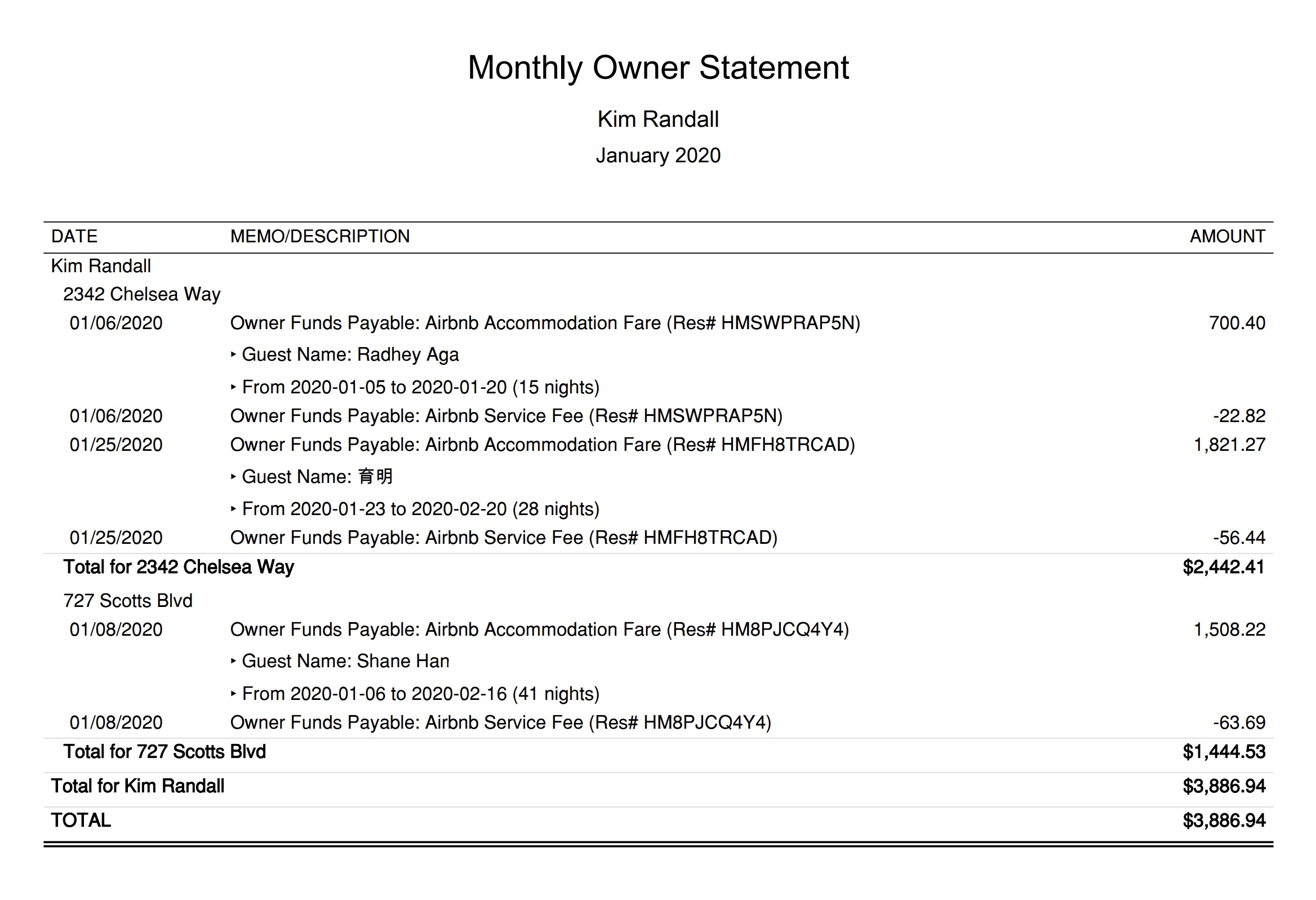
The detailed transaction report below provides a clear snapshot of what the owner earned for each listing during the month. This statement can be sent to owners monthly, with activity grouped by listing so they can easily compare earnings across their properties. The example below shows an owner statement for Kim Randall, who has two listings:
Quick Setup Steps
Here’s how to create this Owner Statement by Listing in QuickBooks Online:
- In QuickBooks Online, go to Reports, select “Transaction Detail by Account”
- Select the report period (perhaps the previous month)
- Select “Customize” and select the following
- Under “Rows/Columns” select to Group by “Class”
- Select “Change columns” and remove all columns except “Date”, “Memo/Description” and “Amount”
- Under “Filter” select “Distribution Account” and select only the account “Rental Liability: Airbnb Owner Funds Payable”
- Under “Filter” select “Class” and select the owner and their respective listings you want to report
- Sort by “Date” ascending order
- Select “Run Report”
From here this statement can be saved as a custom report and re-used every month for the owner.
Profit & Loss by Customer
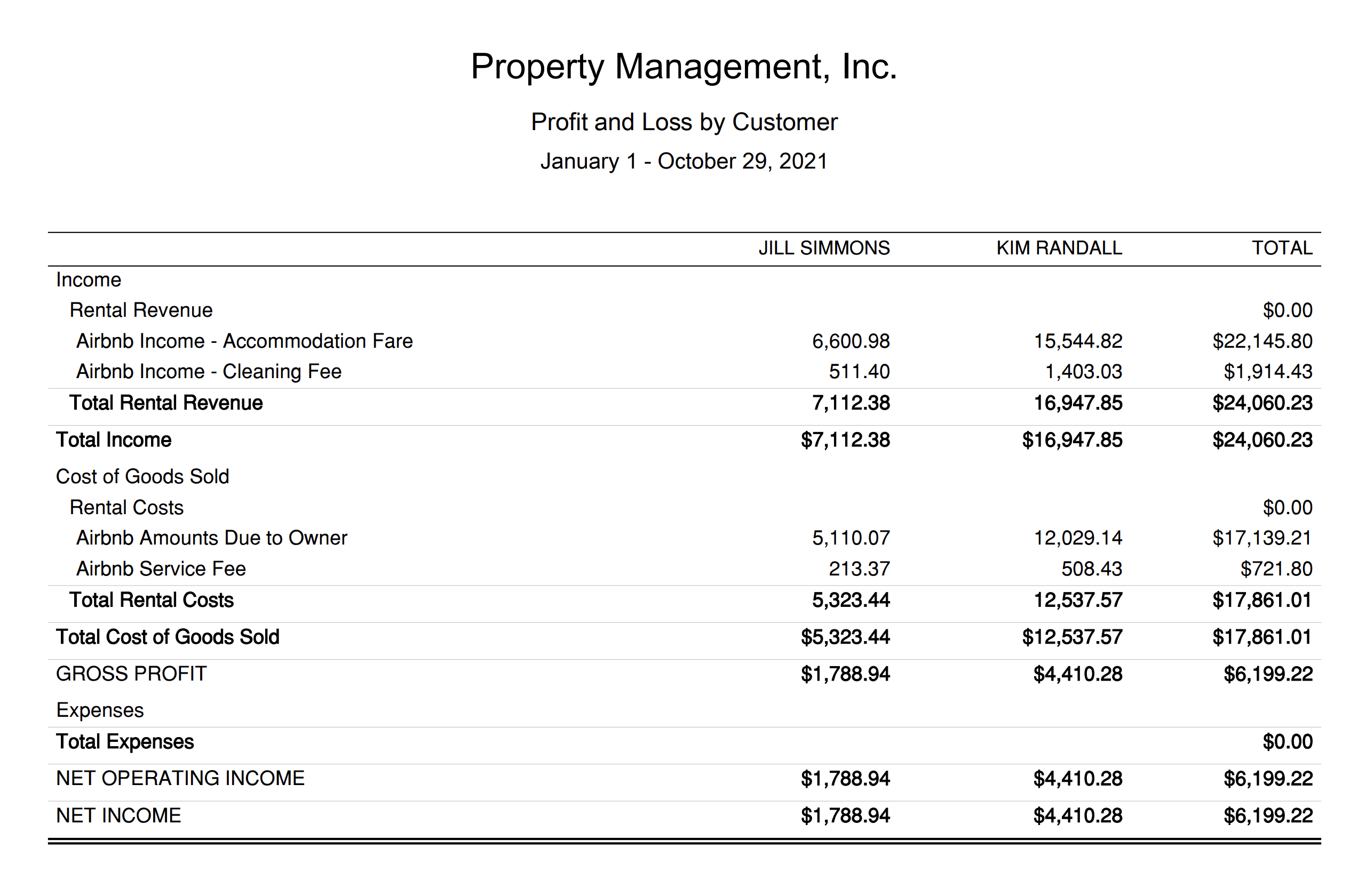
This report is designed specifically for the property manager. It shows how much your company earns (or loses) on a per-listing basis, giving you insight into which types of owners are most profitable and which relationships may need to be reconsidered or renegotiated. You can find this report in QuickBooks under “Reports” as “Profit and Loss by Customer”:
Conclusion
Paying owners accurately requires both strong integrity and a streamlined accounting process. Because many jurisdictions do not mandate trust accounting, many property managers of Airbnb listings choose the method outlined in this guide. It is far simpler to implement than trust accounting, and because all Airbnb revenue is recognized as income to the management company, it can also make securing a business loan easier.
This method offers excellent transparency for owners, but just as importantly, it provides you, the property management company, with clear insight into the performance and profitability of your business. We hope this guide has been valuable as you continue to build and strengthen your firm.
Finally, there are other business models that are not covered in this guide but are covered better in the following guides. Be sure to check these out :
- QuickBooks for Airbnb Listings: Trust Accounting for Property Managers
- QuickBooks for Airbnb Listings: Co-Host Accounting
- QuickBooks for Airbnb Listings: Rental Arbitrage Accounting
- QuickBooks for Airbnb Listings: Investment Property Accounting
- All QuickBooks Templates for Airbnb
- Airbnb Accounting & Bookkeeping: A Comprehensive Guide
11 thoughts on “QuickBooks for Airbnb: Property Management without Trust Accounting”
Comments are closed.