

Reconciling Guesty payouts in QuickBooks Online is rarely a one-to-one matching exercise. A single deposit often represents multiple reservations, reduced by Guesty service fees, refunds, adjustments, and, in some cases, taxes—along with advance guest deposits, which must be accounted for differently than earned revenue. As a result, the cash that hits your bank account almost never matches your true gross revenue. This guide explains how Guesty payouts actually flow, how to separate each component for clean, defensible accounting, and how to streamline reconciliation in QuickBooks Online—especially when using Tallybreeze to automate the heavy lifting and eliminate manual guesswork.
Note: If you haven’t already, be sure to review our comprehensive guide to Guesty Accounting
Why Guesty Payouts Don’t Reflect What you Actually Earn
Many property managers make a costly accounting mistake by reporting only the net payout that lands in their bank account. This approach understates gross revenue—a common audit red flag—and simultaneously erases legitimate deductions such as Guesty service fees and guest refunds.
The issue stems from classifying Guesty payouts incorrectly. Guesty deducts its fees and any applicable refunds before releasing funds, so the bank deposit reflects only a net figure, not the full financial activity tied to each reservation.
Accurate, audit-ready accounting requires decomposing each payout into its underlying components and recording them separately. For an individual Guesty reservation, a payout is properly defined as:
Payout = Accommodation Fare + Cleaning Fee − Guesty Service Fee − Refunds To maintain clean, defensible books, each element of this equation must be mapped to the appropriate chart-of-accounts category in QuickBooks. Recording only the net payout as income obscures true performance, misstates revenue and expenses, and creates compounding inaccuracies over time.
What Tallybreeze Syncs from Guesty into QuickBooks
To address this discrepancy, each payout must be decomposed down to the individual reservation level. Every line item should be recorded separately and assigned to the appropriate account in your accounting system to ensure accurate, defensible financials.
| Guesty Line Item per Reservation | Why it Matters |
| Guesty Income – Accommodation Fare | This represents your primary revenue and reflects the value of the lodging provided to the guest. Calculated as the number of nights stayed multiplied by the nightly rate, it typically makes up the largest portion of the reservation total. It must be recorded separately to ensure accurate revenue recognition, proper accrual accounting, and clear financial reporting. |
| Guesty Income – Cleaning Fee | While included in the payout, the cleaning fee represents a separate revenue category from lodging. It reflects income earned for preparing and servicing the property, not for providing the stay itself. Recording it separately from accommodation revenue ensures proper cost matching, improves financial clarity, and enables accurate analysis of cleaning-related profitability. |
| Guesty Income – Additional Charges | This category captures any supplemental income beyond the accommodation fare and cleaning fee. It may include pet fees, extra guest fees, early check-in or late check-out fees, damage waivers, resort fees, or other custom charges applied to the reservation. Because these amounts are variable and operational in nature, they should be recorded separately to preserve visibility into ancillary revenue streams, ensure accurate financial reporting, and support detailed profitability analysis by fee type. |
| Guesty Application Fee | Guesty deducts its service fee from each reservation prior to releasing the payout. This fee represents a legitimate operating expense and must be recorded separately—not netted against revenue. Properly classifying it as an expense preserves gross revenue visibility, ensures accurate expense reporting, and maintains clean, audit-ready financial statements. |
| Payment Processing Fee | This fee reflects the cost of processing guest payments through Guesty’s payment system or Stripe. It should be recorded as a separate merchant processing expense—not netted against revenue—to ensure accurate gross revenue reporting and clear visibility into payment-related costs. |
| Taxes Payable | If you collect occupancy or lodging taxes from guests, this line item represents funds held in trust that must be remitted to the appropriate tax authority. These amounts are not revenue—they are liabilities. Recording them separately ensures accurate financial reporting, maintains compliance, and prevents overstating income. |
| Guesty General Refunds | This line item represents amounts returned to guests due to cancellations, adjustments, or service issues. Refunds should be recorded separately to preserve accurate gross revenue reporting and maintain a clear audit trail of all reservation activity. |
| Advanced Guest Deposits | When you receive payment for a reservation that occurs in a future period, the funds are considered an advance guest deposit. These amounts should not be recognized as income when received, because the stay—and therefore the earning of that revenue—has not yet occurred. Instead, they must be recorded as a liability and recognized as income only once the reservation takes place. |
How to Reconcile Guesty Payouts in QuickBooks Online with Tallybreeze
1. Connect Guesty & QuickBooks
In Tallybreeze, select “Connection” and add both your Guesty and QuickBooks Online accounts.
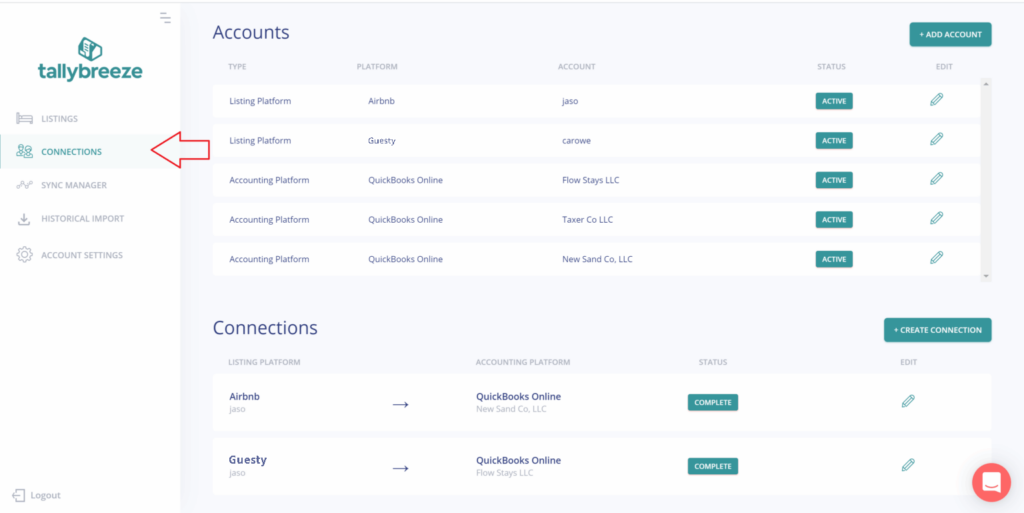
From there, connect Guesty to QuickBooks, configure your payment clearing and suspense accounts, and save the connection.
For more details on this step, see article: Connect your Guesty and QuickBooks accounts
2. Setup your Guesty Listings Rules
In Tallybreeze, select “Listing Rules” on the left menu and select to edit any listing by clicking its edit link on the right.
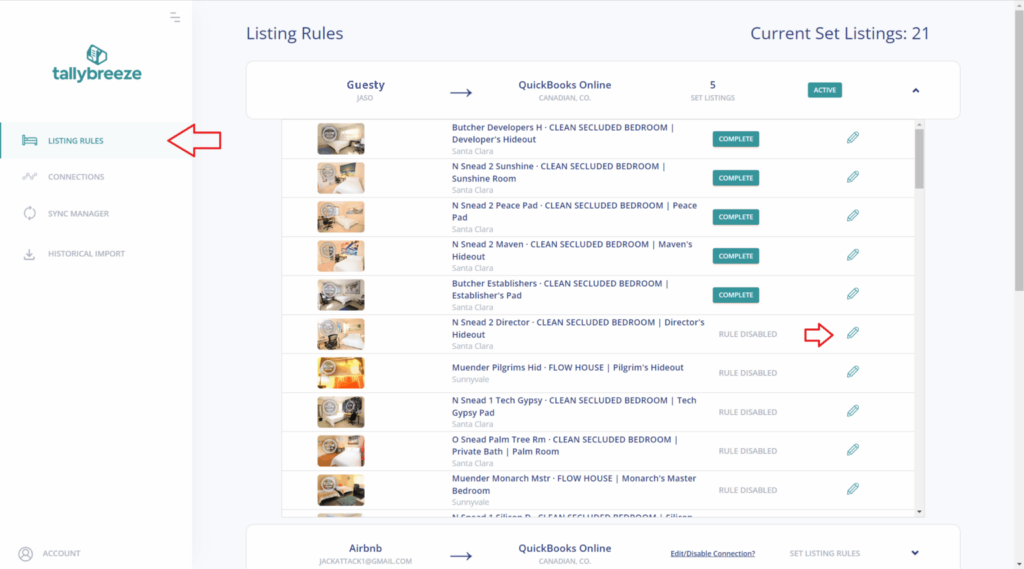
From there set up your listing rules by using a template (details below) or setup manually with your own chart of accounts. For more details on this step, see article: Enable your first Guesty listing
3. Import and Sync Reservations from Guesty to QuickBooks
- Navigate to Historical Import in the left menu and confirm that your connection is selected at the top.
- Review the Start and End Dates – begin by importing the current month and the previous month (both are free during your trial).
- Check the reservations you want to bring in, then click Import Selected to Sync Manager.
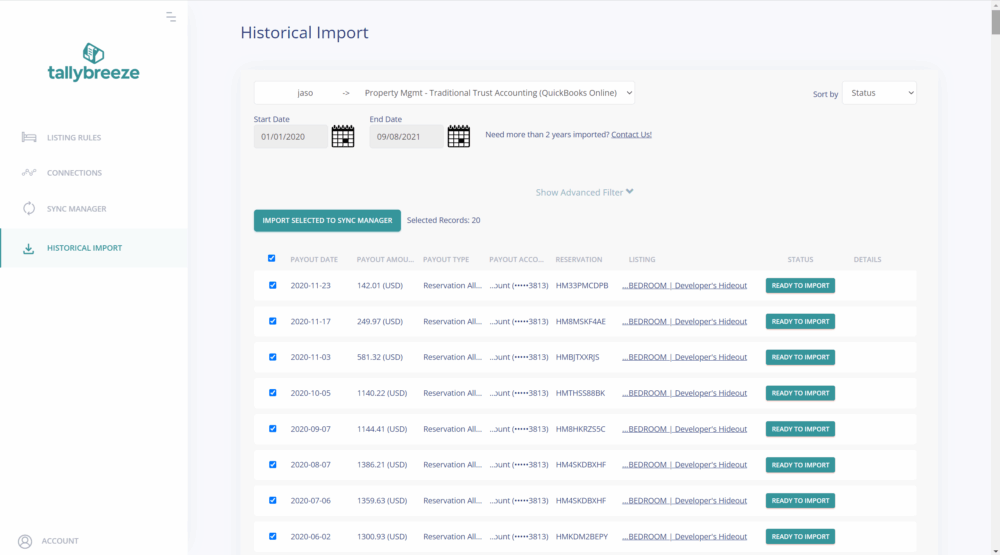
As new reservations are created, Tallybreeze automatically syncs them into your Sync Manager and itemizes every component—including Accommodation Fare, Cleaning Fee, Guesty fees, and occupancy taxes (etc…). Each payout is reconstructed from its underlying line items, ensuring the running balance ties exactly to the net deposit from Guesty and keeps your books continuously aligned with real-time financial activity.
For more details on this step, see article: Import and sync reservations
4. Match Guesty Bank Deposits in QuickBooks
When a Guesty payout appears in your QuickBooks Online bank feed, navigate to the Banking tab and review the suggested match to the transfer from your clearing account. With a single click on Match, reconciliation is complete—transforming what was once a manual reconstruction into a simple verification step. For even greater efficiency, you can create a bank rule to automatically assign Guesty deposits to the clearing account, further streamlining the reconciliation process.
Guesty Accounting Templates
In Guesty accounting, different business models require different chart-of-accounts templates. Each model classifies financial activity differently, so the correct setup depends entirely on how your business operates.
For example, if you own the Guesty property, 100% of the accommodation fare is recognized as your income. However, if you operate as a property manager using a trust account, the accommodation fare belongs to the trust—not to you. In that case, only your management commission (e.g., 20%) is recognized as income.
Because each model follows a distinct accounting flow, the chart of accounts must be tailored accordingly. Explore the templates below to understand how each business model works and which structure best fits your operation.
- Investment Property Accounting
- Rental Arbitrage Accounting
- Property Management Accounting without a Trust Account
- Trust Accounting for Property Managers
- Vacation Rental Cost Accounting and Chart of Accounts to Consider
Occupancy Taxes
In jurisdictions where occupancy taxes must be collected and remitted, Guesty enables you to receive these funds directly, making you responsible for reporting and remitting them to the appropriate tax authority.
In QuickBooks Online, you can determine the amount owed by navigating to Reports → Balance Sheet, selecting the appropriate reporting period, and filtering by the class assigned to your listing. Locate the occupancy tax liability account; the balance shown represents the amount currently owed to the tax authority.
If your jurisdiction requires supporting documentation, you can run an Account Transaction report filtered by both the listing’s class and the tax liability account. This provides a clear, auditable record of all taxes collected and outstanding.
Benefits of using Tallybreeze to Reconcile Guesty in QuickBooks
Tallybreeze gives Guesty operators and property managers accounting that scales without adding friction. It delivers clean, automated reservation data directly into QuickBooks, eliminating manual fixes and ensuring clear visibility into every dollar.
It handles accruals, advanced deposits, reconciliation, and tax allocations with precision – and continues to unify your financials as you expand to channels like Airbnb or Vrbo and payment methods like Stripe or GuestyPay.
Because QuickBooks stays your system of record, you maintain full control. Connect unlimited Guesty or Vrbo accounts, customize workflows for any business model, and roll back or redo any synced reservation. Every fare, fee, and tax is tracked accurately at the listing level for complete clarity.
Teams consistently notice immediate improvements:
- No more data juggling, reservations sync cleanly into QuickBooks. Your finance workflows move faster because the numbers arrive organized, complete, and ready for reporting.
- Every revenue and cost component lands in the proper chart-of-accounts category. Guesty fees, refunds, taxes, commissions, and adjustments are all posted precisely—strengthening your profitability analysis.
- Listing-level performance becomes clearer and more actionable. You can quickly see which listings perform, which underperform, and which markets or strategies merit expansion.
- Reconciliation stays effortless—even during peak seasons. Higher booking volume no longer leads to higher workload or stress.
- Month-end closes become smooth and consistent. Cleaner data means leadership gets timely insights with greater confidence.
- Historical cleanup becomes straightforward. The Historical Import feature supports accounting catch-up when upgrading systems or formalizing financial processes.
For hosts managing a single property or operators overseeing hundreds, Tallybreeze provides clear Guesty accounting, automated with precision – delivering the accurate, unified financial record your business relies on.
Final Thoughts
Reconciling Guesty payouts in QuickBooks Online becomes far more straightforward once you understand how each reservation breaks down and how those components flow through your accounting system. By separating accommodation revenue, fees, taxes, and adjustments, you gain an accurate view of your true financial performance—something a net bank deposit alone cannot provide. With Tallybreeze automating the syncing, categorization, and matching process, reconciliation becomes a simple verification step rather than a manual reconstruction. Whether you manage a single property or an entire portfolio, this approach ensures cleaner books, faster month-end closes, and reliable financial visibility as your Guesty business grows.